
iOS 學習筆記(十六):用 FMDB 優雅地操作 SQLite 資料庫
原生 SQLite 的 C 語言 API 在 iOS 上寫起來相當不友善: statement 的綁定、指標的生命週期、資源的釋放,樣樣都得自己盯著。於是社群裡出現了一批把它包乾淨的封装庫,例如 FMDB、PlausibleDatabase、sqlitepersistentobjects 等。
其中 FMDB 以簡潔易用的 API 著稱,本文就帶大家快速上手。
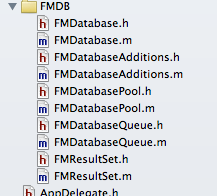
前置準備
下載 FMDB 後,把需要的原始碼檔案拖進專案,並加入 libsqlite3.dylib 依賴庫即可。值得一提的是,FMDB 同時相容 ARC 與非 ARC 專案,它會依專案設定自動調整記憶體管理相關的程式碼,不需要你手動切換。
三個核心類別
- FMDatabase:代表單一 SQLite 資料庫,所有 SQL 都透過它執行。
- FMResultSet:查詢結果集,用來遍歷讀取資料,概念上近似 Android 的 Cursor。
- FMDatabaseQueue:多執行緒環境下執行查詢與更新時使用,負責保證執行緒安全。
建立、開啟與關閉
db = [FMDatabase databaseWithPath:database_path];
關於路徑參數,有三種行為值得記住:
1. 檔案不存在時,FMDB 會自動幫你建立。
2. 傳入空字串 @"":資料庫會建在臨時目錄,連線中斷時檔案隨之刪除。
3. 傳入 NULL:建立一組記憶體內的資料庫,連線中斷時同樣消失。
[db open]   // 回傳 BOOL
[db close]
新增、修改、刪除
除了查詢之外,所有異動都走 executeUpdate,回傳值為 BOOL。

建立資料表:
if ([db open]) {
    NSString *sqlCreateTable = [NSString stringWithFormat:@"CREATE TABLE IF NOT EXISTS '%@' ('%@' INTEGER PRIMARY KEY AUTOINCREMENT, '%@' TEXT, '%@' INTEGER, '%@' TEXT)", TABLENAME, ID, NAME, AGE, ADDRESS];
    BOOL res = [db executeUpdate:sqlCreateTable];
    if (!res) { NSLog(@"error when creating db table"); }
    else      { NSLog(@"success to creating db table"); }
    [db close];
}
新增資料:
if ([db open]) {
    NSString *insertSql1 = [NSString stringWithFormat:@"INSERT INTO '%@' ('%@', '%@', '%@') VALUES ('%@', '%@', '%@')", TABLENAME, NAME, AGE, ADDRESS, @"張三", @"13", @"濟南"];
    BOOL res = [db executeUpdate:insertSql1;

    NSString *insertSql2 = [NSString stringWithFormat:@"INSERT INTO '%@' ('%@', '%@', '%@') VALUES ('%@', '%@', '%@')", TABLENAME, NAME, AGE, ADDRESS, @"李四", @"12", @"濟南"];
    BOOL res2 = [db executeUpdate:insertSql2];

    if (!res) { NSLog(@"error when insert db table"); }
    else      { NSLog(@"success to insert db table"); }
    [db close];
}
更新資料:
if ([db open]) {
    NSString *updateSql = [NSString stringWithFormat:@"UPDATE '%@' SET '%@' = '%@' WHERE '%@' = '%@'", TABLENAME, AGE, @"15", AGE, @"13"];
    BOOL res = [db executeUpdate:updateSql];
    if (!res) { NSLog(@"error when update db table"); }
    else      { NSLog(@"success to update db table"); }
    [db close];
}
刪除資料:
if ([db open]) {
    NSString *deleteSql = [NSString stringWithFormat:@"delete from %@ where %@ = '%@'", TABLENAME, NAME, @"張三"];
    BOOL res = [db executeUpdate:deleteSql];
    if (!res) { NSLog(@"error when delete db table"); }
    else      { NSLog(@"success to delete db table"); }
    [db close];
}
查詢與 FMResultSet
查詢改用 executeQuery,並搭配 FMResultSet 逐列取值:
if ([db open]) {
    NSString *sql = [NSString stringWithFormat:@"SELECT * FROM %@", TABLENAME];
    FMResultSet *rs = [db executeQuery:sql];
    while ([rs next]) {
        int Id = [rs intForColumn:ID];
        NSString *name = [rs stringForColumn:NAME];
        NSString *age = [rs stringForColumn:AGE];
        NSString *address = [rs stringForColumn:ADDRESS];
        NSLog(@"id = %d, name = %@, age = %@ address = %@", Id, name, age, address);
    }
    [db close];
}
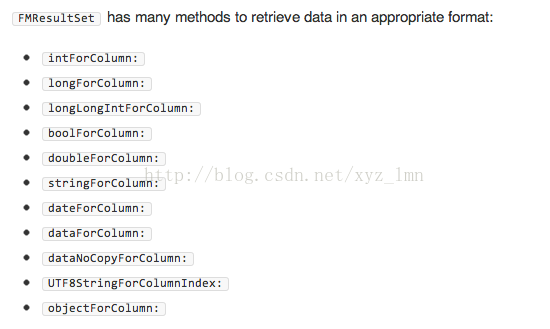
FMResultSet 提供了一整套型別化的取值方法(intForColumn:、stringForColumn: 等),幾乎覆蓋日常所需。
多執行緒:交給 FMDatabaseQueue
這裡有一條鐵則:不要把同一個 FMDatabase 物件丟到多個執行緒去操作,否則資料可能互相干擾、導致內容錯亂。正確做法是用 FMDatabaseQueue——以資料庫路徑初始化一次,然後把操作包進 inDatabase: 的 block 裡,由佇列替你排隊,你完全不必自己管理 FMDatabase 的生命週期。
FMDatabaseQueue *queue = [FMDatabaseQueue databaseQueueWithPath:database_path];

dispatch_queue_t q1 = dispatch_queue_create("queue1", NULL);
dispatch_queue_t q2 = dispatch_queue_create("queue2", NULL);

dispatch_async(q1, ^{
    for (int i = 0; i < 50; ++i) {
        [queue inDatabase:^(FMDatabase *db2) {
            NSString *insertSql1 = [NSString stringWithFormat:@"INSERT INTO '%@' ('%@', '%@', '%@') VALUES (?, ?, ?)", TABLENAME, NAME, AGE, ADDRESS];
            NSString *name = [NSString stringWithFormat:@"jack %d", i];
            NSString *age  = [NSString stringWithFormat:@"%d", 10 + i];
            BOOL res = [db2 executeUpdate:insertSql1, name, age, @"濟南"];
            if (!res) { NSLog(@"error to inster data: %@", name); }
            else      { NSLog(@"succ to inster data: %@", name); }
        }];
    }
});

dispatch_async(q2, ^{
    for (int i = 0; i < 50; ++i) {
        [queue inDatabase:^(FMDatabase *db2) {
            NSString *insertSql2 = [NSString stringWithFormat:@"INSERT INTO '%@' ('%@', '%@', '%@') VALUES (?, ?, ?)", TABLENAME, NAME, AGE, ADDRESS];
            NSString *name = [NSString stringWithFormat:@"lilei %d", i];
            NSString *age  = [NSString stringWithFormat:@"%d", 10 + i];
            BOOL res = [db2 executeUpdate:insertSql2, name, age, @"北京"];
            if (!res) { NSLog(@"error to inster data: %@", name); }
            else      { NSLog(@"succ to inster data: %@", name); }
        }];
    }
});
順帶一提,上面用 ? 佔位再傳參數的寫法,比把值直接拼進 SQL 字串更安全,也能避開引號與特殊字元造成的語法問題,建議養成習慣。
以上就是本文的全部內容,希望對大家的學習有所幫助。