
iOS 頁面跳轉實戰:Modal 與 Push 混用時如何一鍵回到首頁
編輯:iOS 開發綜合
Modal(模態呈現)與 Push(導航堆疊)混用是新手最容易暈的地方,尤其是「跳了好幾層之後要一次回到首頁」這個需求。以下兩個場景涵蓋了絕大多數實務情況。
場景一:連續兩次 Modal 之後返回首頁(A → B → C → A)
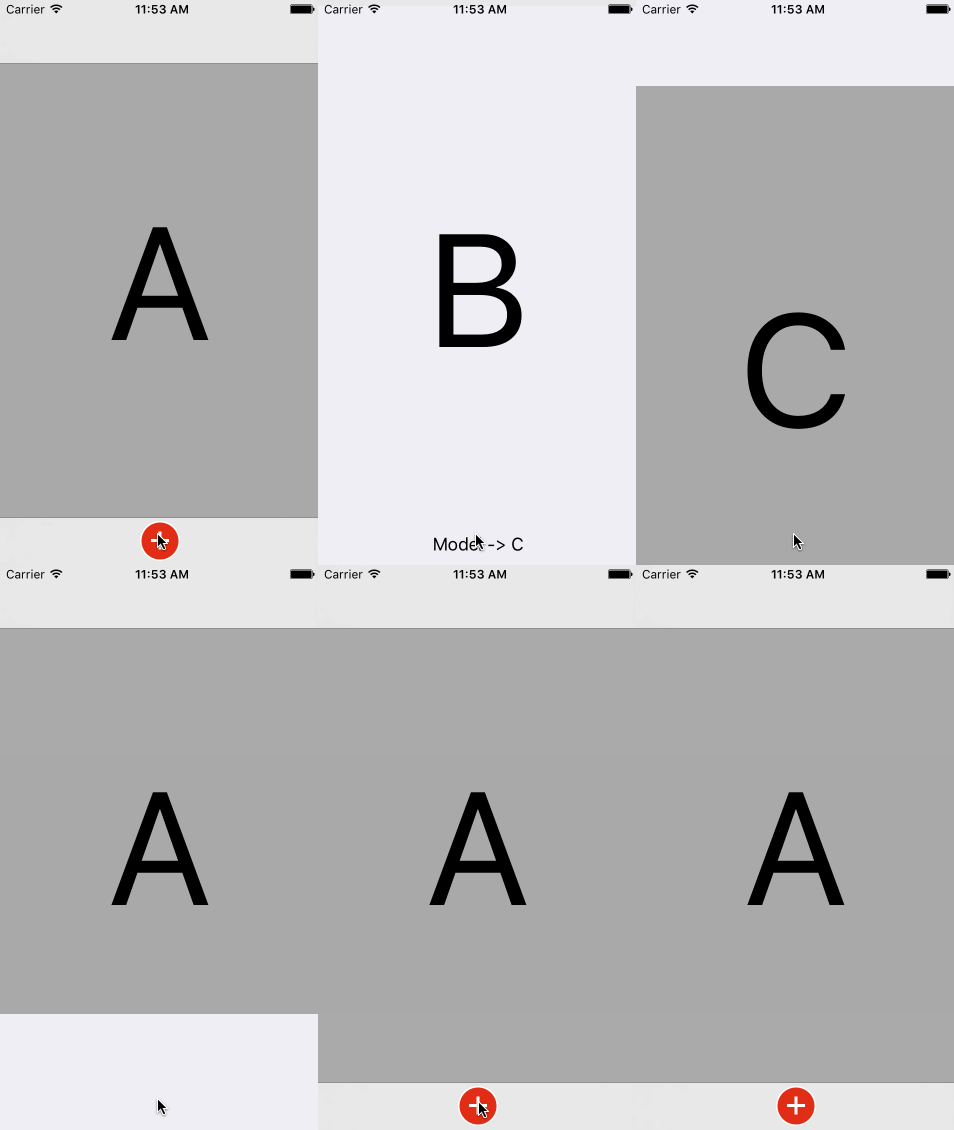
關鍵在於:C 並不是直接 dismiss 自己,而是往上找到「最初那個呈現者」的呈現者,一併關掉整條 Modal 鏈。
/** 在 C 的關閉方法中(iOS 6.0 以上寫法) */
if ([self respondsToSelector:@selector(presentingViewController)]) {
    [self.presentingViewController.presentingViewController dismissViewControllerAnimated:YES completion:nil];
} else {
    [self.parentViewController.parentViewController dismissViewControllerAnimated:YES completion:nil];
}
場景二:Modal 推出的視圖中再 Push 下一層,然後返回首頁(A → B → C → A)
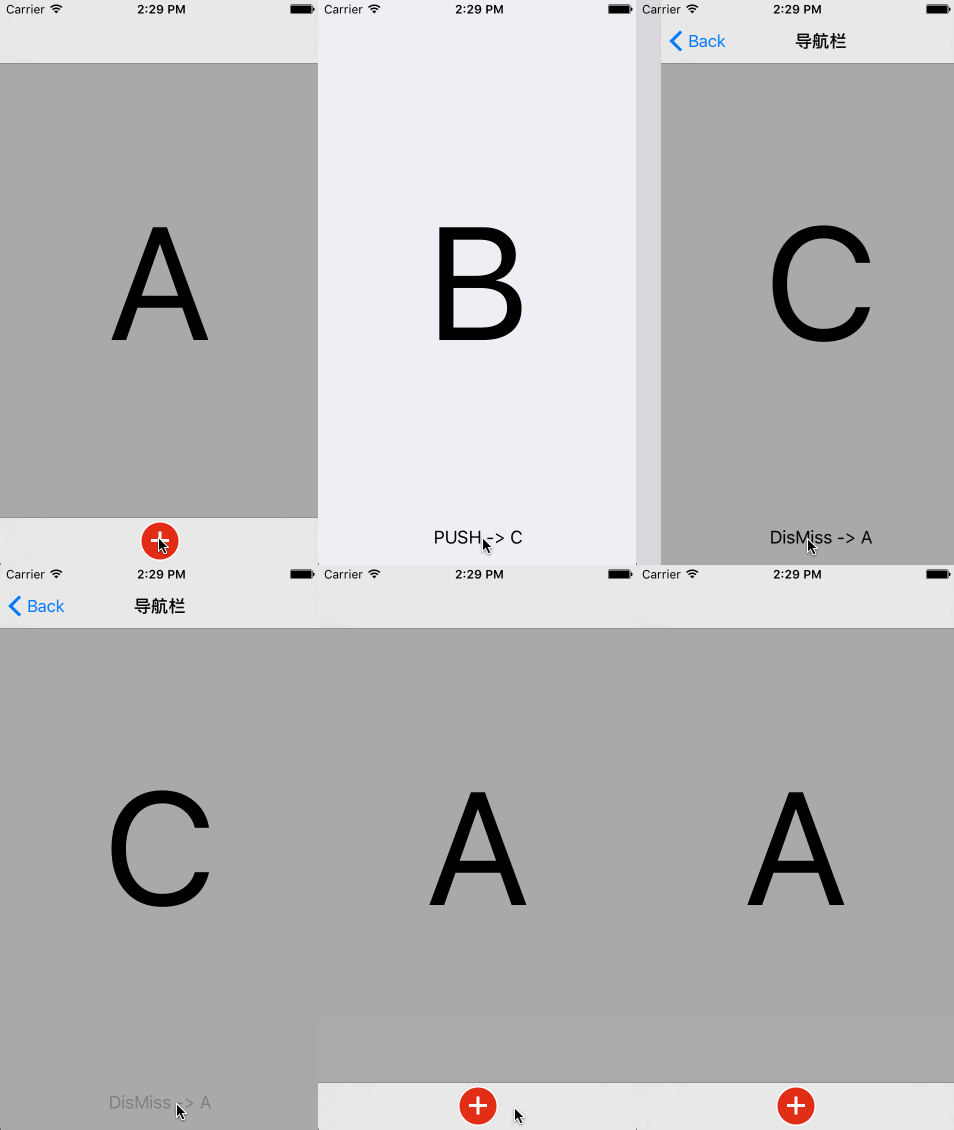
這個場景的難點是:B 是 Modal 出來的,本身沒有導航欄,但 C 需要導航欄才能 push。解法是幫 B 包一層 UINavigationController,再用 delegate 控制導航欄的顯示與隱藏。
/** 步驟一:A 呈現 B 時,先給 B 包裝一個導航控制器 */
UINavigationController *ANavigationController = [[UINavigationController alloc] initWithRootViewController:[[BViewController alloc] init]];
[self presentViewController:ANavigationController animated:YES completion:nil];

/** 步驟二:B 遵守 UINavigationControllerDelegate,讓自己隱藏導航欄 */
#pragma mark - UINavigationControllerDelegate
- (void)navigationController:(UINavigationController *)navigationController
      willShowViewController:(UIViewController *)viewController
                    animated:(BOOL)animated {
    // 只有顯示自己時隱藏導航欄,push 到 C 時才顯示
    BOOL isShowMyController = [viewController isKindOfClass:[self class]];
    [self.navigationController setNavigationBarHidden:isShowMyController animated:YES];
}

/** 步驟三:B 中 push 出 C */
[self.navigationController pushViewController:[[CViewController alloc] init] animated:YES];

/** 步驟四:C 中直接 dismiss,整條鏈一起關掉 */
[self.navigationController dismissViewControllerAnimated:YES completion:nil];
幾點補充
第一,self.navigationController dismissViewControllerAnimated: 這行看起來有點反直覺——dismiss 是呈現者的方法,但因為訊息會沿著呈現鏈向上傳遞,實際效果是從 A 開始關閉整個 Modal,因此 C 內部直接這樣呼叫是可行的。
第二,若你只是想「回到 UINavigationController 的根視圖」,用 popToRootViewControllerAnimated: 會更直觀,前提是目標在導航堆疊裡而非 Modal 鏈上。
第三,這種多層跳轉的體驗本身值得檢討。如果一個流程需要連續三四層才能到達終點,通常意味著資訊架構可以簡化,例如把步驟合併到同一頁或用分步表單呈現,比堆疊頁面更友善。