
Navigation Bar 使用時務必留意的細節解析
把 button 當作 bar button item 的 custom view 時,記得把 isEnabled 初始化為 false,而且順序不能錯。
要把 bar button item 的 custom view 設成 button,但一開始 isEnabled 必須是 false。
先產生一個 button:
let leftButton = UIButton(frame: CGRect(x: 0, y: 0, width: 80, height: 44)) leftButton.setTitleColor(UIColor.green, for: .normal) leftButton.setTitleColor(UIColor.red, for: .disabled) leftButton.setTitle("Enabled", for: .normal) leftButton.setTitle("Disabled", for: .disabled) leftButton.addTarget(self, action: #selector(leftButtonClicked(_:)), for: .touchUpInside)
如果先設定 isEnabled,再設定 bar button item:
leftButton.isEnabled = false navigationItem.leftBarButtonItem = UIBarButtonItem(customView: leftButton)
結果 isEnabled 仍然是 true。
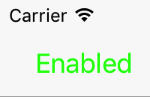
正確的順序應該是:
navigationItem.leftBarButtonItem = UIBarButtonItem(customView: leftButton) leftButton.isEnabled = false // or navigationItem.leftBarButtonItem?.isEnabled = false
這時候 isEnabled 才會是 false。

改動 navigation bar 的 isTranslucent 屬性會連帶改變 view 的座標。
放兩個 label,其中 frameLabel 沒有加上約束(NSLayoutConstraint),而 constraintLabel 則在左、右、下三邊都設了約束,並與 view 相接。

設定右上角按鈕的動作:
navigationItem.rightBarButtonItem = UIBarButtonItem(title: "Change", style: .plain, target: self, action: #selector(rightButtonClicked(_:)))
切換 navigation bar 的 isTranslucent 屬性,並印出 label 的座標:
@objc private func rightButtonClicked(_ sender: AnyObject) { navigationController?.navigationBar.isTranslucent = !navigationController!.navigationBar.isTranslucent updateLabelContent() } private func updateLabelContent() { title = navigationController!.navigationBar.isTranslucent ? "Translecent" : "Opaque" let frameLabelOrigin = frameLabel.frame.origin frameLabel.text = "Frame label. x = \(frameLabelOrigin.x), y = \(frameLabelOrigin.y)" let constraintLabelOrigin = constraintLabel.frame.origin constraintLabel.text = "Constraint label. x = \(constraintLabelOrigin.x), y = \(constraintLabelOrigin.y)" print("\(title)") print("Status bar frame:", UIApplication.shared.statusBarFrame) // (0.0, 0.0, 375.0, 20.0) print("Navigation bar frame:", navigationController!.navigationBar.frame) // (0.0, 20.0, 375.0, 44.0) }
透過點擊右上角按鈕,就能觀察變化。
透明時:

不透明時:

可以發現 view controller 的 view 座標改變了,但 status bar 與 navigation bar 的座標並沒有變。

當 navigation bar 從不透明變成透明,status bar 與 navigation bar 的座標都不變。整個 view 會下移 64,高度減少 64,而且不會超出 window。沒有加約束的 frameLabel 座標不變,但它相對於 window 的位置會跟著 view 一起下移;而加了約束的 constraintLabel 座標改變了,相對於 window 的位置卻維持不變。
因此,如果你需要更動 navigation bar 的 isTranslucent 屬性,就要考慮這是否會影響其他 view,以及該 view 是否用約束來定位。
以上就是本文的全部內容,希望對大家的學習或工作能帶來一些幫助,同時也歡迎多多支持本站。
- 上一篇文章: XIB 上手實戰:用可視化方式打造 iOS 介面
- 下一篇文章: 動手實作 iOS 點擊圖片放大的瀏覽效果