iOS tableView實現單選和多選的實例代碼
編輯:IOS開發綜合
今天在項目中遇到了tableView的單選需求,現在總結一下,用一個簡單的demo實現了簡單的單選和多選兩個功能.先看下效果圖:
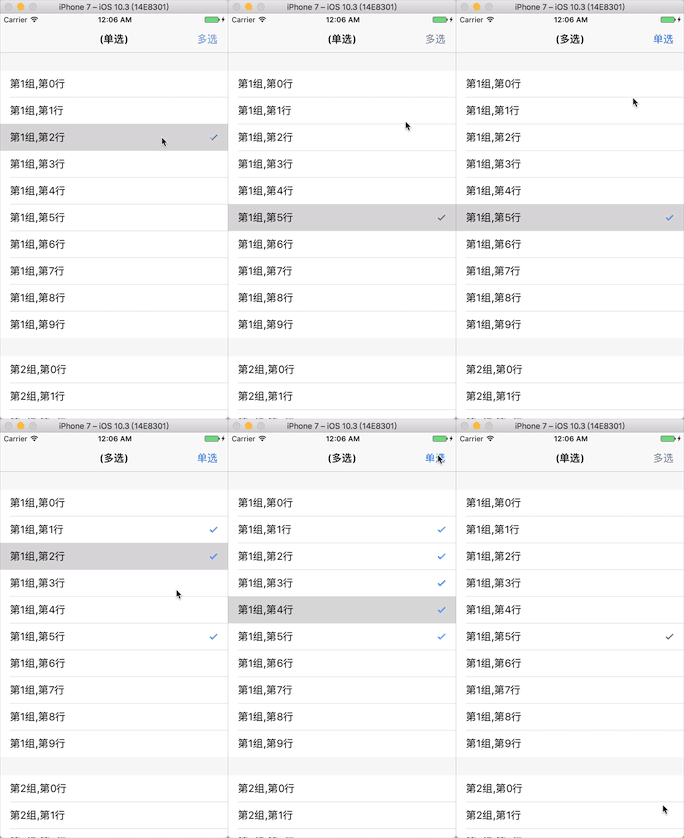
1:首先實現下單選
1:使用一個變量記錄選中的行
@property (assign, nonatomic) NSIndexPath *selIndex; //單選選中的行
2:設置tableView數據,共2組,每組10行,
- (NSInteger)numberOfSectionsInTableView:(UITableView *)tableView {
  return 2;
}
- (NSInteger)tableView:(UITableView *)tableView numberOfRowsInSection:(NSInteger)section {
  return 10;
}
3:實現tableView的點擊方法,每次點擊記錄點擊的索引,取消之前的選擇行,將當前選擇的行打鉤
-(void)tableView:(UITableView *)tableView didSelectRowAtIndexPath:(NSIndexPath *)indexPath{

    //取消之前的選擇
    UITableViewCell *celled = [tableView cellForRowAtIndexPath:_selIndex];
    celled.accessoryType = UITableViewCellAccessoryNone;

    //記錄當前的選擇的位置
    _selIndex = indexPath;

    //當前選擇的打鉤
    UITableViewCell *cell = [tableView cellForRowAtIndexPath:indexPath];
    cell.accessoryType = UITableViewCellAccessoryCheckmark;
}
4:列表滾動時,判斷是否為選中的行,如果是cell是選中的那一行,就設置cell的accessoryType為UITableViewCellAccessoryCheckmark,到這裡單選就實現完成了
- (UITableViewCell *)tableView:(UITableView *)tableView cellForRowAtIndexPath:(NSIndexPath *)indexPath {

  static NSString *cellid = @"cellid";
  UITableViewCell *cell = [tableView dequeueReusableCellWithIdentifier:cellid];
  if (cell == nil) {
    cell = [[UITableViewCell alloc]initWithStyle:UITableViewCellStyleDefault reuseIdentifier:cellid];
  }
  cell.textLabel.text = [NSString stringWithFormat:@"第%zi組,第%zi行",indexPath.section+1,indexPath.row];

  if (_selIndex == indexPath) {
     cell.accessoryType = UITableViewCellAccessoryCheckmark;
  }else{
     cell.accessoryType = UITableViewCellAccessoryNone;
  }
  return cell;
}
2:下面實現多選
1:使用一個數組記錄選中的行
@property (strong, nonatomic) NSMutableArray *selectIndexs; //多選選中的行
2:使用一個變量判斷是單選還是多選狀態
@property (nonatomic, assign) BOOL isSingle; //單選還是多選
3:導航欄右側按鈕設置為單選和雙選的切換按鈕,並初始化多選記錄數組
UIBarButtonItem *rightItem = [[UIBarButtonItem alloc]initWithTitle:@"多選" style:UIBarButtonItemStylePlain target:self action:@selector(singleSelect)];
  self.navigationItem.rightBarButtonItem = rightItem;

  //初始化多選數組
  _selectIndexs = [NSMutableArray new];
4:點擊導航欄上的切換按鈕切換單選還是多選狀態
//單選還是多選按鈕點擊事件
-(void)singleSelect{
  _isSingle = !_isSingle;
  if (_isSingle) {
    self.navigationItem.rightBarButtonItem.title = @"多選";
    self.title = @"(單選)";
    //切換為單選的時候,清除多選數組,重新加載列表
    [self.selectIndexs removeAllObjects];
    [self.tableView reloadData];
  }else{
    self.title = @"(多選)";
    self.navigationItem.rightBarButtonItem.title = @"單選";
  }
}
5:為tableView的點擊方法中加上單選還是多選的狀態判斷,多選的話,將點擊的行加入到多選索引數組中去,然後改變該行的cell.accessoryType,重復點擊就做反操作
//選中某一行
-(void)tableView:(UITableView *)tableView didSelectRowAtIndexPath:(NSIndexPath *)indexPath{

  if (_isSingle) {    //單選
    //取消之前的選擇
    UITableViewCell *celled = [tableView cellForRowAtIndexPath:_selIndex];
    celled.accessoryType = UITableViewCellAccessoryNone;

    //記錄當前的選擇的位置
    _selIndex = indexPath;

    //當前選擇的打鉤
    UITableViewCell *cell = [tableView cellForRowAtIndexPath:indexPath];
    cell.accessoryType = UITableViewCellAccessoryCheckmark;

  }else{           //多選
    UITableViewCell *cell = [tableView cellForRowAtIndexPath:indexPath];

    if (cell.accessoryType == UITableViewCellAccessoryCheckmark) { //如果為選中狀態
      cell.accessoryType = UITableViewCellAccessoryNone; //切換為未選中
      [_selectIndexs removeObject:indexPath]; //數據移除
    }else { //未選中
      cell.accessoryType = UITableViewCellAccessoryCheckmark; //切換為選中
      [_selectIndexs addObject:indexPath]; //添加索引數據到數組
    }
  }
}
6:在cellForRow代理方法中同樣加入單選多選的判斷,在滾動列表是加載列表,判斷是否選中
- (UITableViewCell *)tableView:(UITableView *)tableView cellForRowAtIndexPath:(NSIndexPath *)indexPath {

  static NSString *cellid = @"cellid";
  UITableViewCell *cell = [tableView dequeueReusableCellWithIdentifier:cellid];
  if (cell == nil) {
    cell = [[UITableViewCell alloc]initWithStyle:UITableViewCellStyleDefault reuseIdentifier:cellid];
  }
  cell.textLabel.text = [NSString stringWithFormat:@"第%zi組,第%zi行",indexPath.section+1,indexPath.row];

  if (_isSingle) {      //單選
    if (_selIndex == indexPath) {
      cell.accessoryType = UITableViewCellAccessoryCheckmark;
    }else{
      cell.accessoryType = UITableViewCellAccessoryNone;
    }
    return cell;
  }else{           //多選
    cell.accessoryType = UIAccessibilityTraitNone;
    for (NSIndexPath *index in _selectIndexs) {
      if (indexPath == index) {
        cell.accessoryType = UITableViewCellAccessoryCheckmark;
      }
    }
  }
  return cell;
}
到這裡就完成了,沒什麼技術含量,有需求的可以參考下,有好的想法可以多多交流,項目在github的地址.
以上就是本文的全部內容,希望對大家的學習有所幫助,也希望大家多多支持本站。
相關文章
+