iOS 驗證碼按鈕倒計時功能
編輯:IOS開發綜合
在app 注冊或者登錄 需要驗證碼的地方、為了避免短時間內刷驗證碼、往往會加上一層驗證。
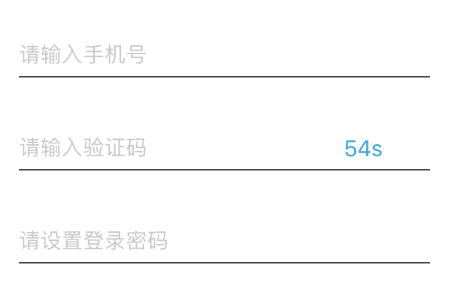
倒計時結束後、可以重新獲取!
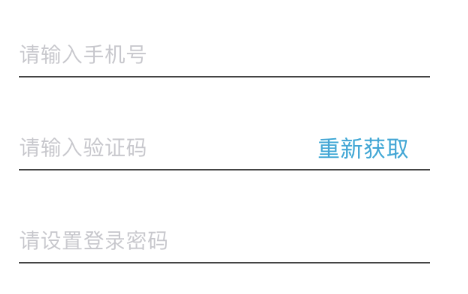
代碼實現如下:
// _CountdownTime 倒計時總時間;
//_timer 定時器
- (void)startTime:(UIButton *)VerificationCodeButton
{
 __block NSInteger timeout = [_CountdownTime integerValue];
 dispatch_queue_t queue = dispatch_get_global_queue(DISPATCH_QUEUE_PRIORITY_DEFAULT, 0);
 _timer= dispatch_source_create(DISPATCH_SOURCE_TYPE_TIMER, 0, 0,queue);
 dispatch_source_set_timer(_timer,dispatch_walltime(NULL, 0),1.0*NSEC_PER_SEC, 0);
 dispatch_source_set_event_handler(_timer, ^{
  if(timeout<=0){
   dispatch_source_cancel(_timer);
   dispatch_async(dispatch_get_main_queue(), ^{
    [VerificationCodeButton setTitle:@"重新獲取" forState:UIControlStateNormal];
    VerificationCodeButton.userInteractionEnabled = YES;
    VerificationCodeButton.alpha = 1.0;
    VerificationCodeButton.backgroundColor = [UIColor whiteColor];
   });
  } else {
   NSString *strTime = [NSString stringWithFormat:@"%lds", (long)timeout];
   dispatch_async(dispatch_get_main_queue(), ^{
    [VerificationCodeButton setTitle:strTime forState:UIControlStateNormal];
    VerificationCodeButton.userInteractionEnabled = NO;
    VerificationCodeButton.backgroundColor = [UIColor lightTextColor];
   });
   timeout--;
  }
 });
 dispatch_resume(_timer);
}
總結
以上所述是小編給大家介紹的iOS 驗證碼按鈕倒計時功能,希望對大家有所幫助,如果大家有任何疑問請給我留言,小編會及時回復大家的。在此也非常感謝大家對本站網站的支持!
相關文章
+