iOS動畫(Core Animation)使用
一、簡介
IOS 動畫主要是指Core Animation框架。官方使用文檔地址為:Core Animation Guide。
Core Animation是IOS和OS X平台上負責圖形渲染與動畫的基礎框架。Core Animation可以作用與動畫視圖或者其他可視元素,為你完成了動畫所需的大部分繪幀工作。你只需要配置少量的動畫參數(如開始點的位置和結束點的位置)即可使用Core Animation的動畫效果。Core Animation將大部分實際的繪圖任務交給了圖形硬件來處理,圖形硬件會加速圖形渲染的速度。這種自動化的圖形加速技術讓動畫擁有更高的幀率並且顯示效果更加平滑,不會加重CPU的負擔而影響程序的運行速度。
二、Core Animation類圖以及常用字段
Core Animation類的繼承關系圖
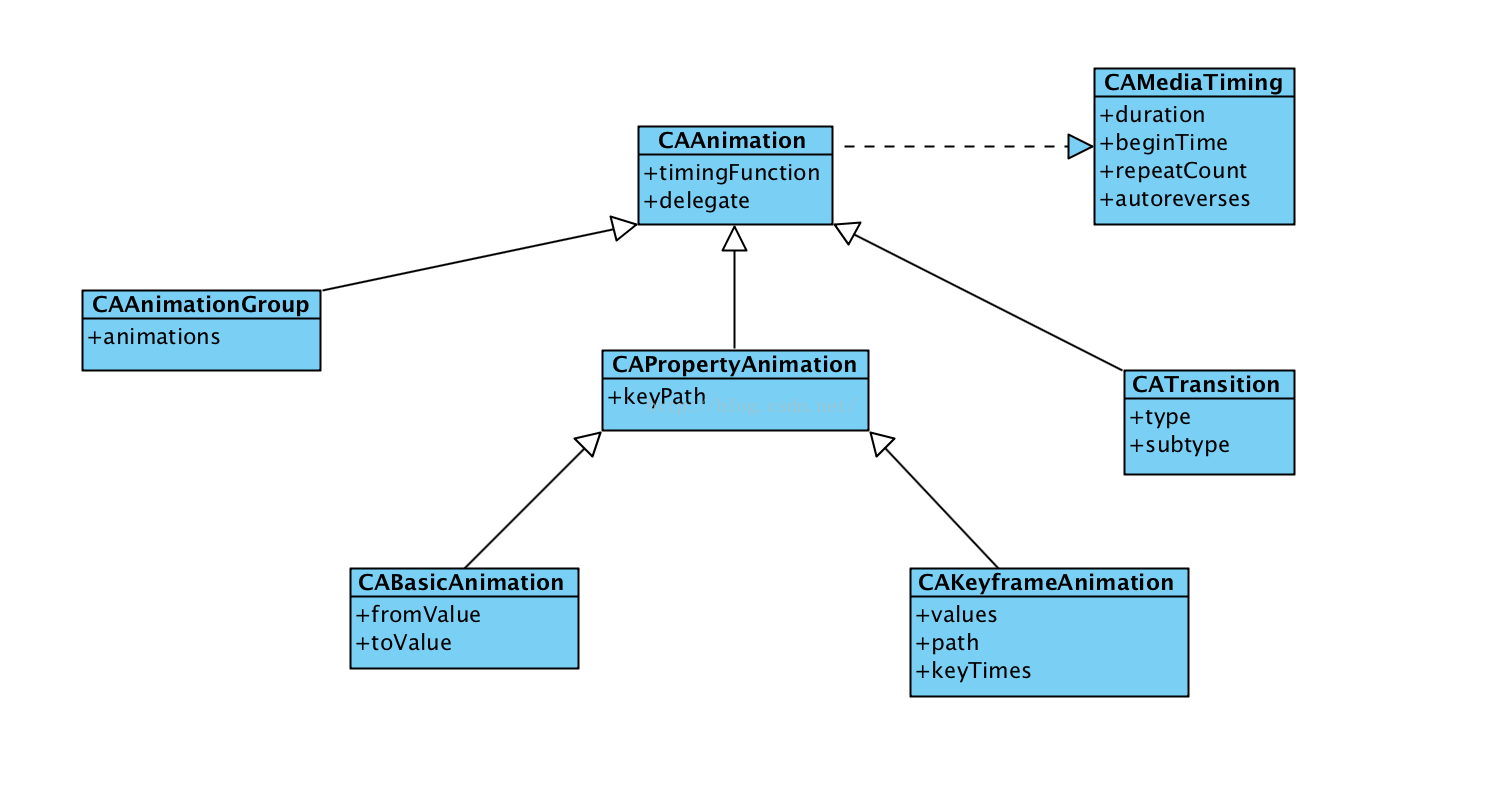
常用屬性duration : 動畫的持續時間 beginTime : 動畫的開始時間 repeatCount : 動畫的重復次數 autoreverses : 執行的動畫按照原動畫返回執行 timingFunction : 控制動畫的顯示節奏系統提供五種值選擇,分別是:
kCAMediaTimingFunctionLinear 線性動畫
kCAMediaTimingFunctionEaseIn 先慢後快(慢進快出)
kCAMediaTimingFunctionEaseOut 先塊後慢(快進慢出)
kCAMediaTimingFunctionEaseInEaseOut 先慢後快再慢
kCAMediaTimingFunctionDefault 默認,也屬於中間比較快
delegate : 動畫代理。能夠檢測動畫的執行和結束。
/* Delegate methods for CAAnimation. */

@interface NSObject (CAAnimationDelegate)

/* Called when the animation begins its active duration. */

- (void)animationDidStart:(CAAnimation *)anim;

/* Called when the animation either completes its active duration or
 * is removed from the object it is attached to (i.e. the layer). 'flag'
 * is true if the animation reached the end of its active duration
 * without being removed. */

- (void)animationDidStop:(CAAnimation *)anim finished:(BOOL)flag;

@end
path:關鍵幀動畫中的執行路徑 type : 過渡動畫的動畫類型,系統提供了四種過渡動畫。
kCATransitionFade 漸變效果
kCATransitionMoveIn 進入覆蓋效果
kCATransitionPush 推出效果
kCATransitionReveal 揭露離開效果 subtype : 過渡動畫的動畫方向
kCATransitionFromRight 從右側進入
kCATransitionFromLeft 從左側進入
kCATransitionFromTop 從頂部進入
kCATransitionFromBottom 從底部進入
三、IOS動畫的調用方式
第一種:UIView 代碼塊調用
    _demoView.frame = CGRectMake(0, SCREEN_HEIGHT/2-50, 50, 50);
    [UIView animateWithDuration:1.0f animations:^{
        _demoView.frame = CGRectMake(SCREEN_WIDTH, SCREEN_HEIGHT/2-50, 50, 50);
    } completion:^(BOOL finished) {
        _demoView.frame = CGRectMake(SCREEN_WIDTH/2-25, SCREEN_HEIGHT/2-50, 50, 50);
    }];
第二種:UIView [begin commit]模式
    [UIView beginAnimations:@"move" context:nil];
    [UIView setAnimationDuration:2];
    [UIView setAnimationDelegate:self];
    //改變它的frame的x,y的值
    animationView.frame = CGRectMake(100, 100, 120, 100);
    [UIView commitAnimations];
第三種:使用Core Animation中的類
// time:閃爍間隔 repeatCount = MAXFLOAT(永久閃爍) CABasicAnimation *animation = [CABasicAnimation animationWithKeyPath:@"opacity"]; //這是透明度值得變化。 animation.fromValue = [NSNumber numberWithFloat:1.0f]; animation.toValue = [NSNumber numberWithFloat:0.0f]; //是否自動倒退 animation.autoreverses = YES; animation.duration = time; animation.repeatCount = repeatCount; //動畫執行完畢之後不刪除動畫 animation.removedOnCompletion = NO; animation.fillMode = kCAFillModeForwards; //沒有的話是均勻的動畫。 animation.timingFunction = [CAMediaTimingFunction functionWithName:kCAMediaTimingFunctionEaseIn];
四、iOS動畫的使用
4.1:基礎動畫(CABaseAnimation)
重要屬性fromValue: keyPath對應的初始值toValue: keyPath對應的結束值基礎動畫主要提供了對於CALayer對象中的可變屬性進行簡單動畫的操作。比如:位移、透明度、縮放、旋轉、背景色等等。效果演示:
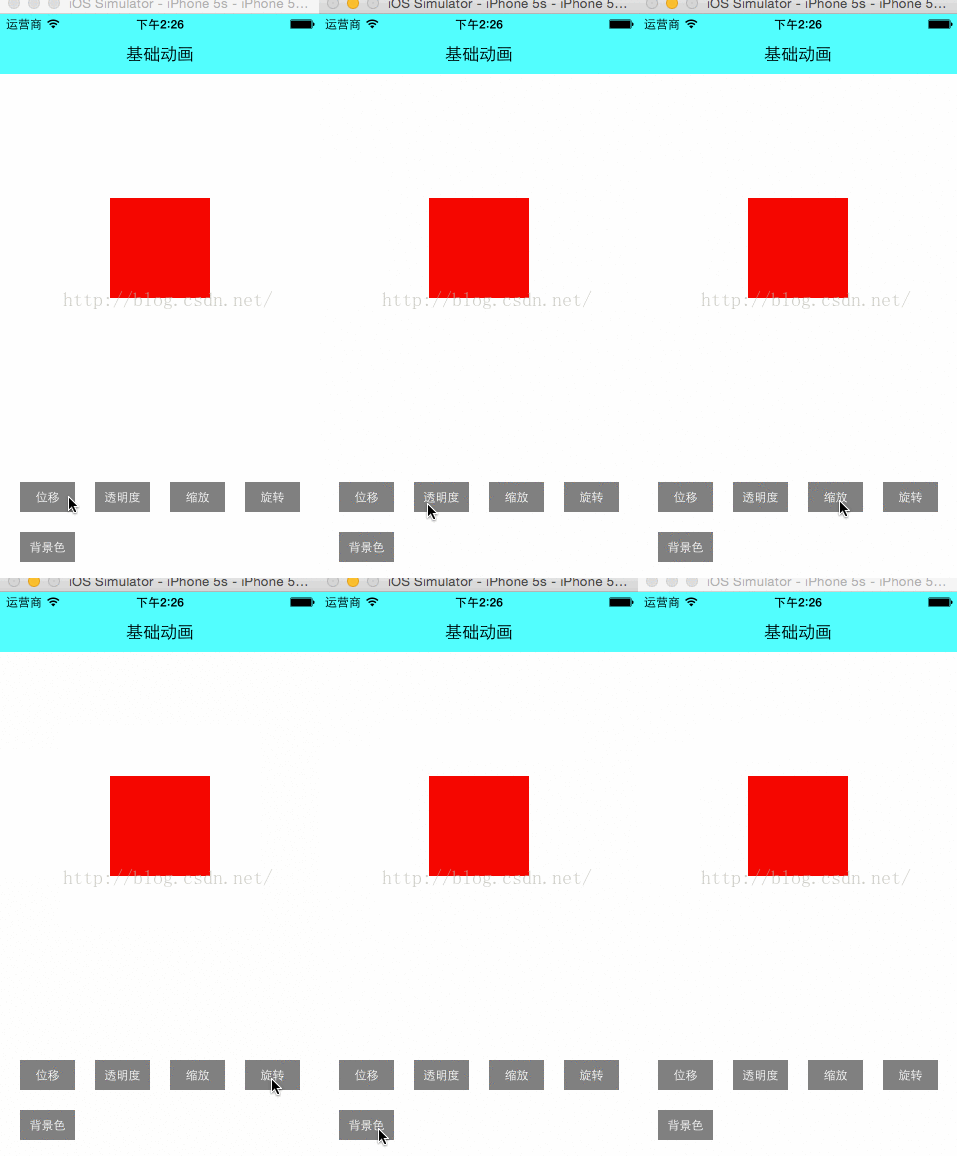
位移動畫代碼演示:
    //使用CABasicAnimation創建基礎動畫
    CABasicAnimation *anima = [CABasicAnimation animationWithKeyPath:@"position"];
    anima.fromValue = [NSValue valueWithCGPoint:CGPointMake(0, SCREEN_HEIGHT/2-75)];
    anima.toValue = [NSValue valueWithCGPoint:CGPointMake(SCREEN_WIDTH, SCREEN_HEIGHT/2-75)];
    anima.duration = 1.0f;
    //anima.fillMode = kCAFillModeForwards;
    //anima.removedOnCompletion = NO;
    [_demoView.layer addAnimation:anima forKey:@"positionAnimation"];
注意點如果fillMode=kCAFillModeForwards和removedOnComletion=NO,那麼在動畫執行完畢後,圖層會保持顯示動畫執行後的狀態。但在實質上,圖層的屬性值還是動畫執行前的初始值,並沒有真正被改變。
4.2:關鍵幀動畫(CAKeyframeAnimation)
CAKeyframeAnimation和CABaseAnimation都屬於CAPropertyAnimatin的子類。CABaseAnimation只能從一個數值(fromValue)變換成另一個數值(toValue),而CAKeyframeAnimation則會使用一個NSArray保存一組關鍵幀。重要屬性values: 就是上述的NSArray對象。裡面的元素稱為”關鍵幀”(keyframe)。動畫對象會在指定的時間(duration)內,依次顯示values數組中的每一個關鍵幀
path: 可以設置一個CGPathRef\CGMutablePathRef,讓層跟著路徑移動。path只對CALayer的anchorPoint和position起作用。如果你設置了path,那麼values將被忽略。
keyTimes: 可以為對應的關鍵幀指定對應的時間點,其取值范圍為0到1.0,keyTimes中的每一個時間值都對應values中的每一幀.當keyTimes沒有設置的時候,各個關鍵幀的時間是平分的。
效果演示:
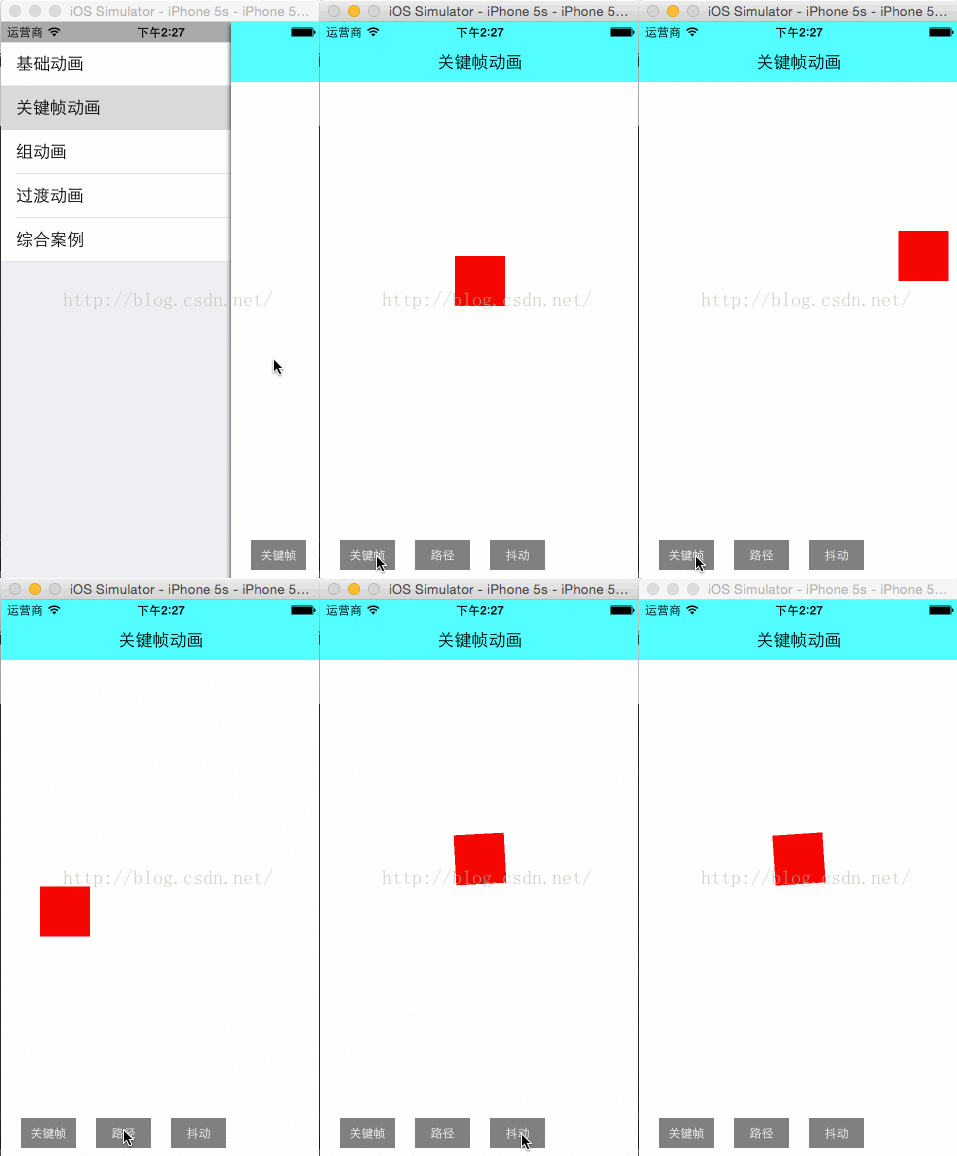
圓形路徑動畫代碼演示:
    CAKeyframeAnimation *anima = [CAKeyframeAnimation animationWithKeyPath:@"position"];
    UIBezierPath *path = [UIBezierPath bezierPathWithOvalInRect:CGRectMake(SCREEN_WIDTH/2-100, SCREEN_HEIGHT/2-100, 200, 200)];
    anima.path = path.CGPath;
    anima.duration = 2.0f;
    [_demoView.layer addAnimation:anima forKey:@"pathAnimation"];
說明:CABasicAnimation可看做是最多只有2個關鍵幀的CAKeyframeAnimation
4.3:組動畫(CAAnimationGroup)
CAAnimation的子類,可以保存一組動畫對象,將CAAnimationGroup對象加入層後,組中所有動畫對象可以同時並發運行。重要屬性animations: 用來保存一組動畫對象的NSArray
效果演示:
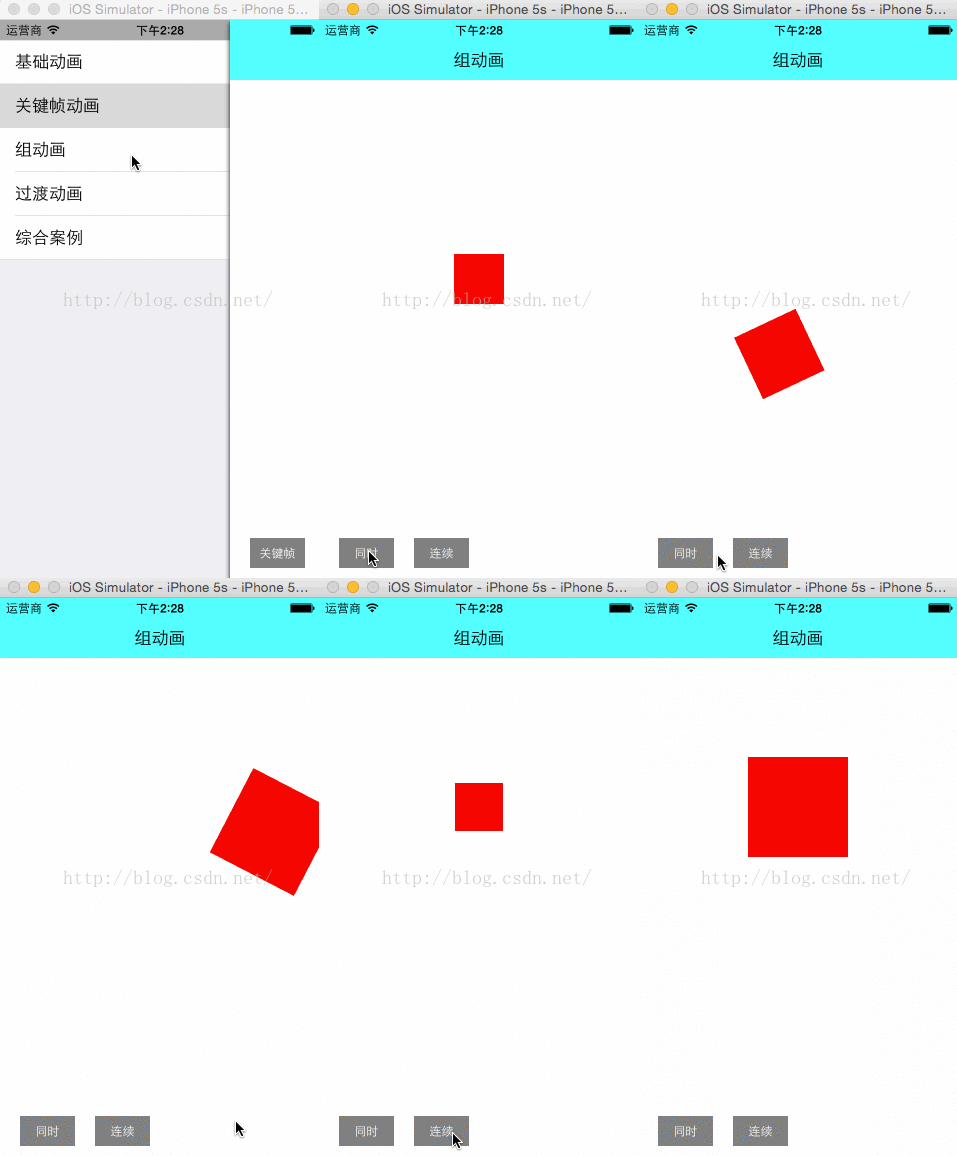
組動畫代碼演示:
    CAKeyframeAnimation *anima1 = [CAKeyframeAnimation animationWithKeyPath:@"position"];
    NSValue *value0 = [NSValue valueWithCGPoint:CGPointMake(0, SCREEN_HEIGHT/2-50)];
    NSValue *value1 = [NSValue valueWithCGPoint:CGPointMake(SCREEN_WIDTH/3, SCREEN_HEIGHT/2-50)];
    NSValue *value2 = [NSValue valueWithCGPoint:CGPointMake(SCREEN_WIDTH/3, SCREEN_HEIGHT/2+50)];
    NSValue *value3 = [NSValue valueWithCGPoint:CGPointMake(SCREEN_WIDTH*2/3, SCREEN_HEIGHT/2+50)];
    NSValue *value4 = [NSValue valueWithCGPoint:CGPointMake(SCREEN_WIDTH*2/3, SCREEN_HEIGHT/2-50)];
    NSValue *value5 = [NSValue valueWithCGPoint:CGPointMake(SCREEN_WIDTH, SCREEN_HEIGHT/2-50)];
    anima1.values = [NSArray arrayWithObjects:value0,value1,value2,value3,value4,value5, nil];

    //縮放動畫
    CABasicAnimation *anima2 = [CABasicAnimation animationWithKeyPath:@"transform.scale"];
    anima2.fromValue = [NSNumber numberWithFloat:0.8f];
    anima2.toValue = [NSNumber numberWithFloat:2.0f];

    //旋轉動畫
    CABasicAnimation *anima3 = [CABasicAnimation animationWithKeyPath:@"transform.rotation"];
    anima3.toValue = [NSNumber numberWithFloat:M_PI*4];

    //組動畫
    CAAnimationGroup *groupAnimation = [CAAnimationGroup animation];
    groupAnimation.animations = [NSArray arrayWithObjects:anima1,anima2,anima3, nil];
    groupAnimation.duration = 4.0f;

    [_demoView.layer addAnimation:groupAnimation forKey:@"groupAnimation"];
4.4:過渡動畫(CATransition)
CAAnimation的子類,用於做過渡動畫或者轉場動畫,能夠為層提供移出屏幕和移入屏幕的動畫效果。重要屬性type:動畫過渡類型
Apple 官方的SDK其實只提供了四種過渡效果。
kCATransitionFade 漸變效果
kCATransitionMoveIn 進入覆蓋效果
kCATransitionPush 推出效果
kCATransitionReveal 揭露離開效果 私有API提供了其他很多非常炫的過渡動畫,比如@"cube"、@"suckEffect"、@"oglFlip"、 @"rippleEffect"、@"pageCurl"、@"pageUnCurl"、@"cameraIrisHollowOpen"、@"cameraIrisHollowClose"等。注意點私有api,不建議開發者們使用。因為蘋果公司不提供維護,並且有可能造成你的app審核不通過。
subtype:動畫過渡方向
kCATransitionFromRight 從右側進入
kCATransitionFromLeft 從左側進入
kCATransitionFromTop 從頂部進入
kCATransitionFromBottom 從底部進入
startProgress:動畫起點(在整體動畫的百分比)endProgress:動畫終點(在整體動畫的百分比)
效果演示:
4.5:綜合案例
4.5.1 : 仿Path菜單效果
效果演示: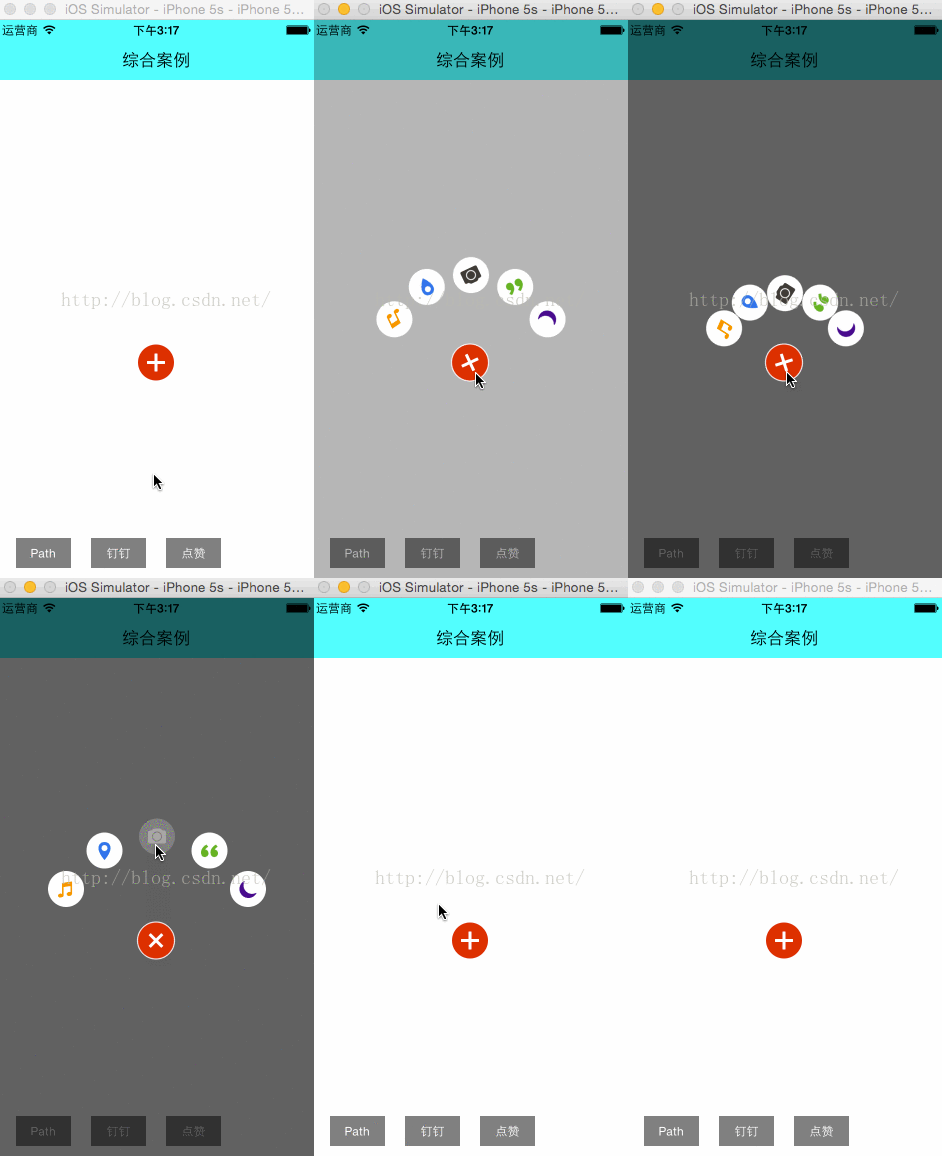
動畫解析:
1、點擊紅色按鈕,紅色按鈕旋轉。(旋轉動畫)
2、黑色小按鈕依次彈出,並且帶有旋轉效果。(位移動畫、旋轉動畫、組動畫)
3、點擊黑色小按鈕,其他按鈕消失,被點擊的黑色按鈕變大變淡消失。(縮放動畫、alpha動畫、組動畫)博主的話:代碼過多,這裡不做演示。文章最後提供代碼下載地址。
4.5.2: 仿釘釘菜單效果
效果演示: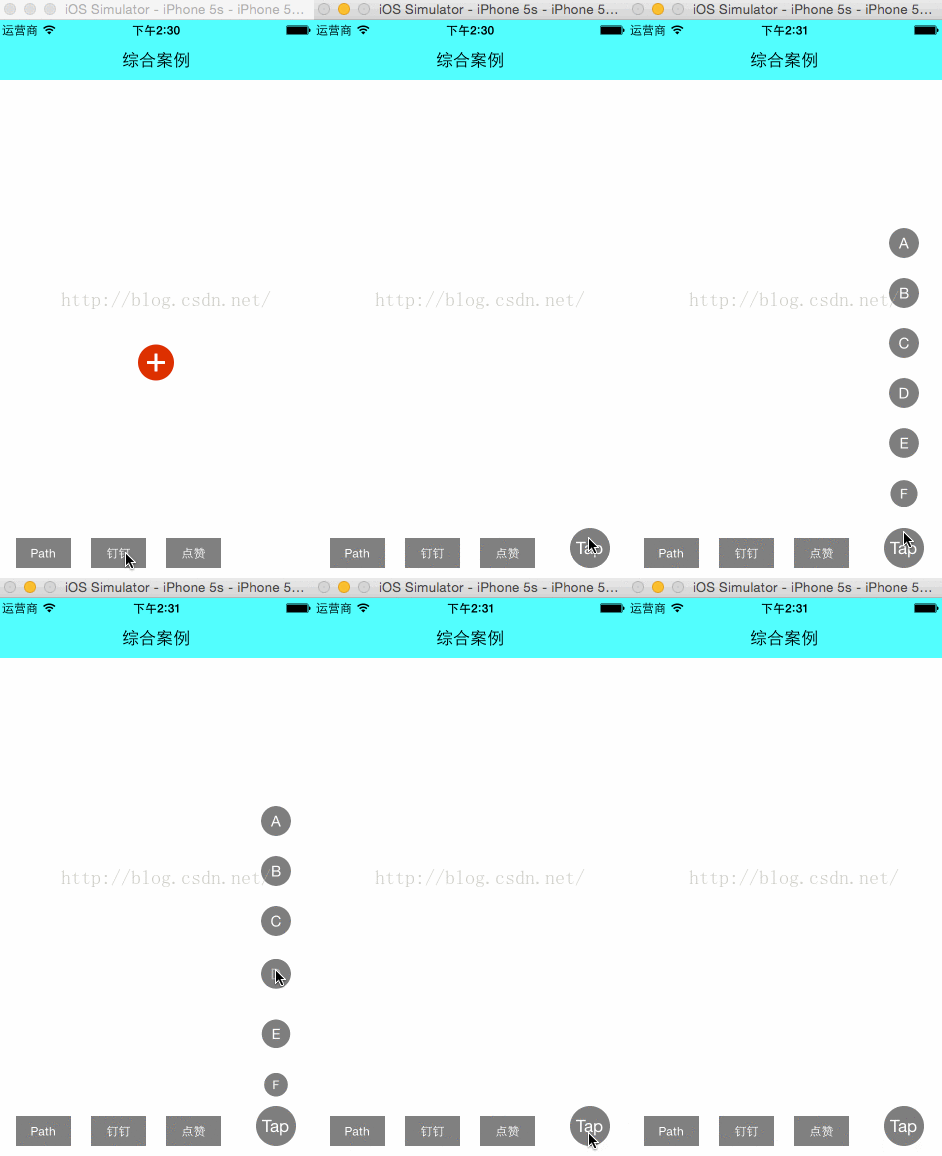
看上去挺炫的,其實實現很簡單,就是位移動畫+縮放動畫。
4.5.3: 點贊煙花效果動畫
效果演示: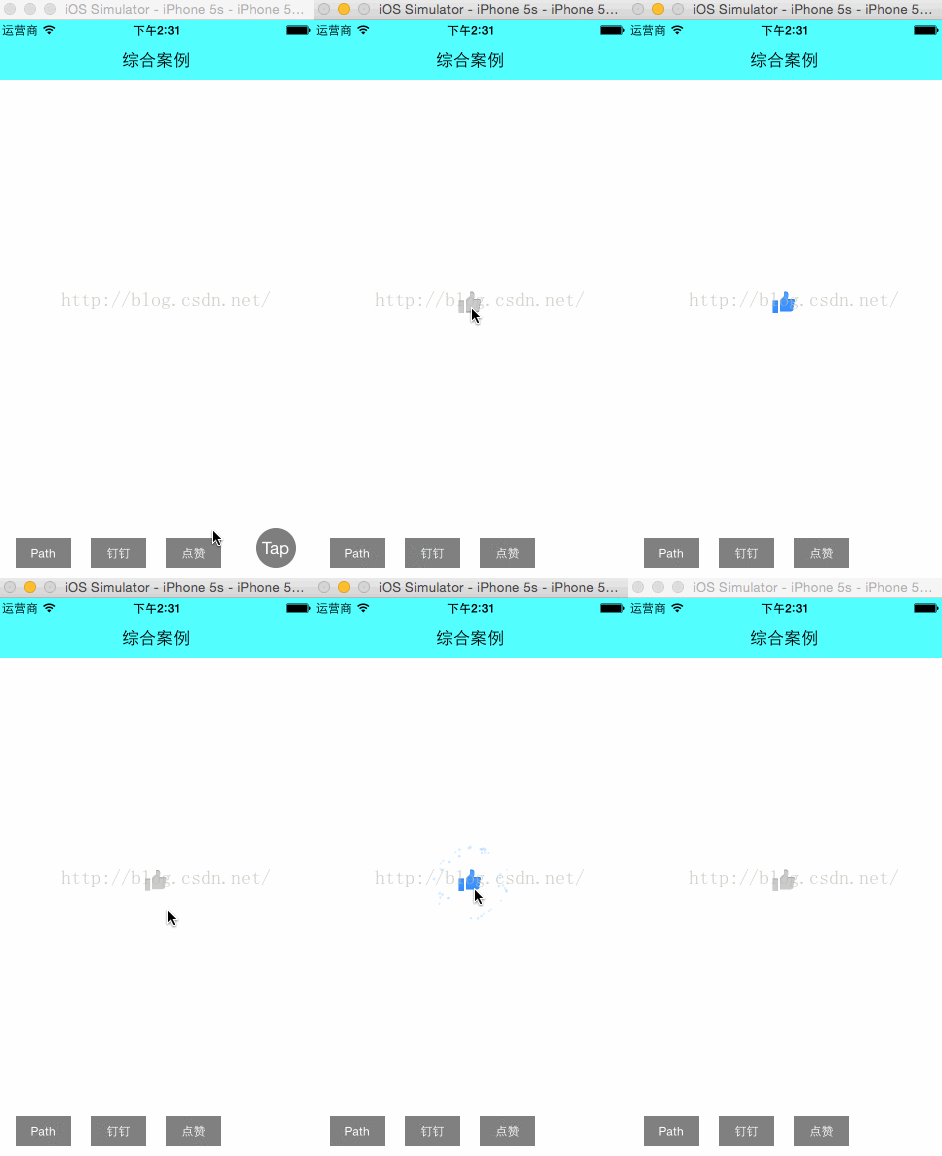
這裡其實只有按鈕變大效果使用的縮放動畫。煙花效果 使用的是一種比較特殊的動畫--粒子動畫。 一個粒子系統一般有兩部分組成: 1、CAEmitterCell:可以看作是單個粒子的原型(例如,一個單一的粉撲在一團煙霧)。當散發出一個粒子,UIKit根據這個發射粒子和定義的基礎上創建一個隨機粒子。此原型包括一些屬性來控制粒子的圖片,顏色,方向,運動,縮放比例和生命周期。
2、CAEmitterLayer:主要控制發射源的位置、尺寸、發射模式、發射源的形狀等等。 以上兩個類的屬性還是比較多的,這裡就不細講了。大家可以google一下,詳細的了解吧。
五、總結
任何復雜的動畫其實都是由一個個簡單的動畫組裝而成的,只要我們善於分解和組裝,我們就能實現出滿意的效果。動畫其實也不是那麼難。六、常用動畫代碼
以下是自己封裝了一些常用動畫管理類//
// AnimationManager.h
// redlips
//
// Created by zizp on 15/12/23.
// Copyright ? 2015年 xiaohongchun. All rights reserved.
//
#import@interface AnimationManager : NSObject /* 閃爍動畫 * time:閃爍間隔 * repeatCount = MAXFLOAT(永久閃爍)重復次數 */ + (CABasicAnimation *)opacityForever_Animation:(CGFloat)time repeatCount:(CGFloat)repeatCount; /* 橫向、縱向移動 * time: * x,y : 終點 */ + (CABasicAnimation *)moveX:(CGFloat)time X:(NSNumber *)x; + (CABasicAnimation *)moveY:(CGFloat)time Y:(NSNumber *)y; /* 縮放 * time: * Multiple: fromValue * orginMultiple: toValue * repeatTimes: 重復次數 */ + (CABasicAnimation *)scale:(NSNumber *)Multiple orgin:(NSNumber *)orginMultiple durTimes:(CGFloat)time Rep:(CGFloat)repertTimes; /* 組合動畫 * time: * animationAry: 動畫組 * repeatTimes: 重復次數 */ + (CAAnimationGroup *)groupAnimation:(NSArray *)animationAry durTimes:(CGFloat)time Rep:(CGFloat)repeatTimes; /* 路徑動畫 * path: 路徑 * time: * repeatTimes: 重復次數 */ + (CAKeyframeAnimation *)keyframeAnimation:(CGMutablePathRef)path durTimes:(CGFloat)time Rep:(CGFloat)repeatTimes; /* 旋轉動畫 * time: * degree: 角度 * direction: 方向 * repeatTimes: 重復次數 */ + (CABasicAnimation *)rotation:(CGFloat)time degree:(CGFloat)degree direction:(CGFloat)direction repeatCount:(CGFloat)repeatCount; @end
//
// AnimationManager.m
// redlips
//
// Created by zizp on 15/12/23.
// Copyright ? 2015年 xiaohongchun. All rights reserved.
//
#import "AnimationManager.h"

static NSString * const kAnimationWithKeyPathRotation_X = @"transform.rotation.x";      /**< The rotation, in radians, in the x axis. */
static NSString * const kAnimationWithKeyPathRotation_Y = @"transform.rotation.y";      /**< The rotation, in radians, in the y axis. */
static NSString * const kAnimationWithKeyPathRotation_Z = @"transform.rotation.z";      /**< The rotation, in radians, in the z axis. */
static NSString * const kAnimationWithKeyPathRotation   = @"transform.rotation";        /**< The rotation, in radians, in the z axis. This is identical to setting the rotation.z field */
static NSString * const kAnimationWithKeyPathScale_X    = @"transform.scale.x";         /**< Scale factor for the x axis. */
static NSString * const kAnimationWithKeyPathScale_Y    = @"transform.scale.y";         /**< Scale factor for the y axis. */
static NSString * const kAnimationWithKeyPathScale_Z    = @"transform.scale.z";         /**< Scale factor for the z axis. */
static NSString * const kAnimationWithKeyPathScale      = @"transform.scale";           /**< Average of all three scale factors */
static NSString * const kAnimationWithKeyPathTranslation_X = @"transform.translation.x";/**< Translate in the x axis */
static NSString * const kAnimationWithKeyPathTranslation_Y = @"transform.translation.y";/**< Translate in the y axis */
static NSString * const kAnimationWithKeyPathTranslation_Z = @"transform.translation.z";/**< Translate in the z axis */
static NSString * const kAnimationWithKeyPathTranslation   = @"transform.translation";  /**< Translate in the x and y axis. Value is an CGPoint*/
static NSString * const kAnimationWithKeyPathOpacity    = @"opacity";       /**< 閃爍 */
static NSString * const kAnimationWithKeyPathPosition   = @"position";      /**< 路徑 */
static NSString * const kAnimationWithKeyPathTransform  = @"transform";     /**< 旋轉 */


@implementation AnimationManager

#pragma mark ====== 閃爍的動畫 ======
+ (CABasicAnimation *)opacityForever_Animation:(CGFloat)time repeatCount:(CGFloat)repeatCount
{
    // time:閃爍間隔  repeatCount = MAXFLOAT(永久閃爍)
    CABasicAnimation *animation = [CABasicAnimation animationWithKeyPath:@"opacity"];
    //這是透明度值得變化。
    animation.fromValue = [NSNumber numberWithFloat:1.0f];
    animation.toValue = [NSNumber numberWithFloat:0.0f];
    //是否自動倒退
    animation.autoreverses = YES;
    animation.duration = time;
    animation.repeatCount =  repeatCount;
    //動畫執行完畢之後不刪除動畫
    animation.removedOnCompletion = NO;
    animation.fillMode = kCAFillModeForwards;
    //沒有的話是均勻的動畫。
    animation.timingFunction = [CAMediaTimingFunction functionWithName:kCAMediaTimingFunctionEaseIn];
    return animation;
}

#pragma mark ====== 橫向、縱向移動 ======
+ (CABasicAnimation *)moveX:(CGFloat)time X:(NSNumber *)x
{
    // .y 的話就向下移動。
    CABasicAnimation *animation = [CABasicAnimation animationWithKeyPath:@"transform.translation.x" ];

    animation.toValue = x;
    animation.duration = time;
    //是否刪除動畫(若為 YES 則動畫完成後返回設定的 frame)
    animation.removedOnCompletion = NO;
    animation.repeatCount = MAXFLOAT ;
    animation.fillMode = kCAFillModeForwards ;
    return animation;
}

+ (CABasicAnimation *)moveY:(CGFloat)time Y:(NSNumber *)y
{
    // .y 的話就向下移動。
    CABasicAnimation *animation = [CABasicAnimation animationWithKeyPath:@"transform.translation.y" ];
    animation.toValue = y;
    animation.duration = time;
    //是否刪除動畫(若為 YES 則動畫完成後返回設定的 frame)
    animation.removedOnCompletion = NO;
    animation.repeatCount = MAXFLOAT ;
    animation.fillMode = kCAFillModeForwards ;
    return animation;
}

#pragma mark ====== 縮放 ======
+ (CABasicAnimation *)scale:(NSNumber *)Multiple orgin:(NSNumber *)orginMultiple durTimes:(CGFloat)time Rep:(CGFloat)repertTimes
{
    CABasicAnimation *animation = [CABasicAnimation animationWithKeyPath:@"transform.scale" ];
    animation.fromValue = Multiple;
    animation.toValue = orginMultiple;
    //是否自動倒退
    animation.autoreverses = YES;
    animation.repeatCount = repertTimes;
    animation.duration = time; // 不設置時候的話,有一個默認的縮放時間.
    animation.removedOnCompletion = NO;
    animation.fillMode = kCAFillModeForwards;
    return animation;
}

#pragma mark ====== 組合動畫 ======
+ (CAAnimationGroup *)groupAnimation:(NSArray *)animationAry durTimes:(CGFloat)time Rep:(CGFloat)repeatTimes
{
    CAAnimationGroup *animation = [CAAnimationGroup animation];
    animation.animations = animationAry;
    animation.duration = time;
    animation.removedOnCompletion = NO;
    animation.repeatCount = repeatTimes;
    animation.fillMode = kCAFillModeForwards;
    return animation;
}

#pragma mark ====== 路徑動畫 ======
+ (CAKeyframeAnimation *)keyframeAnimation:(CGMutablePathRef)path durTimes:(CGFloat)time Rep:(CGFloat)repeatTimes
{
    CAKeyframeAnimation *animation = [CAKeyframeAnimation animationWithKeyPath:@"position"];
    animation.path = path;
    animation.removedOnCompletion = NO;
    animation.fillMode = kCAFillModeForwards;
    animation.timingFunction = [CAMediaTimingFunction functionWithName:kCAMediaTimingFunctionEaseIn];
    //是否自動倒退
    animation.autoreverses = NO;
    animation.duration = time;
    animation.repeatCount = repeatTimes;
    return animation;
}

#pragma mark ====== 旋轉動畫 ======
+ (CABasicAnimation *)rotation:(CGFloat)time degree:(CGFloat)degree direction:(CGFloat)direction repeatCount:(CGFloat)repeatCount
{
    CATransform3D rotationTransform = CATransform3DMakeRotation(degree, 0, 0, direction);
    CABasicAnimation *animation = [CABasicAnimation animationWithKeyPath:@"transform"];
    animation.toValue = [NSValue valueWithCATransform3D:rotationTransform];
    animation.duration = time;
    //是否自動倒退
    animation.autoreverses = NO;
    animation.cumulative = NO;
    animation.fillMode = kCAFillModeForwards;
    animation.repeatCount = repeatCount;
    animation.delegate = self;
    return animation;
}

#pragma mark ====== 粒子動畫 ======
+ (CAEmitterLayer *)AnimationEmitterPosition:(CGPoint)emitterPosition
{
    CAEmitterLayer *fireworksEmitter = [CAEmitterLayer layer];
    //發射位置
    fireworksEmitter.emitterPosition = emitterPosition;
    //發射源的z坐標位置
    fireworksEmitter.emitterZPosition = -20.f;
    //發射源的大小
    fireworksEmitter.emitterSize	= CGSizeMake(10.f, 10.f);
    //決定粒子形狀的深度聯系
    //fireworksEmitter.emitterDepth   = 30.f;
    //發射模式
    fireworksEmitter.emitterMode	= kCAEmitterLayerOutline;
    //發射源的形狀
    fireworksEmitter.emitterShape	= kCAEmitterLayerLine;
    //渲染模式
    fireworksEmitter.renderMode		= kCAEmitterLayerAdditive;
    //用於初始化隨機數產生的種子 (1 -- 10)
    //fireworksEmitter.seed = (arc4random()%10)+1;
    //自旋轉速度
    fireworksEmitter.spin = 0.f;
    //粒子的縮放比例
    fireworksEmitter.scale = 1.f;
    //粒子速度
    fireworksEmitter.velocity = 1.f;

    // Create the rocket
    CAEmitterCell *rocket = [CAEmitterCell emitterCell];

    rocket.birthRate		= 5.0;
    //周圍發射角度
    rocket.emissionRange	= M_PI/6;  // some variation in angle
    rocket.velocity			= 300;
    //粒子的速度范圍
    //rocket.velocityRange	= 400;
    //粒子y方向的加速度分量
    rocket.yAcceleration	= 275;
    rocket.lifetime			= 1.02;	// we cannot set the birthrate < 1.0 for the burst

    NSString *imageName = [NSString stringWithFormat:@"liveRoom_zan_da_%zd", getRandomNumber(1, 12)];
    rocket.contents			= (id) [[UIImage imageNamed:imageName] CGImage];
    rocket.scale			= 0.3;
    //rocket.color			 = [[UIColor redColor] CGColor];
    //rocket.greenRange		 = 1.0;         // different colors
    //rocket.redRange		 = 1.0;
    //rocket.blueRange		 = 1.0;
    rocket.spinRange		= M_PI/2;		// slow spin
    rocket.alphaRange       = 1.0;

    // the burst object cannot be seen, but will spawn the sparks
    // we change the color here, since the sparks inherit its value
    CAEmitterCell *burst = [CAEmitterCell emitterCell];

    burst.birthRate			= 1.0;		// at the end of travel
    burst.velocity			= 0;
    //burst.scale			 = 2.5;

    //粒子 red 在生命周期內的改變速度
    //burst.redSpeed		 = -1.5;
    //burst.blueSpeed		 = +1.5;
    //burst.greenSpeed		= +1.0;
    burst.lifetime			= 1.35;
    burst.alphaSpeed        = -2.3;

    // putting it together
    //fireworksEmitter.emitterCells	= [NSArray arrayWithObject:rocket];
    //rocket.emitterCells			= [NSArray arrayWithObject:burst];

    return fireworksEmitter;
}


#pragma mark - UIView的,翻轉、旋轉、偏移、翻頁、縮放、取反的動畫效果 -
//翻轉
- (void)animationFlipWithView:(UIView *)animationView
{
    [UIView beginAnimations:@"doflip" context:nil];
    [UIView setAnimationDuration:1];
    //設置動畫淡入淡出
    [UIView setAnimationCurve:UIViewAnimationCurveEaseInOut];
    [UIView setAnimationDelegate:self];
    //設置翻轉方向
    [UIView setAnimationTransition:UIViewAnimationTransitionFlipFromLeft forView:animationView cache:YES];
    [UIView commitAnimations];
}

//旋轉
- (void)animationRotateWithView:(UIView *)animationView
{
    //創建一個CGAffineTransform  transform對象
    CGAffineTransform  transform;
    //設置旋轉度數
    transform = CGAffineTransformRotate(animationView.transform, M_PI/6.0);
    [UIView beginAnimations:@"rotate" context:nil ];
    [UIView setAnimationDuration:2];
    [UIView setAnimationDelegate:self];
    //獲取transform的值
    [animationView setTransform:transform];
    [UIView commitAnimations];
}

//偏移
-(void)animationMoveWithView:(UIView *)animationView
{
    [UIView beginAnimations:@"move" context:nil];
    [UIView setAnimationDuration:2];
    [UIView setAnimationDelegate:self];
    //改變它的frame的x,y的值
    animationView.frame = CGRectMake(100, 100, 120, 100);
    [UIView commitAnimations];
}

//翻頁
-(void)animationCurlUpWithView:(UIView *)animationView
{
    [UIView beginAnimations:@"curlUp" context:nil];
    [UIView setAnimationCurve:UIViewAnimationCurveEaseInOut];//指定動畫曲線類型,該枚舉是默認的,線性的是勻速的
    [UIView setAnimationDuration:1];
    [UIView setAnimationDelegate:self];
    //設置翻頁的方向
    [UIView setAnimationTransition:UIViewAnimationTransitionCurlUp forView:animationView cache:YES];
    [UIView commitAnimations];
}

//縮放
-(void)animationScaleWithView:(UIView *)animationView
{
    CGAffineTransform  transform;
    transform = CGAffineTransformScale(animationView.transform, 1.2, 1.2);
    [UIView beginAnimations:@"scale" context:nil];
    [UIView setAnimationDuration:2];
    [UIView setAnimationDelegate:self];
    [animationView setTransform:transform];
    [UIView commitAnimations];
}

//取反的動畫效果是根據當前的動畫取他的相反的動畫
-(void)animationInvertWithView:(UIView *)animationView
{
    CGAffineTransform transform;
    transform=CGAffineTransformInvert(animationView.transform);

    [UIView beginAnimations:@"Invert" context:nil];
    [UIView setAnimationDuration:2];
    [UIView setAnimationDelegate:self];
    //獲取改變後的view的transform
    [animationView setTransform:transform];
    [UIView commitAnimations];
}

@end