手勢
編輯:IOS開發綜合
此篇文章將要介紹手勢的相關內容,具體內容請看下面
效果
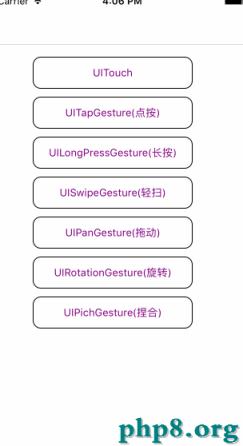
細節
1.UITouch
#import "ViewController_0.h"

@interface ViewController_0 ()

@property (nonatomic, strong)UILabel *label;

@end

@implementation ViewController_0

- (void)viewDidLoad {

    [super viewDidLoad];

    self.label                   = [[UILabel alloc] initWithFrame:CGRectMake(100, 100, 100, 100)];
    self.label.backgroundColor   = [UIColor yellowColor];
    self.label.layer.borderWidth = 1;
    [self.view addSubview:self.label];

    UILabel *textlabel = [[UILabel alloc] initWithFrame:CGRectMake(10, 80, 200, 45)];
    textlabel.text     = @"拖動方塊";
    [textlabel sizeToFit];
    textlabel.font     = [UIFont systemFontOfSize:12];
    [self.view addSubview:textlabel];
}

- (void)touchesBegan:(NSSet<UITouch *> *)touches withEvent:(nullable UIEvent *)event {

    //1.拿到手勢
    UITouch *touch = [touches anyObject];

    //2.拿到touch 所在view的坐標
    CGPoint point = [touch locationInView:self.view];

    //3.讓label拿到坐標
    self.label.center = point;

    NSLog(@"1.手指接觸到了屏幕");
}

- (void)touchesMoved:(NSSet<UITouch *> *)touches withEvent:(nullable UIEvent *)event {

    //1.拿到手勢
    UITouch *touch = [touches anyObject];

    //2.拿到touch 所在view的坐標
    CGPoint point = [touch locationInView:self.view];

    //3.讓label拿到坐標
    self.label.center = point;

    NSLog(@"2.手指在屏幕上移動");
}

- (void)touchesEnded:(NSSet<UITouch *> *)touches withEvent:(nullable UIEvent *)event {

     NSLog(@"3.手指剛離開屏幕");
}

- (void)touchesCancelled:(NSSet<UITouch *> *)touches withEvent:(nullable UIEvent *)event {

    NSLog(@"4.手勢失效了");
}

@end
2.UITapGestureRecognizer
#import "ViewController_1.h"

@interface ViewController_1 ()

@property (nonatomic, strong) UILabel *label;

@end

@implementation ViewController_1

- (void)viewDidLoad {

    [super viewDidLoad];

    UILabel *textlabel = [[UILabel alloc] initWithFrame:CGRectMake(10, 80, 200, 45)];
    textlabel.text     = @"電腦上操作tap手勢 alt +shift 需要連續點擊次數2次";
    [textlabel sizeToFit];
    textlabel.font     = [UIFont systemFontOfSize:12];
    [self.view addSubview:textlabel];

    self.label                        = [[UILabel alloc] initWithFrame:CGRectMake(100, 150, 100, 100)];
    self.label.backgroundColor        = [UIColor orangeColor];
    self.label.userInteractionEnabled = YES;
    self.label.text                   = @"0";
    self.label.textAlignment          = NSTextAlignmentCenter;
    [self.view addSubview:self.label];

    // 1.創建tap手勢
    UITapGestureRecognizer *tap = [[UITapGestureRecognizer alloc] initWithtarget:self action:@selector(labelTap:)];
    tap.numberOfTapsRequired    = 2; //需要輕輕點擊的次數
    tap.numberOfTouchesRequired = 2;//需要的手指數量 :2根手指alt +shift 需要匹配點擊次數2次(其實直接用默認的就好)
    [self.label addGestureRecognizer:tap];
}

- (void)labelTap:(UITapGestureRecognizer *)tap {

    int num = [self.label.text intValue];
    num++;
    self.label.text = [NSString stringWithFormat:@"%d",num ];
}

@end
3.UILongPressGestureRecognizer
#import "ViewController_2.h"

@interface ViewController_2 () <UIGestureRecognizerDelegate>

@property (nonatomic, strong) UILabel *label;

@end

@implementation ViewController_2

- (void)viewDidLoad {

    [super viewDidLoad];

    UILabel *textlabel = [[UILabel alloc] initWithFrame:CGRectMake(10, 80, 200, 45)];
    textlabel.text     = @"long長按手勢";
    [textlabel sizeToFit];
    textlabel.font     = [UIFont systemFontOfSize:12];
    [self.view addSubview:textlabel];

    self.label                        = [[UILabel alloc] initWithFrame:CGRectMake(40, 150, 200, 150)];
    self.label.backgroundColor        = [UIColor grayColor];
    self.label.userInteractionEnabled = YES;
    self.label.text                   = @"0";
    self.label.textAlignment          = NSTextAlignmentCenter;
    [self.view addSubview:self.label];

    UILongPressGestureRecognizer *longPress = [[UILongPressGestureRecognizer alloc] initWithtarget:self action:@selector(longPressAction:)];
    longPress.numberOfTapsRequired          = 1;
    longPress.numberOfTouchesRequired       = 1;
    longPress.minimumPressDuration          = 1.0;
    longPress.delegate   = self;
    [self.label addGestureRecognizer:longPress];
}

- (void)longPressAction:(UILongPressGestureRecognizer *)longPress {

    if(longPress.state == UIGestureRecognizerStateBegan) {

        NSLog(@"手勢狀態開始");

    } else if(longPress.state == UIGestureRecognizerStateEnded) {

        NSLog(@"手勢狀態結束");

    } else if(longPress.state == UIGestureRecognizerStateChanged) {

        NSLog(@"手勢狀態改變");

        NSInteger num = [self.label.text integerValue];
        num ++;
        self.label.text = [NSString stringWithFormat:@"%ld",(long)num];
    }
}

@end
4.UISwipeGestureRecognizer
#import "ViewController_3.h"

@interface ViewController_3 ()

@property (nonatomic, strong) UILabel *label;

@end

@implementation ViewController_3

- (void)viewDidLoad {

    [super viewDidLoad];

    UILabel *textlabel      = [[UILabel alloc] initWithFrame:CGRectMake(10, 80, 200, 45)];
    textlabel.text          = @"swipe手勢 向右滑動➕1,你也可以設置左劃上劃下劃";
    textlabel.numberOfLines = 0;
    textlabel.font          = [UIFont systemFontOfSize:12];
    [self.view addSubview:textlabel];

    self.label                        = [[UILabel alloc] initWithFrame:CGRectMake(100, 150, 100, 100)];
    self.label.backgroundColor        = [UIColor grayColor];
    self.label.userInteractionEnabled = YES;
    self.label.text                   = @"0";
    self.label.textAlignment          = NSTextAlignmentCenter;
    [self.view addSubview:self.label];

    UISwipeGestureRecognizer *swipeGesture = [[UISwipeGestureRecognizer alloc] initWithtarget:self action:@selector(swipeAction:)];
    swipeGesture.direction                 = UISwipeGestureRecognizerDirectionRight;//默認就是向右劃
    [self.label addGestureRecognizer:swipeGesture];
}

-(void)swipeAction:(UISwipeGestureRecognizer *)swipe {

    if (swipe.direction == UISwipeGestureRecognizerDirectionLeft) {

        NSLog(@"現在響應左劃手勢");

    } else if (swipe.direction == UISwipeGestureRecognizerDirectionRight) {

        NSLog(@"現在響應右劃手勢");

        NSInteger num   = [self.label.text integerValue];
        num ++;
        self.label.text = [NSString stringWithFormat:@"%ld",(long)num];

    } else if (swipe.direction == UISwipeGestureRecognizerDirectionUp) {

        NSLog(@"現在響應上劃手勢");

    } else if (swipe.direction == UISwipeGestureRecognizerDirectionDown) {

        NSLog(@"現在響應下劃手勢");
    }
}

@end
5.UIPanGestureRecognizer
#import "ViewController_4.h"

@interface ViewController_4 ()

@property (nonatomic, strong) UILabel *label;

@end

@implementation ViewController_4

- (void)viewDidLoad {

    [super viewDidLoad];

    UILabel *textlabel = [[UILabel alloc] initWithFrame:CGRectMake(10, 80, 200, 45)];
    textlabel.text     = @"pan手勢,拖動方塊";
    [textlabel sizeToFit];
    textlabel.font     = [UIFont systemFontOfSize:12];
    [self.view addSubview:textlabel];

    self.label                        = [[UILabel alloc] initWithFrame:CGRectMake(100, 100, 100, 100)];
    self.label.backgroundColor        = [UIColor grayColor];
    self.label.userInteractionEnabled = YES;
    self.label.text                   = @"0";
    self.label.textAlignment          = NSTextAlignmentCenter;
    [self.view addSubview:self.label];

    UIPanGestureRecognizer *pan = [[UIPanGestureRecognizer alloc] initWithTarget:self action:@selector(panAction:)];
    [self.label addGestureRecognizer:pan];
}

- (void)panAction:(UIPanGestureRecognizer *)pan {

    CGPoint offset    = [pan  locationInView:self.view];
    self.label.center = offset;
}

@end
6.UIRotationGestureRecognizer
#import "ViewController_5.h"

@interface ViewController_5 ()

@property (nonatomic, strong) UILabel *label;

@end

@implementation ViewController_5

- (void)viewDidLoad {

    [super viewDidLoad];

    UILabel *textlabel = [[UILabel alloc] initWithFrame:CGRectMake(10, 80, 200, 45)];
    textlabel.text     = @"模擬器測試旋轉手勢時,按住 option鍵,再用觸摸板或鼠標操作";
    textlabel.font     = [UIFont systemFontOfSize:12];
    textlabel.numberOfLines = 0;
    [self.view addSubview:textlabel];

    self.label                        = [[UILabel alloc] initWithFrame:CGRectMake(40, 200, 200, 50)];
    self.label.backgroundColor        = [UIColor grayColor];
    self.label.userInteractionEnabled = YES;
    self.label.text                   = @"we are friends";
    self.label.textAlignment          = NSTextAlignmentCenter;
    [self.view addSubview:self.label];

    //(模擬器測試捏合和旋轉手勢時,按住 option 鍵,再用觸摸板或鼠標操作)
    UIRotationGestureRecognizer *rotation = [[UIRotationGestureRecognizer alloc] initWithTarget:self action:@selector(rotationAction:)];
    [self.view addGestureRecognizer:rotation];

}

- (void)rotationAction:(UIRotationGestureRecognizer *)rotation {

    self.label.transform = CGAff.netransformRotate(self.label.transform, rotation.rotation);
    rotation.rotation = 0; // 這個很重要!!!!!

//    static float  orginState;
//
//    self.label.transform = CGAff.netransformMakeRotation(rotation.rotation + orginState);
//
//    if (rotation.state == UIGestureRecognizerStateEnded) {
//
//        orginState = orginState + rotation.state;
//        self.label.transform = CGAff.netransformMakeRotation(rotation.rotation);
//    }
}

@end
7.UIPinchGestureRecognizer
#import "ViewController_6.h"

@interface ViewController_6 ()

@property (nonatomic, strong) UILabel *label;

@end

@implementation ViewController_6

- (void)viewDidLoad {

    [super viewDidLoad];

    UILabel *textlabel = [[UILabel alloc] initWithFrame:CGRectMake(10, 80, 200, 45)];
    textlabel.text     = @"模擬器測試捏合手勢時,按住 option鍵,再用觸摸板或鼠標操作";
    textlabel.font     = [UIFont systemFontOfSize:12];
    textlabel.numberOfLines = 0;
    [self.view addSubview:textlabel];

    self.label                        = [[UILabel alloc] initWithFrame:CGRectMake(100, 250, 80, 80)];
    self.label.backgroundColor        = [UIColor grayColor];
    self.label.userInteractionEnabled = YES;
    self.label.text                   = @"0";
    self.label.textAlignment          = NSTextAlignmentCenter;
    [self.view addSubview:self.label];

//    (模擬器測試捏合和旋轉手勢時,按住 option 鍵,再用觸摸板或鼠標操作)
    UIPinchGestureRecognizer * pinch = [[UIPinchGestureRecognizer alloc]initWithTarget:self action:@selector(pichGesture:)];
    [self.view addGestureRecognizer:pinch];
}

- (void)pichGesture:(UIPinchGestureRecognizer *)pinch {

    static float originScale = 1;

    //手勢縮放返回的scale  是相對於上一次的
    self.label.transform = CGAffineTransformMakeScale(pinch.scale * originScale , pinch.scale*originScale);

    if (pinch.state == UIGestureRecognizerStateEnded) {

        originScale = originScale * pinch.scale;
    }
}

@end
謝謝您的訪問.
【手勢】的相關資料介紹到這裡,希望對您有所幫助! 提示:不會對讀者因本文所帶來的任何損失負責。如果您支持就請把本站添加至收藏夾哦!

相關文章
+- iOS輕點、觸摸和手勢代碼開辟
- 應用Swift代碼完成iOS手勢解鎖、指紋解鎖實例詳解
- iOS開辟之手勢辨認
- iOS仿郵箱年夜師的九宮格手勢暗碼解鎖
- iOS完成手勢解鎖操作
- 加載帶有手勢辨認器的XIB文件需留意哪些成績
- iOS開辟中的幾個手勢操作實例分享
- iOS手勢辨認的詳細運用辦法(拖動,縮放,旋轉,點擊,手勢依賴,自定義手勢)
- ios的手勢操作之UIGestureRecognizer淺析(引薦)
- iOS右劃手勢所遇到的問題
- iOS手勢密碼的完成辦法
- 應用iOS手勢與scrollView代理完成圖片的縮小減少
- iOS 手勢沖突問題匯總(及解決辦法)
- iOS 語音錄制及播放,類似微信手勢脫出取消,拖回繼續錄制。
- iOS實現手勢密碼功能