IOS本地日志記錄方案
此篇文章將要介紹IOS本地日志記錄方案的相關內容,具體內容請看下面
我們在項目中日志記錄這塊也算是比較重要的,有時候用戶程序出什麼問題,光靠服務器的日志還不能准確的找到問題。
現在一般記錄日志有幾種方式:1、使用第三方工具來記錄日志,如騰訊的Bugly,它是只把程序的異常日志,程序崩潰日志,以及一些自定義的操作日志上傳到Bugly的後台
2、我們把日志記錄到本地,在適合的時候再上傳到服務器
這裡我要介紹的是第二種方法,第一種和第二種可以一起用。
假如現在有下面這樣的日志記錄要求1、日志記錄在本地
2、日志最多記錄N天,N天之前的都需要清理掉
3、日志可以上傳到服務器,由服務器控制是否需要上傳
4、上傳的日志應該壓縮後再上傳
實現思路1、日志記錄在本地
也就是把字符串保存到本地,我們可以用 將NSString轉換成NSData然後寫入本地,但是NSData寫入本地會對本地的文件進入覆蓋,所以我們只有當文件不存在的時候第一次寫入的時候用這種方式,如果要將日志內容追加到日志文件裡面,我們可以用NSFleHandle來處理
2、日志最多記錄N天,N天之前的都需要清理掉
這個就比較容易了,我們可以將本地日志文件名定成當天日期,每天一個日志文件,這樣我們在程序啟動後,可以去檢測並清理掉過期的日志文件
3、日志可以上傳到服務器,由服務器控制是否需要上傳
這個功能我們需要後台的配合,後台需要提供兩個接口,一個是APP去請求時返回當前應用是否需要上傳日志,根據參數來判斷,第二個接口就是上傳日志的接口
4、上傳的日志應該壓縮後再上傳
一般壓縮的功能我們可以使用zip壓縮,OC中有開源的插件 ZipArchive 地址:http://code.google.com/p/ziparchive/ (需要FQ)
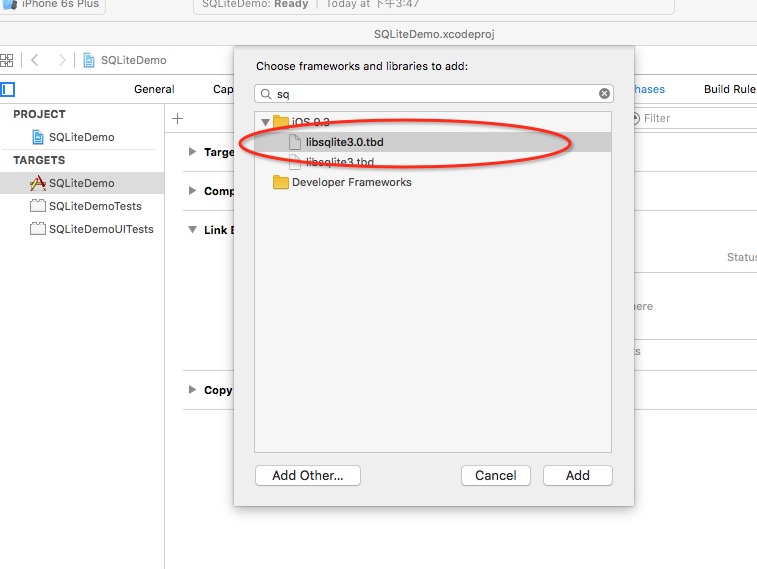
具體實現代碼我們先將ZipArchive引入到項目中,注意還需要引入系統的 libz.tbd 動態庫,好下:


由於ZipArchive是使用C++編寫的,是不支持ARC的,所以我們需要在項目中把這個類的ARC關閉掉,不然會編譯不通過,如下:
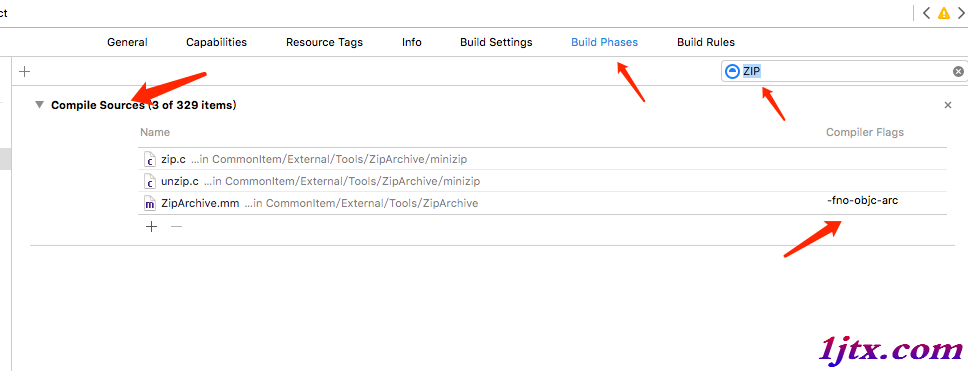
給ZipArchive.mm文件添加一個-fno-objc-arc 標簽就可以了
然後就是代碼部分了,創建一個日志工具類,LogManager
//
//  LogManager.h
//  LogFileDemo
//
//  Created by xgao on 17/3/9.
//  Copyright © 2017年 xgao. All rights reserved.
//

#import <Foundation/Foundation.h>

@interface LogManager : NSObject

/**
 *  獲取單例實例
 *
 *  @return 單例實例
 */
+ (instancetype) sharedInstance;

#pragma mark - Method

/**
 *  寫入日志
 *
 *  @param module 模塊名稱
 *  @param logStr 日志信息,動態參數
 */
- (void)logInfo:(NSString*)module logStr:(NSString*)logStr, ...;

/**
 *  清空過期的日志
 */
- (void)clearExpiredLog;

/**
 *  檢測日志是否需要上傳
 */
- (void)checkLogNeedUpload;

@end
//
//  LogManager.m
//  LogFileDemo
//
//  Created by xgao on 17/3/9.
//  Copyright © 2017年 xgao. All rights reserved.
//

#import "LogManager.h"
#import "ZipArchive.h"
#import "X.networking.h"

// 日志保留最大天數
static const int LogMaxSaveDay = 7;
// 日志文件保存目錄
static const NSString* LogFilePath = @"/Documents/OTKLog/";
// 日志壓縮包文件名
static NSString* ZipFileName = @"OTKLog.zip";

@interface LogManager()

// 日期格式化
@property (nonatomic,retain) NSDateFormatter* dateFormatter;
// 時間格式化
@property (nonatomic,retain) NSDateFormatter* timeFormatter;

// 日志的目錄路徑
@property (nonatomic,copy) NSString* basePath;

@end

@implementation LogManager

/**
 *  獲取單例實例
 *
 *  @return 單例實例
 */
+ (instancetype) sharedInstance{

    static LogManager* instance = nil;

    static dispatch_once_t onceToken;
    dispatch_once(&onceToken, ^{
        if (!instance) {
            instance = [[LogManager alloc]init];
        }
    });

    return instance;
}

// 獲取當前時間
+ (NSDate*)getCurrDate{

    NSDate *date = [NSDate date];
    NSTimeZone *zone = [NSTimeZone systemTimeZone];
    NSInteger interval = [zone secondsFromGMTForDate: date];
    NSDate *localeDate = [date dateByAddingTimeInterval: interval];

    return localeDate;
}

#pragma mark - Init

- (instancetype)init{

    self = [super init];
    if (self) {

        // 創建日期格式化
        NSDateFormatter* dateFormatter = [[NSDateFormatter alloc]init];
        [dateFormatter setDateFormat:@"yyyy-MM-dd"];
        // 設置時區,解決8小時
        [dateFormatter setTimeZone:[NSTimeZone timeZoneWithAbbreviation:@"UTC"]];
        self.dateFormatter = dateFormatter;

        // 創建時間格式化
        NSDateFormatter* timeFormatter = [[NSDateFormatter alloc]init];
        [timeFormatter setDateFormat:@"HH:mm:ss"];
        [timeFormatter setTimeZone:[NSTimeZone timeZoneWithAbbreviation:@"UTC"]];
        self.timeFormatter = timeFormatter;

        // 日志的目錄路徑
        self.basePath = [NSString stringWithFormat:@"%@%@",NSHomeDirectory(),LogFilePath];
    }
    return self;
}

#pragma mark - Method

/**
 *  寫入日志
 *
 *  @param module 模塊名稱
 *  @param logStr 日志信息,動態參數
 */
- (void)logInfo:(NSString*)module logStr:(NSString*)logStr, ...{

#pragma mark - 獲取參數

    NSMutableString* parmaStr = [NSMutableString string];
    // 聲明一個參數指針
    va_list paramList;
    // 獲取參數地址,將paramList指向logStr
    va_start(paramList, logStr);
    id arg = logStr;

    @try {
        // 遍歷參數列表
        while (arg) {
            [parmaStr appendString:arg];
            // 指向下一個參數,後面是參數類似
            arg = va_arg(paramList, NSString*);
        }

    } @catch (NSException *exception) {

        [parmaStr appendString:@"【記錄日志異常】"];
    } @finally {

        // 將參數列表指針置空
        va_end(paramList);
    }

#pragma mark - 寫入日志

    // 異步執行
    dispatch_async(dispatch_queue_create("writeLog", nil), ^{

        // 獲取當前日期做為文件名
        NSString* fileName = [self.dateFormatter stringFromDate:[NSDate date]];
        NSString* filePath = [NSString stringWithFormat:@"%@%@",self.basePath,fileName];

        // [時間]-[模塊]-日志內容
        NSString* timeStr = [self.timeFormatter stringFromDate:[LogManager getCurrDate]];
        NSString* writeStr = [NSString stringWithFormat:@"[%@]-[%@]-%@\n",timeStr,module,parmaStr];

        // 寫入數據
        [self writeFile:filePath stringData:writeStr];

        NSLog(@"寫入日志:%@",filePath);
    });
}

/**
 *  清空過期的日志
 */
- (void)clearExpiredLog{

    // 獲取日志目錄下的所有文件
    NSArray* files = [[NSFileManager defaultManager] contentsOfDirectoryAtPath:self.basePath error:nil];
    for (NSString* file in files) {

        NSDate* date = [self.dateFormatter dateFromString:file];
        if (date) {
            NSTimeInterval oldTime = [date timeIntervalSince1970];
            NSTimeInterval currTime = [[LogManager getCurrDate] timeIntervalSince1970];

            NSTimeInterval second = currTime - oldTime;
            int day = (int)second / (24 * 3600);
            if (day >= LogMaxSaveDay) {
                // 刪除該文件
                [[NSFileManager defaultManager] removeItemAtPath:[NSString stringWithFormat:@"%@/%@",self.basePath,file] error:nil];
                NSLog(@"[%@]日志文件已被刪除!",file);
            }
        }
    }


}

/**
 *  檢測日志是否需要上傳
 */
- (void)checkLogNeedUpload{

    __block NSError* error = nil;
    // 獲取實體字典
    __block NSDictionary* resultDic = nil;

    // 請求的URL,後台功能需要自己做
    NSString* url = [NSString stringWithFormat:@"%@/common/phone/logs",SERVIERURL];

    // 發起請求,從服務器上獲取當前應用是否需要上傳日志
    [[X.networking sharedInstance] get:url success:^(NSString* jsonData) {

        // 獲取實體字典
        NSDictionary* dataDic = [Utilities getDataString:jsonData error:&error];
        resultDic = dataDic.count > 0 ? [dataDic objectForKey:@"data"] : nil;

        if([resultDic isEqual:[NSNull null]]){
            error = [NSError errorWithDomain:[NSString stringWithFormat:@"請求失敗,data沒有數據!"] code:500 userInfo:nil];
        }

        // 完成後的處理
        if (error == nil) {

            // 處理上傳日志
            [self uploadLog:resultDic];
        }else{
            LOGERROR(@"檢測日志返回結果有誤!data沒有數據!");
        }
    } faild:^(NSString *errorInfo) {

        LOGERROR(([NSString stringWithFormat:@"檢測日志失敗!%@",errorInfo]));
    }];
}

#pragma mark - Private

/**
 *  處理是否需要上傳日志
 *
 *  @param resultDic 包含獲取日期的字典
 */
- (void)uploadLog:(NSDictionary*)resultDic{

    if (!resultDic) {
        return;
    }

    // 0不拉取,1拉取N天,2拉取全部
    int type = [resultDic[@"type"] intValue];
    // 壓縮文件是否創建成功
    BOOL created = NO;
    if (type == 1) {
        // 拉取指定日期的

        // "dates": ["2017-03-01", "2017-03-11"]
        NSArray* dates = resultDic[@"dates"];

        // 壓縮日志
        created = [self compressLog:dates];
    }else if(type == 2){
        // 拉取全部

        // 壓縮日志
        created = [self compressLog:nil];
    }

    if (created) {
        // 上傳
        [self uploadLogToServer:^(BOOL boolValue) {
            if (boolValue) {
                LOGINFO(@"日志上傳成功---->>");
                // 刪除日志壓縮文件
                [self deleteZipFile];
            }else{
                LOGERROR(@"日志上傳失敗!!");
            }
        } errorBlock:^(NSString *errorInfo) {
             LOGERROR(([NSString stringWithFormat:@"日志上傳失敗!!Error:%@",errorInfo]));
        }];
    }
}

/**
 *  壓縮日志
 *
 *  @param dates 日期時間段,空代表全部
 *
 *  @return 執行結果
 */
- (BOOL)compressLog:(NSArray*)dates{

    // 先清理幾天前的日志
    [self clearExpiredLog];

    // 獲取日志目錄下的所有文件
    NSArray* files = [[NSFileManager defaultManager] contentsOfDirectoryAtPath:self.basePath error:nil];
    // 壓縮包文件路徑
    NSString * zipFile = [self.basePath stringByAppendingString:ZipFileName] ;

    ZipArchive* zip = [[ZipArchive alloc] init];
    // 創建一個zip包
    BOOL created = [zip CreateZipFile2:zipFile];
    if (!created) {
        // 關閉文件
        [zip CloseZipFile2];
        return NO;
    }

    if (dates) {
        // 拉取指定日期的
        for (NSString* fileName in files) {
            if ([dates containsObject:fileName]) {
                // 將要被壓縮的文件
                NSString *file = [self.basePath stringByAppendingString:fileName];
                // 判斷文件是否存在
                if ([[NSFileManager defaultManager] fileExistsAtPath:file]) {
                    // 將日志添加到zip包中
                    [zip addFileToZip:file newname:fileName];
                }
            }
        }
    }else{
        // 全部
        for (NSString* fileName in files) {
            // 將要被壓縮的文件
            NSString *file = [self.basePath stringByAppendingString:fileName];
            // 判斷文件是否存在
            if ([[NSFileManager defaultManager] fileExistsAtPath:file]) {
                // 將日志添加到zip包中
                [zip addFileToZip:file newname:fileName];
            }
        }
    }

    // 關閉文件
    [zip CloseZipFile2];
    return YES;
}

/**
 *  上傳日志到服務器
 *
 *  @param returnBlock 成功回調
 *  @param errorBlock  失敗回調
 */
- (void)uploadLogToServer:(BoolBlock)returnBlock errorBlock:(ErrorBlock)errorBlock{

    __block NSError* error = nil;
    // 獲取實體字典
    __block NSDictionary* resultDic;

    // 訪問URL
    NSString* url = [NSString stringWithFormat:@"%@/fileupload/fileupload/logs",SERVIERURL_FILE];

    // 發起請求,這裡是上傳日志到服務器,後台功能需要自己做
    [[X.networking sharedInstance] upload:url fileData:nil fileName:ZipFileName mimeType:@"application/zip" parameters:nil success:^(NSString *jsonData) {

        // 獲取實體字典
        resultDic = [Utilities getDataString:jsonData error:&error];

        // 完成後的處理
        if (error == nil) {
            // 回調返回數據
            returnBlock([resultDic[@"state"] boolValue]);
        }else{

            if (errorBlock){
                errorBlock(error.domain);
            }
        }

    } faild:^(NSString *errorInfo) {

        returnBlock(errorInfo);
    }];

}

/**
 *  刪除日志壓縮文件
 */
- (void)deleteZipFile{

    NSString* zipFilePath = [self.basePath stringByAppendingString:ZipFileName];
    if ([[NSFileManager defaultManager] fileExistsAtPath:zipFilePath]) {
        [[NSFileManager defaultManager] removeItemAtPath:zipFilePath error:nil];
    }
}

/**
 *  寫入字符串到指定文件,默認追加內容
 *
 *  @param filePath   文件路徑
 *  @param stringData 待寫入的字符串
 */
- (void)writeFile:(NSString*)filePath stringData:(NSString*)stringData{

    // 待寫入的數據
    NSData* writeData = [stringData dataUsingEncoding:NSUTF8StringEncoding];

    // NSFileManager 用於處理文件
    BOOL createPathOk = YES;
    if (![[NSFileManager defaultManager] fileExistsAtPath:[filePath stringByDeletingLastPathComponent] isDirectory:&createPathOk]) {
        // 目錄不存先創建
        [[NSFileManager defaultManager] createDirectoryAtPath:[filePath stringByDeletingLastPathComponent] withIntermediateDirectories:YES attributes:nil error:nil];
    }
    if(![[NSFileManager defaultManager] fileExistsAtPath:filePath]){
        // 文件不存在,直接創建文件並寫入
        [writeData writeToFile:filePath atomically:NO];
    }else{

        // NSFileHandle 用於處理文件內容
        // 讀取文件到上下文,並且是更新模式
        NSFileHandle* fileHandler = [NSFileHandle fileHandleForUpdatingAtPath:filePath];

        // 跳到文件末尾
        [fileHandler seekToEndOfFile];

        // 追加數據
        [fileHandler writeData:writeData];

        // 關閉文件
        [fileHandler closeFile];
    }
}


@end
日志工具的使用
1、記錄日志
[[LogManager sharedInstance] logInfo:@"首頁" logStr:@"這是日志信息!",@"可以多參數",nil];
2、我們在程序啟動後,進行一次檢測,看要不要上傳日志
    // 幾秒後檢測是否有需要上傳的日志
    [[LogManager sharedInstance] performSelector:@selector(checkLogNeedUpload) withObject:nil afterDelay:3];
這裡可能有人發現我們在記錄日志的時候為什麼最後面要加上nil,因為這個是OC中動態參數的結束後綴,不加上nil,程序就不知道你有多少個參數,可能有人又要說了,NSString的stringWithFormat 方法為什麼不需要加 nil 也可以呢,那是因為stringWithFormat裡面用到了占位符,就是那些 %@ %i 之類的,這樣程序就能判斷你有多少個參數了,所以就不用加 nil 了
看到這裡,可能大家覺得這個記錄日志的方法有點長,後面還加要nil,不方便,那能不能再優化一些,讓它更簡單的調用呢?我可以用到宏來優化,我們這樣定義一個宏,如下:
// 記錄本地日志
#define LLog(module,...) [[LogManager sharedInstance] logInfo:module logStr:__VA_ARGS__,nil]
這樣我們使用的時候就方便了,這樣調用就行了。
LLog(@"首頁", @"這是日志信息!",@"可以多參數");
好的,那本文就結束了,這也是將我工作中用的的分享給大家,老鳥就可以飛過了~~有什麼看不明白的就留言吧。
[db:作者簡介][db:原文翻譯及解析]【IOS本地日志記錄方案】的相關資料介紹到這裡,希望對您有所幫助! 提示:不會對讀者因本文所帶來的任何損失負責。如果您支持就請把本站添加至收藏夾哦!
- 上一頁:CoreAnimation 圖層幾何學
- 下一頁:關於極光推送需要注意的幾點