IOS開發學習筆記-(3) 進度條、等待動畫開始停止
編輯:IOS開發綜合
一、創建對應空間視圖 ,如下圖:
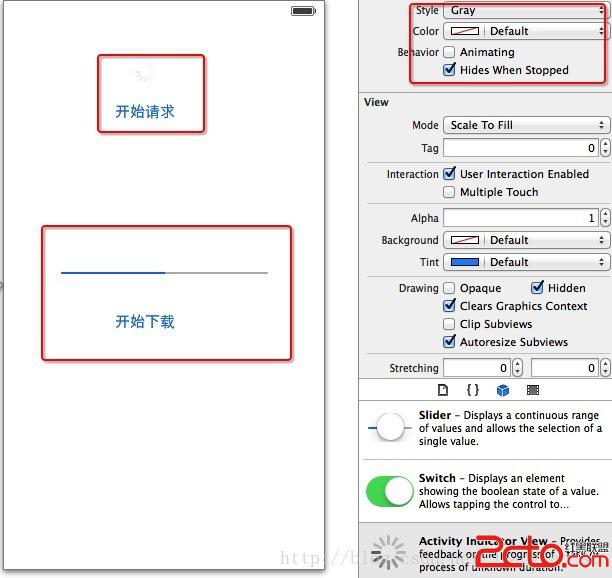
二、編寫對應的 .h 代碼,如下 :
#import@interface ViewController : UIViewController @property (weak, nonatomic) IBOutlet UIActivityIndicatorView *activWaitNetWork; @property (weak, nonatomic) IBOutlet UIProgressView *pgrsDownLoad; @property (weak,nonatomic) NSTimer *timer; - (IBAction)onclickStartRequest:(id)sender; - (IBAction)onclickDownLoad:(id)sender; @end
三、編寫對應的 .m 文件的實現,注釋比較詳細:
#import ViewController.h

@interface ViewController ()

@end

@implementation ViewController

@synthesize activWaitNetWork;
@synthesize pgrsDownLoad;
@synthesize timer;

- (void)viewDidLoad
{
    [super viewDidLoad];
	// Do any additional setup after loading the view, typically from a nib.
}

- (IBAction)onclickStartRequest:(id)sender{

    //如果正在運行,停止; 否則 開始運行加載
    if ([activWaitNetWork isAnimating]) {
       [activWaitNetWork stopAnimating];
    }else{
       [activWaitNetWork startAnimating];
    }
}

- (IBAction)onclickDownLoad:(id)sender{

    //重新開始進度
    pgrsDownLoad.progress = 0;

    //定時任務 跟新 Progerss 的進度
    timer = [NSTimer scheduledTimerWithTimeInterval:1.0 target:self selector:@selector(update) userInfo:nil repeats:YES];

}

- (void)update{

    pgrsDownLoad.progress =  pgrsDownLoad.progress + 0.1 ;
    //當進度完成時,提示下載完成
    if(pgrsDownLoad.progress == 1){
        [timer invalidate];

        UIAlertView *alert  = [[UIAlertView alloc] initWithTitle:@溫馨提示 message:@文件下載完成 delegate:self cancelButtonTitle:@確定 otherButtonTitles:@取消, nil ];

        [alert show];
    }

}

- (void)didReceiveMemoryWarning
{
    [super didReceiveMemoryWarning];
    // Dispose of any resources that can be recreated.
}


@end
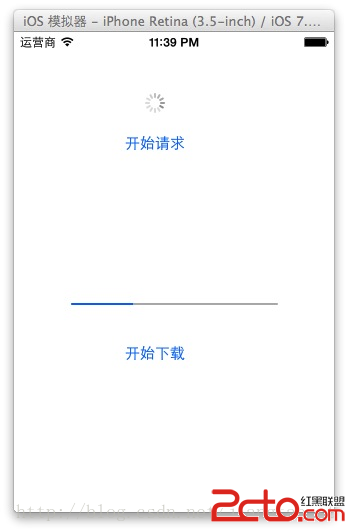
四、運行效果 ,如下:


相關文章
+