IOS改變UISearchBar中搜索框的高度
編輯:IOS開發綜合
一、系統的searchBar
1、UISearchBar的中子控件及其布局
UIView(直接子控件) frame 等於 searchBar的bounds,view的子控件及其布局
- UISearchBarBackground(間接子控件) frame 等於searchBar的bounds
- UISearchBarTextField(間接子控件) frame.origin等於(8.0, 6.0),即不等於searchBar的bounds
2、改變searchBar的frame只會影響其中搜索框的寬度,不會影響其高度,原因如下:
- 系統searchBar中的UISearchBarTextField的高度默認固定為28
- 左右邊距固定為8,上下邊距是父控件view的高度減去28除以2
二、改變UISearchBar的高度
1、方案
重寫UISearchBar的子類(IDSearchBar),重新布局UISearchBar子控件的布局
增加成員屬性contentInset,控制UISearchBarTextField距離父控件的邊距
- 若用戶沒有設置contentInset,則計算出默認的contentInset
- 若用戶設置了contentInset,則根據最新的contentInset布局UISearchBarTextField
2、具體實現
重寫UISearchBar的子類
class IDSearchBar: UISearchBar {

}
增加成員屬性contentInset(可選類型),控制UISearchBarTextField距離父控件的邊距,監聽其值的改變,重新布局searchBar子控件的布局
var contentInset: UIEdgeInsets? {
  didSet {
    self.layoutSubviews()
  }
}
重寫layoutSubviews()布局searchBar的子控件
override func layoutSubviews() {
  super.layoutSubviews()

  // view是searchBar中的唯一的直接子控件
  for view in self.subviews {
    // UISearchBarBackground與UISearchBarTextField是searchBar的簡介子控件
    for subview in view.subviews {

      // 找到UISearchBarTextField
      if subview.isKindOfClass(UITextField.classForCoder()) {

        if let textFieldContentInset = contentInset { // 若contentInset被賦值
          // 根據contentInset改變UISearchBarTextField的布局
          subview.frame = CGRect(x: textFieldContentInset.left, y: textFieldContentInset.top, width: self.bounds.width - textFieldContentInset.left - textFieldContentInset.right, height: self.bounds.height - textFieldContentInset.top - textFieldContentInset.bottom)
        } else { // 若contentSet未被賦值
          // 設置UISearchBar中UISearchBarTextField的默認邊距
          let top: CGFloat = (self.bounds.height - 28.0) / 2.0
          let bottom: CGFloat = top
          let left: CGFloat = 8.0
          let right: CGFloat = left
          contentInset = UIEdgeInsets(top: top, left: left, bottom: bottom, right: right)
        }
      }
    }
  }
}
三、IDSearchBar使用示例
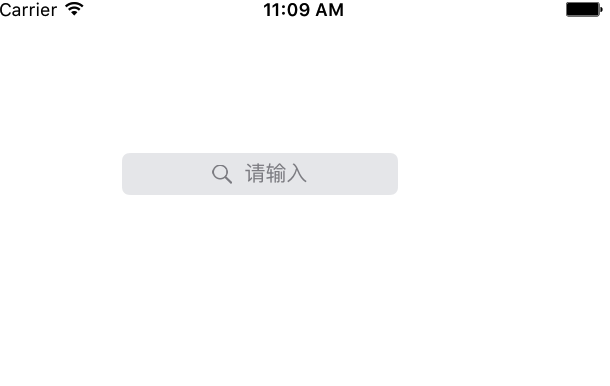
1、未設置contentInset
設置searchBar的frame
searchBar.frame = CGRect(x: 80, y: 100, width: 200, height: 40)
效果如圖
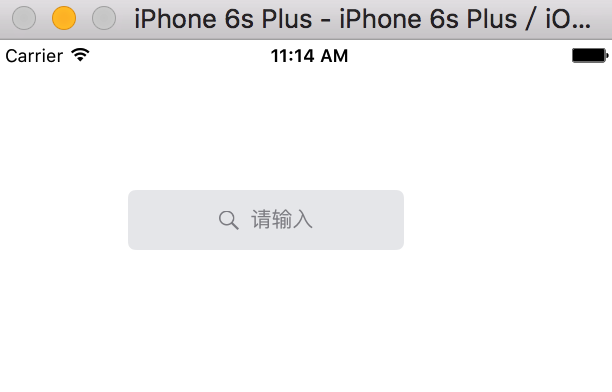
2、設置contentInset
設置searchBar的frame
searchBar.frame = CGRect(x: 80, y: 100, width: 200, height: 40)
設置searchBar的contentInset
// 設置contentInset
searchBar.contentInset = UIEdgeInsets(top: 0, left: 8, bottom: 0, right: 8)
效果如圖
四、IDSearchBar的設計原則
1、注意
- UISearchBar默認是有自己默認的布局方式的
- 設計IDSearchBar旨在改變searBar中搜索框的高度,但是可能會有改變寬的的需求
2、設計原則
- 在沒有改變searchBar中搜索框的高度的需求時,需要使用UISearchBar的默認布局
- 若需要改變searchBar中搜索框的高度的需求時,需要按照需求來改變UISearchBar的布局
- 為了增加可控性,在IDSearchBar中增加成員屬性contentInset來控制IDSearchBar的內邊距
以上就是本文的全部內容,希望對大家的學習有所幫助。
相關文章
+