iOS百度地圖簡單使用詳解
百度地圖 iOS SDK是一套基於iOS 5.0及以上版本設備的應用程序接口,不僅提供展示地圖的基本接口,還提供POI檢索、路徑規劃、地圖標注、離線地圖、定位、周邊雷達等豐富的LBS能力 。
今天主要介紹以下接口
- 基礎地圖
- POI檢索
- 定位
首先配置環境
1.自動配置.framework形式開發包(使用CocoaPods)<推薦>
2.手動配置.framework形式開發包
特別注意:
(API裡有很多注意點,大家可以具體去看.但是我說的後兩點少其中一個都會失敗,第一點是有需求的話,必須加上)
1、如果在iOS9中使用了調起百度地圖客戶端功能,必須在"Info.plist"中進行如下配置,否則不能調起百度地圖客戶端。
  <key>LSApplicationQueriesSchemes</key>
  <array>
    <string>baidumap</string>
  </array>
2、自iOS SDK v2.5.0起,為了對iOS8的定位能力做兼容,需要在info.plist裡添加(以下二選一,兩個都添加默認使用 NSLocationWhenInUseUsageDescription):
NSLocationWhenInUseUsageDescription ,允許在前台使用時獲取GPS的描述
NSLocationAlwaysUsageDescription ,允許永久使用GPS的描述
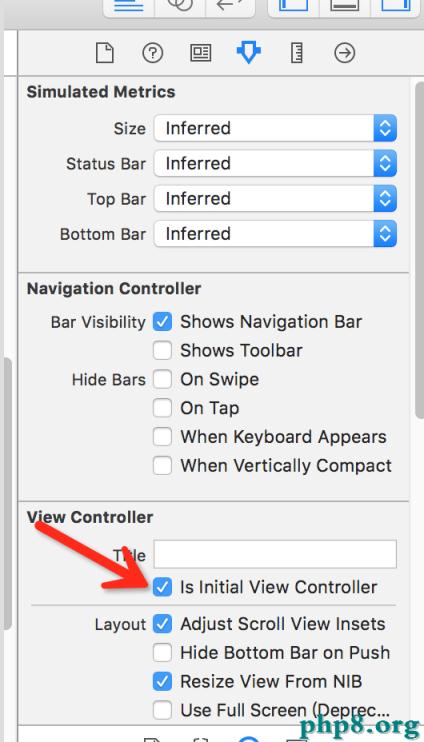
3、在使用Xcode6進行SDK開發過程中,需要在info.plist中添加:Bundle display name ,且其值不能為空(Xcode6新建的項目沒有此配置,若沒有會造成manager start fail
配置完成後
AppDelegate.m文件中添加對BMKMapManager的初始化,並填入申請的授權Key
#import "AppDelegate.h"
#import <BaiduMapAPI_Base/BMKMapManager.h>
@interface AppDelegate ()

@end

@implementation AppDelegate


- (BOOL)application:(UIApplication *)application didFinishLaunchingWithOptions:(NSDictionary *)launchOptions {

//創建並初始化一個引擎對象
  BMKMapManager *manager = [[BMKMapManager alloc] init];
//啟動地圖引擎
  BOOL success = [manager start:@"zBWLNgRUrTp9CVb5Ez6gZpNebljmYylO" generalDelegate:nil];

  if (!success) {
    NSLog(@"失敗");
  }
  // Override point for customization after application launch.
  return YES;
}
1.基礎地圖
#import "ViewController.h"
#import <BaiduMapAPI_Map/BMKMapView.h>
@interface ViewController ()<BMKMapViewDelegate>

@property (nonatomic,strong) BMKMapView *mapView;//地圖視圖
@end

@implementation ViewController

- (void)viewDidLoad {
  [super viewDidLoad];
   //初始化地圖
  self.mapView = [[BMKMapView alloc] initWithFrame:self.view.frame];
  self.mapView.delegate =self;
  //設置地圖的顯示樣式
  self.mapView.mapType = BMKMapTypeSatellite;//衛星地圖

  //設定地圖是否打開路況圖層
  self.mapView.trafficEnabled = YES;

  //底圖poi標注
  self.mapView.showMapPoi = NO;

  //在手機上當前可使用的級別為3-21級
  self.mapView.zoomLevel = 21;

  //設定地圖View能否支持旋轉
  self.mapView.rotateEnabled = NO;

  //設定地圖View能否支持用戶移動地圖
  self.mapView.scrollEnabled = NO;

  //添加到view上
  [self.view addSubview:self.mapView];

  //還有很多屬性,根據需求查看API
}
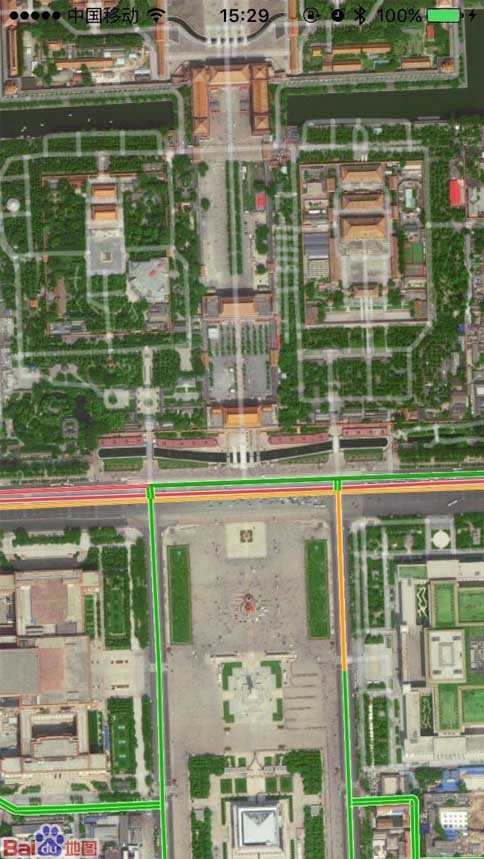
運行效果入下;
2.定位
#import "ViewController.h"
#import <BaiduMapAPI_Map/BMKMapView.h>
#import <BaiduMapAPI_Location/BMKLocationService.h>
@interface ViewController ()<BMKLocationServiceDelegate,BMKMapViewDelegate>

@property (nonatomic,strong) BMKMapView *mapView;//地圖視圖
@property (nonatomic,strong) BMKLocationService *service;//定位服務

@end

@implementation ViewController


- (void)viewDidLoad {
  [super viewDidLoad];

   //初始化地圖
  self.mapView = [[BMKMapView alloc] initWithFrame:self.view.frame];
  self.mapView.delegate =self;

  //添加到view上
  [self.view addSubview:self.mapView];

  //初始化定位
  self.service = [[BMKLocationService alloc] init];

  //設置代理
  self.service.delegate = self;

  //開啟定位
  [self.service startUserLocationService];


  // Do any additional setup after loading the view, typically from a nib.
}

#pragma mark -------BMKLocationServiceDelegate

/**
 *用戶位置更新後,會調用此函數
 *@param userLocation 新的用戶位置
 */
- (void)didUpdateBMKUserLocation:(BMKUserLocation *)userLocation {


  //展示定位
  self.mapView.showsUserLocation = YES;

  //更新位置數據
  [self.mapView updateLocationData:userLocation];

  //獲取用戶的坐標
   self.mapView.centerCoordinate = userLocation.location.coordinate;

   self.mapView.zoomLevel =18;

}
運行結果
POI檢索
#import "ViewController.h"
#import <BaiduMapAPI_Map/BMKMapView.h>
#import <BaiduMapAPI_Location/BMKLocationService.h>
#import <BaiduMapAPI_Search/BMKPoiSearch.h>
#import <BaiduMapAPI_Map/BMKAnnotation.h>
#import <BaiduMapAPI_Map/BMKPointAnnotation.h>
#import <BaiduMapAPI_Map/BMKPinAnnotationView.h>


#define kWidth [UIScreen mainScreen].bounds.size.width
@interface ViewController ()<BMKLocationServiceDelegate,BMKPoiSearchDelegate,BMKMapViewDelegate>

@property (nonatomic,strong) BMKMapView *mapView;//地圖視圖
@property (nonatomic,strong) BMKLocationService *service;//定位服務
@property (nonatomic,strong) BMKPoiSearch *poiSearch;//搜索服務

@property (nonatomic,strong) NSMutableArray *dataArray;
@end

@implementation ViewController

- (NSMutableArray *)dataArray {
  if (!_dataArray) {
    _dataArray = [NSMutableArray array];

  }
  return _dataArray;

}
- (void)viewDidLoad {
  [super viewDidLoad];

  //初始化地圖
  self.mapView = [[BMKMapView alloc] initWithFrame:self.view.frame];
  self.mapView.delegate =self;
//  //設置地圖的顯示樣式
//  self.mapView.mapType = BMKMapTypeSatellite;//衛星地圖
//
//  //設置路況
//  self.mapView.trafficEnabled = YES;
//
//  //底圖poi標注
//  self.mapView.showMapPoi = NO;
//
//  //在手機上當前可使用的級別為3-21級
//  self.mapView.zoomLevel = 21;
//
//  //旋轉
//  self.mapView.rotateEnabled = NO;
//
//  //拖拽
//  self.mapView.scrollEnabled = NO;
//

  [self.view addSubview:self.mapView];

  //初始化定位
  self.service = [[BMKLocationService alloc] init];

  //設置代理
  self.service.delegate = self;

  //開啟定位
  [self.service startUserLocationService];


  // Do any additional setup after loading the view, typically from a nib.
}

#pragma mark -------BMKLocationServiceDelegate


/**
 *用戶位置更新後,會調用此函數
 *@param userLocation 新的用戶位置
 */
- (void)didUpdateBMKUserLocation:(BMKUserLocation *)userLocation {


  //展示定位
  self.mapView.showsUserLocation = YES;

  //更新位置數據
  [self.mapView updateLocationData:userLocation];

  //獲取用戶的坐標
   self.mapView.centerCoordinate = userLocation.location.coordinate;

   self.mapView.zoomLevel =18;


  //初始化搜索
  self.poiSearch =[[BMKPoiSearch alloc] init];


  self.poiSearch.delegate = self;


  //初始化一個周邊雲檢索對象
  BMKNearbySearchOption *option = [[BMKNearbySearchOption alloc] init];

  //索引 默認為0
  option.pageIndex = 0;

  //頁數默認為10
  option.pageCapacity = 50;

  //搜索半徑
  option.radius = 200;

  //檢索的中心點,經緯度
  option.location = userLocation.location.coordinate;

  //搜索的關鍵字
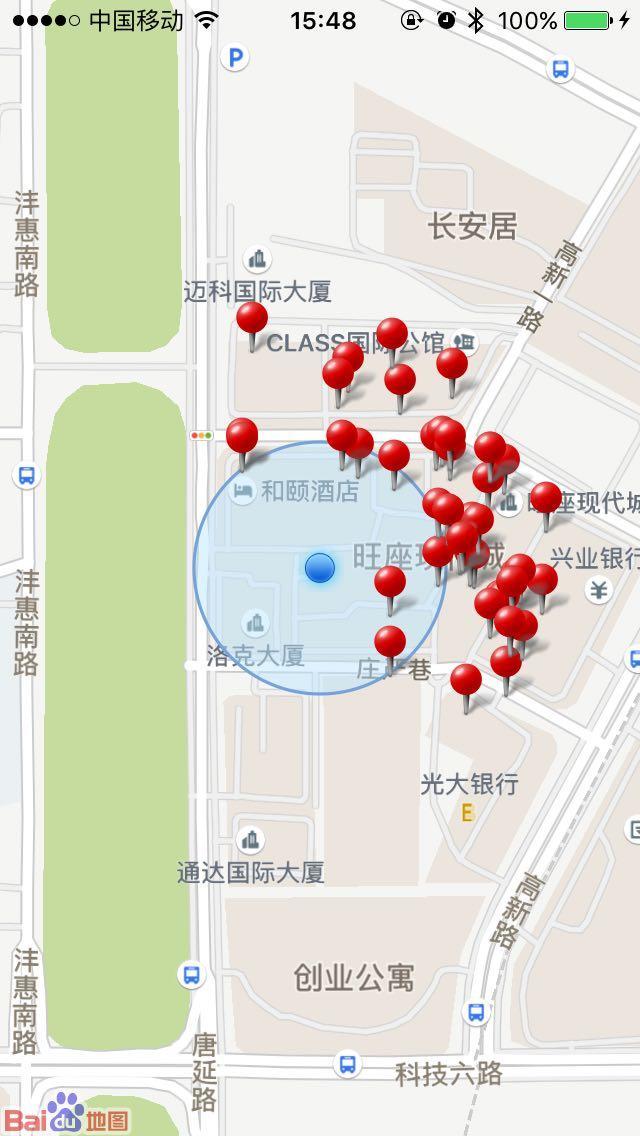
  option.keyword = @"小吃";


   //根據中心點、半徑和檢索詞發起周邊檢索
  BOOL flag = [self.poiSearch poiSearchNearBy:option];
  if (flag) {
    NSLog(@"搜索成功");
    //關閉定位
    [self.service stopUserLocationService];
  }
  else {

    NSLog(@"搜索失敗");
  }

}


#pragma mark -------BMKPoiSearchDelegate
/**
 *返回POI搜索結果
 *@param searcher 搜索對象
 *@param poiResult 搜索結果列表
 *@param errorCode 錯誤號,@see BMKSearchErrorCode
 */
- (void)onGetPoiResult:(BMKPoiSearch *)searcher result:(BMKPoiResult *)poiResult errorCode:(BMKSearchErrorCode)errorCode {

   //若搜索成功
  if (errorCode ==BMK_SEARCH_NO_ERROR) {

    //POI信息類
    //poi列表
    for (BMKPoiInfo *info in poiResult.poiInfoList) {

      [self.dataArray addObject:info];

      //初始化一個點的注釋 //只有三個屬性
      BMKPointAnnotation *annotoation = [[BMKPointAnnotation alloc] init];

      //坐標
      annotoation.coordinate = info.pt;

      //title
      annotoation.title = info.name;

      //子標題
      annotoation.subtitle = info.address;

      //將標注添加到地圖上
      [self.mapView addAnnotation:annotoation];
    }
  }


}

/**
 *返回POI詳情搜索結果
 *@param searcher 搜索對象
 *@param poiDetailResult 詳情搜索結果
 *@param errorCode 錯誤號,@see BMKSearchErrorCode
 */
- (void)onGetPoiDetailResult:(BMKPoiSearch *)searcher result:(BMKPoiDetailResult *)poiDetailResult errorCode:(BMKSearchErrorCode)errorCode {

  NSLog(@"%@",poiDetailResult.name);

}


#pragma mark -------------BMKMapViewDelegate

/**
 *根據anntation生成對應的View
 *@param mapView 地圖View
 *@param annotation 指定的標注
 *@return 生成的標注View
 */
- (BMKAnnotationView *)mapView:(BMKMapView *)mapView viewForAnnotation:(id<BMKAnnotation>)annotation {

  //如果是注釋點
  if ([annotation isKindOfClass:[BMKPointAnnotation class]]) {

    //根據注釋點,創建並初始化注釋點視圖
    BMKPinAnnotationView *newAnnotation = [[BMKPinAnnotationView alloc] initWithAnnotation:annotation reuseIdentifier:@"an"];

    //設置大頭針的顏色
    newAnnotation.pinColor = BMKPinAnnotationColorRed;

    //設置動畫
    newAnnotation.animatesDrop = YES;

    return newAnnotation;

  }

  return nil;
}
/**
 *當選中一個annotation views時,調用此接口
 *@param mapView 地圖View
 *@param views 選中的annotation views
 */
- (void)mapView:(BMKMapView *)mapView didSelectAnnotationView:(BMKAnnotationView *)view {

  //poi詳情檢索信息類
  BMKPoiDetailSearchOption *option = [[BMKPoiDetailSearchOption alloc] init];


  BMKPoiInfo *info = self.dataArray.firstObject;

  //poi的uid,從poi檢索返回的BMKPoiResult結構中獲取
  option.poiUid = info.uid;

  /**
   *根據poi uid 發起poi詳情檢索
   *異步函數,返回結果在BMKPoiSearchDelegate的onGetPoiDetailResult通知
   *@param option poi詳情檢索參數類(BMKPoiDetailSearchOption)
   *@return 成功返回YES,否則返回NO
   */
  BOOL flag = [self.poiSearch poiDetailSearch:option];

  if (flag) {
    NSLog(@"檢索成功");
  }
  else {

    NSLog(@"檢索失敗");
  }


}
運行結果

總結
百度地圖的功能很強大,還有很多檢索,都沒有寫.大家又興趣可以鑽研下,畢竟第三方的接口文檔相對比較明了.以上就是本文的全部內容,希望對大家的學習有所幫助,也希望大家多多支持本站。