
iOScollectionView廣告無限滾動實例(Swift實現)
編輯:IOS開發綜合
今天公司裡的實習生跑過來問我一般App上廣告的無限滾動是怎麼實現的,剛好很久沒寫博客了,就決定寫下了,盡量幫助那些處於剛學iOS的程序猿.
做一個小demo,大概實現效果如下圖所示:

基本實現思路:
1. 在你需要放置無限滾動展示數據的地方把他的數據,在原本的基礎上把你要展示的數據擴大三倍.(當然擴大兩倍也是可以的,三倍的話,比較好演示)
  // MARK: - 設置數據源
  func collectionView(_ collectionView: UICollectionView, numberOfItemsInSection section: Int) -> Int {
//    print(self.arrayM.count)
    return self.arrayM.count * 3
  }
2.當在定時器的作用下,或者在拖動情況存下滾動到第八個時候,設置此時的collectionView.contentOffset.x等於滾動到第三個cell的contentOffset.x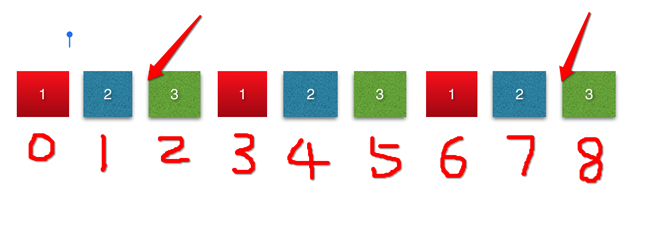
if collectionView.contentOffset.x == CGFloat(3 * self.arrayM.count - 1) * self.collectionView.bounds.width {
      self.collectionView.contentOffset.x = CGFloat(self.arrayM.count - 1) * self.collectionView.bounds.width
    }
3.當拖動到第0個cell時,設置此時的collectionView.contentOffset.x等於第六個cell的contentOffset.x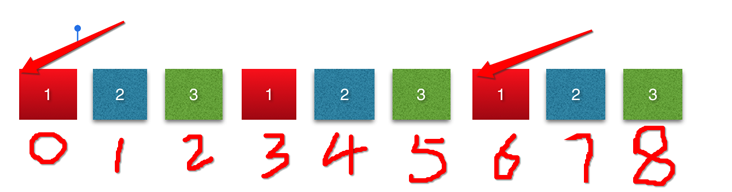
if collectionView.contentOffset.x == 0 {
      self.collectionView.contentOffset.x = CGFloat(2 * self.arrayM.count - 1) * self.collectionView.bounds.width

    }
代碼如下:
我在代碼中用到5張照片,所以應該一共有15個cell
import UIKit

class ViewController: UIViewController ,UICollectionViewDataSource, UICollectionViewDelegate {

  @IBOutlet weak var collectionView: UICollectionView!
  var timer : Timer?
  var arrayM : [BOModel] = [] {
    didSet {
      self.collectionView.reloadData()
    }
  }
  static let CellID = "cell"
  override func viewDidLoad() {
    super.viewDidLoad()

    self.collectionView.dataSource = self
    self.collectionView.delegate = self

    // 加載數據
    loadData()
    self.collectionView.register(UINib.init(nibName: "BOCollectionViewCell", bundle: nil), forCellWithReuseIdentifier: ViewController.CellID)

    //設置collextionView
    setupCollectionView()

    // 開啟定時器
    starTimer()

  }

  /// 從polist中加載數據
  func loadData() {
    let stemp: NSArray = NSArray(contentsOfFile: Bundle.main.path(forResource: "shops.plist", ofType: nil)!)!

    for dict in stemp {
      let model = BOModel.init(dict: dict as! [String : Any])

      self.arrayM.append(model)
    }
  }
  /// 設置cellection的布局方式
  ///
  /// - Returns: 一個布局類型
  func setupCollectionFlowlayout() -> (UICollectionViewFlowLayout) {
    let flowLayout = UICollectionViewFlowLayout()
    flowLayout.itemSize = self.collectionView.bounds.size
    flowLayout.minimumLineSpacing = 0
    flowLayout.minimumInteritemSpacing = 0
    flowLayout.scrollDirection = .horizontal
    flowLayout.sectionInset = UIEdgeInsetsMake(0, 0, 0, 0)
    return flowLayout
  }

  /// 設置collectionVIew
  func setupCollectionView() -> () {

    self.collectionView.collectionViewLayout = self.setupCollectionFlowlayout()
    self.collectionView.showsVerticalScrollIndicator = false
    self.collectionView.showsHorizontalScrollIndicator = false
    self.collectionView.isPagingEnabled = true

  }

  // MARK: - 設置數據源
  func collectionView(_ collectionView: UICollectionView, numberOfItemsInSection section: Int) -> Int {
//    print(self.arrayM.count)
    return self.arrayM.count * 3
  }

  func collectionView(_ collectionView: UICollectionView, cellForItemAt indexPath: IndexPath) -> UICollectionViewCell {
    let cell = self.collectionView.dequeueReusableCell(withReuseIdentifier: ViewController.CellID, for: indexPath) as! BOCollectionViewCell

    cell.model = self.arrayM[indexPath.row % self.arrayM.count]
    return cell
  }

  // MARK: - 實現代理方法
  func scrollViewDidEndDecelerating(_ scrollView: UIScrollView) {
    //contentOffset.x == 0 時,重新設置contentOffset.x的值
    if collectionView.contentOffset.x == 0 {
      self.collectionView.contentOffset.x = CGFloat(2 * self.arrayM.count - 1) * self.collectionView.bounds.width

    }
    //當到達最後一個cell時,重新設置contentOffset.x的值
    if collectionView.contentOffset.x == CGFloat(3 * self.arrayM.count - 1) * self.collectionView.bounds.width {
      self.collectionView.contentOffset.x = CGFloat(self.arrayM.count - 1) * self.collectionView.bounds.width
    }

  }


  /// 開啟定時器
  func starTimer () {
    let timer = Timer.init(timeInterval: 1, target: self, selector: #selector(ViewController.nextPage), userInfo: nil, repeats: true)
    // 這一句代碼涉及到runloop 和 主線程的知識,則在界面上不能執行其他的UI操作
    RunLoop.main.add(timer, forMode: RunLoopMode.commonModes)

    self.timer = timer

  }

  /// 在1秒後,自動跳轉到下一頁
  func nextPage() {
    // 如果到達最後一個,則變成第四個
    if collectionView.contentOffset.x == CGFloat(3 * self.arrayM.count - 1) * self.collectionView.bounds.width {
      self.collectionView.contentOffset.x = CGFloat(self.arrayM.count - 1) * self.collectionView.bounds.width
    }else {
      // 每過一秒,contentOffset.x增加一個cell的寬度
      self.collectionView.contentOffset.x += self.collectionView.bounds.size.width
    }

}


  /// 當collectionView開始拖動的時候,取消定時器
  func scrollViewWillBeginDragging(_ scrollView: UIScrollView) {
    self.timer?.invalidate()
    self.timer = nil
  }

  /// 當用戶停止拖動的時候,開啟定時器
  func scrollViewWillEndDragging(_ scrollView: UIScrollView, withVelocity velocity: CGPoint, targetContentOffset: UnsafeMutablePointer<CGPoint>) {
    starTimer()
  }
}
plist文件如下圖所示: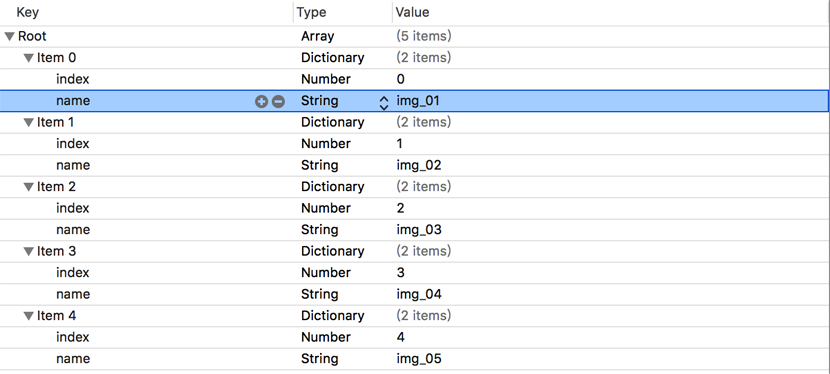
用到的字典轉模型因為比較簡單的轉換,就自己寫了個:
import UIKit

class BOCollectionViewCell: UICollectionViewCell {

  @IBOutlet weak var imageView: UIImageView!
  var model : BOModel? {
    didSet {
      guard let image = UIImage.init(named: (model?.name)!) else {
        return
      }


      self.imageView.image = image
    }
  }
  override func awakeFromNib() {
    super.awakeFromNib()

  }

}
自定義collectionViewCell類中的內容:
import UIKit

class BOCollectionViewCell: UICollectionViewCell {

  @IBOutlet weak var imageView: UIImageView!
  var model : BOModel? {
    didSet {
      guard let image = UIImage.init(named: (model?.name)!) else {
        return
      }


      self.imageView.image = image
    }
  }
  override func awakeFromNib() {
    super.awakeFromNib()

  }

}
附: 其實這種方法比較實現無限滾動,利用了一點小技巧,用電腦測試的時候可能有一點缺陷.
原文鏈接:http://www.cnblogs.com/muzichenyu/p/6071757.html
以上就是本文的全部內容,希望對大家的學習有所幫助,也希望大家多多支持本站。
相關文章
+