iOS實現帶動畫的環形進度條
編輯:IOS開發綜合
本篇寫的是實現環形進度條,並帶動畫效果,要實現這些,僅能通過自己畫一個
方法直接看代碼
為了方便多次調用,用繼承UIView的方式
.m文件
#import <UIKit/UIKit.h>

@interface LoopProgressView : UIView

@property (nonatomic, assign) CGFloat progress;


@end
.h文件
NSTimer的調用並非精確,可以自行百度
這裡因為每0.01s啟動一次定時器,所以要同步進度條和數字,就將self.progress賦值給動畫的duration屬性就可以了,duration為動畫時間。
在使用時我發現如果在tableviewcell中添加了這個環形進度條時有個缺點,就是定時器原本用的是系統的runloop,導致數據顯示滯後,所以現更新為子線程裡添加定時器,子線程的定時器必須添加[[NSRunLoop currentRunLoop] run];才可啟動定時器,因為子線程的runloop裡是不帶nstimer的,要手動添加運行。
#import "LoopProgressView.h"
#import <QuartzCore/QuartzCore.h>

#define ViewWidth self.frame.size.width //環形進度條的視圖寬度
#define ProgressWidth 2.5   //環形進度條的圓環寬度
#define Radius ViewWidth/2-ProgressWidth //環形進度條的半徑

@interface LoopProgressView()
{
 CAShapeLayer *arcLayer;
 UILabel *label;
 NSTimer *progressTimer;
}
@property (nonatomic,assign)CGFloat i;

@end

@implementation LoopProgressView

-(id)initWithFrame:(CGRect)frame
{
 self = [super initWithFrame:frame];
 if (self) {
 self.backgroundColor = [UIColor clearColor];
 }
 return self;
}

-(void)drawRect:(CGRect)rect
{
 _i=0;
 CGContextRef progressContext = UIGraphicsGetCurrentContext();
 CGContextSetLineWidth(progressContext, ProgressWidth);
 CGContextSetRGBStrokeColor(progressContext, 209.0/255.0, 209.0/255.0, 209.0/255.0, 1);

 CGFloat xCenter = rect.size.width * 0.5;
 CGFloat yCenter = rect.size.height * 0.5;

 //繪制環形進度條底框
 CGContextAddArc(progressContext, xCenter, yCenter, Radius, 0, 2*M_PI, 0);
 CGContextDrawPath(progressContext, kCGPathStroke);

 // //繪制環形進度環
 CGFloat to = self.progress * M_PI * 2; // - M_PI * 0.5為改變初始位置

 // 進度數字字號,可自己根據自己需要,從視圖大小去適配字體字號
 int fontNum = ViewWidth/6;
 49 label = [[UILabel alloc]initWithFrame:CGRectMake(0, 0,Radius+10, ViewWidth/6)];
 label.center = CGPointMake(xCenter, yCenter);
 label.textAlignment = NSTextAlignmentCenter;
 label.font = [UIFont boldSystemFontOfSize:fontNum];
 label.text = @"0%";
 [self addSubview:label];

 UIBezierPath *path=[UIBezierPath bezierPath];
 [path addArcWithCenter:CGPointMake(xCenter,yCenter) radius:Radius startAngle:0 endAngle:to clockwise:YES];
 arcLayer=[CAShapeLayer layer];
 arcLayer.path=path.CGPath;//46,169,230
 arcLayer.fillColor = [UIColor clearColor].CGColor;
 arcLayer.strokeColor=[UIColor colorWithRed:227.0/255.0 green:91.0/255.0 blue:90.0/255.0 alpha:0.7].CGColor;
 arcLayer.lineWidth=ProgressWidth;
 arcLayer.backgroundColor = [UIColor blueColor].CGColor;
 [self.layer addSublayer:arcLayer];


 dispatch_async(dispatch_get_global_queue(0, 0), ^{
 [self drawLineAnimation:arcLayer];
 });

 if (self.progress > 1) {
 NSLog(@"傳入數值范圍為 0-1");
 self.progress = 1;
 }else if (self.progress < 0){
 NSLog(@"傳入數值范圍為 0-1");
 self.progress = 0;
 return;
 }

 if (self.progress > 0) {
 NSThread *thread = [[NSThread alloc]initWithTarget:self selector:@selector(newThread) object:nil];
 [thread start];
 }

}

-(void)newThread
{
 @autoreleasepool {
 progressTimer = [NSTimer scheduledTimerWithTimeInterval:0.01 target:self selector:@selector(timeLabel) userInfo:nil repeats:YES];
 [[NSRunLoop currentRunLoop] run];
 }
}

//NSTimer不會精准調用
-(void)timeLabel
{
 _i += 0.01;
 label.text = [NSString stringWithFormat:@"%.0f%%",_i*100];

 if (_i >= self.progress) {
 [progressTimer invalidate];
 progressTimer = nil;

 }

}

//定義動畫過程
-(void)drawLineAnimation:(CALayer*)layer
{
 CABasicAnimation *bas=[CABasicAnimation animationWithKeyPath:@"strokeEnd"];
 bas.duration=self.progress;//動畫時間
 bas.delegate=self;
 bas.fromValue=[NSNumber numberWithInteger:0];
 bas.toValue=[NSNumber numberWithInteger:1];
 [layer addAnimation:bas forKey:@"key"];
}
@end
完成後在要調用的控制器裡,僅需幾段代碼:傳進的參數:為0-1
 LoopProgressView *custom = [[LoopProgressView alloc]initWithFrame:CGRectMake(50, 100, 100, 100)];
 custom.progress = 0.44;
 [self.view addSubview:custom];
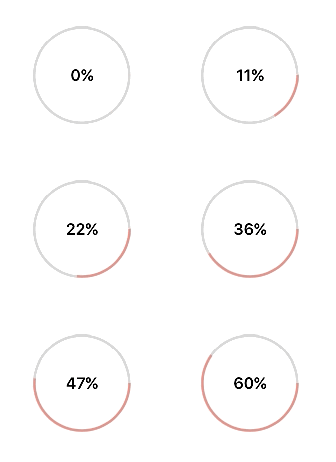
實現:
已經實現進度條和數字的同步:
以上就是本文的全部內容,希望對大家的學習有所幫助,也希望大家多多支持本站。
- 上一頁:iOS手勢密碼的實現方法
- 下一頁:iOS 實現跑馬燈效果的方法示例
相關文章
+