iOS藍牙編程
編輯:IOS開發綜合
藍牙編程
最近公司新來了一部藍牙小票機器,需要對其進行編程,所以閱讀起了iOS藍牙編程的官方文檔,昨日測試成功,想寫下點心得,方便以後查看。言歸正傳。iOS的藍牙框架是支持藍牙4.0協議的。
理解iOS CoreBluetooth兩個很重要的概念,Central 和 Periperal Devices
這兩個概念可以用傳統的模式client-server來理解,central意思是中心,其作用類似server,periperal就是外設,一般攜帶有數據,我們需要去其中獲取數據,下圖是蘋果官網的例子,peripheral是心跳儀,按期作用,我們去這個外設中取心跳數據,則心跳儀的作用就類似server了,我們的手機去心跳儀中獲取數據,類似client。
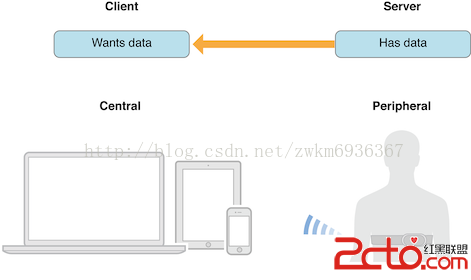
Peripheral如何讓central知道它的存在呢? peripheral.比如上圖的心跳儀,通過不斷廣播自己的存在,並且在廣播過程中附帶廣告包(advertising packet),不知道這樣翻譯是否正確,不對請指正一下。如同好像有個設備在喊,Here~我是心跳儀器,我是心跳儀器,這是我提供的服務(廣告包)。Central發現有個設備在吶喊,就說:“那我看看需不需要你提供服務,拿來我看看”。這樣你就發現了這個設備,並且獲取到它提供的服務。
 vcHL1eK49nBlcmlwaGVyYWyjrL3T18XE473Qy/y747Goy/zM4bmptcS3/s7xo6zV4rj2cGVyaXBoZXJhbLvhu+OxqMv509C3/s7xuPjE46GjscjI59DEzPjSx8b3zOG5qcG91tZzZXJ2aWNlo6zJ6LG40MXPonNlcnZpY2XT68r9vt278cihc2VydmljZS7V4tH5xOO+zdaqtcDT0MTEvLjW1rf+zvHBy6GjCjMuyLu688Tjv8nS1LbUxOO40NDLyKS1xLf+zvG9+NDQstnX96GjscjI587Sw8e21Mr9vt278cihtcS3/s7xuNDQy8iko6zO0r7NttTV4rj2u/HIobXEt/7O8cu1o6y4+M7SxOO1xMv509C1xGNoYXJhY3RlcmlzY3Msy/nT0LXEzNjV96GjvNnJ6NXiyrG68sv8t7W72MG9uPbM2NX3o6zSu7j2ysfQxMz4yv2+3bXEY2hhcmFjdGVyaXN0aWMswe3N4tK7uPbKx9DEzPjRucGmyv2+3aOoz7mx4LXEo6mho8Tjvs2/ydLUttTG5MzY1fe9+NDQtsHQtLLZ1/ejrNXiwO+78cihstnX96Osvs3Kx7bBstnX96Gju/HIobW9ttTTpsr9vt3UtM23Cjxicj4KCr+00rvPwsC019S52c34tcS94bm5zbwKPGltZyBzcmM9"/uploadfile/Collfiles/20141201/2014120109200053.png" alt="\">
介紹完這些概念,我們來看看實際代碼應該如何填寫.這裡對於我的藍牙小票機來編寫的,因為我要對藍牙小票機器進行寫操作,手機是搜索peripharal的,所以手機為central,小票機為peripharal 1.首先導入
#import@interface ViewController () @property (nonatomic, retain) CBCentralManager *centralManager; @end @implementation ViewController - (void)viewDidLoad { [super viewDidLoad]; // Do any additional setup after loading the view, typically from a nib. self.centralManager = [[CBCentralManager alloc] initWithDelegate:self queue:nil]; }
上面代碼這裡我們創建了一個CBCentralManager,用來發現外設,當創建成功,CBCentralManager會回調代理說創建成功了,如下面代碼
/*
 Invoked whenever the central manager's state is updated.
 */
- (void)centralManagerDidUpdateState:(CBCentralManager *)central
{
    NSString * state = nil;

    switch ([central state])
    {
        case CBCentralManagerStateUnsupported:
            state = @"The platform/hardware doesn't support Bluetooth Low Energy.";
            break;
        case CBCentralManagerStateUnauthorized:
            state = @"The app is not authorized to use Bluetooth Low Energy.";
            break;
        case CBCentralManagerStatePoweredOff:
            state = @"Bluetooth is currently powered off.";
            break;
        case CBCentralManagerStatePoweredOn:
            state = @"work";
            break;
        case CBCentralManagerStateUnknown:
        default:
            ;
    }

    NSLog(@"Central manager state: %@", state);
}
上面的代碼如果這個時候如果是CBCentralManagerStatePoweredOn,代表藍牙可用。一定要在該方法回調後去開啟掃描外設,否則無反應.
3.現在可以連接掃描外設了
- (IBAction)scan:(id)sender {
    [self.centralManager scanForPeripheralsWithServices:nil options:nil];
}
上面代碼我創建了一個按鈕來掃描,就不上對應的xib圖片了.這個方法如果傳入的事nil,代表掃描所有外設。
- (IBAction)scan:(id)sender {
    [self.centralManager scanForPeripheralsWithServices:@[[CBUUID UUIDWithString:@"FFE0"]] options:nil];
}
如果你只想搜索有提供對應的服務號的外設(去peripharal 的advertising packet裡匹配服務號,傳入一個數組進入,對象為CBUUID,也就是Service的唯一標識符。一般我們搜索過一個nil的就會知道我們要的服務好是什麼樣子的了,之後編程就可以直接使用這個已知的服務好。除非你的藍牙設備的廠家更改服務號,不過幾乎不可能。
- (void)centralManager:(CBCentralManager *)central didDiscoverPeripheral:(CBPeripheral *)peripheral advertisementData:(NSDictionary *)advertisementData RSSI:(NSNumber *)RSSI
{
    static int i = 0;
    NSString *str = [NSString stringWithFormat:@"Did discover peripheral. peripheral: %@ rssi: %@, UUID: %@ advertisementData: %@ ", peripheral, RSSI, peripheral.UUID, advertisementData];
    NSLog(@"%@",str);
    [self.discoverdPeriparals addObject:peripheral];
}
當你發現了一個設備,該方法會回調。peripheral代表你發現的設備,advertisementData時廣告數據,rssi代表著信號強度.
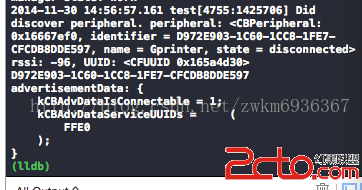
從廣播數據中可以看到一個服務UUIDs,因為廣播數據有數量大小限制,數據比較少。不過目前我們只是發現了這個設備,假設該設備已經是我們感興趣的設備,你可以通過[self.centralManager stopScan]來停止掃描,也可以繼續掃描。
4.連接發現的外設
- (IBAction)connect:(id)sender {
    [self.centralManager connectPeripheral:[self.discoverdPeriparals firstObject]  options:nil];
}
假設第一個是我們需要的外設,連接它。
/*
 Invoked whenever a connection is succesfully created with the peripheral.
 Discover available services on the peripheral
 */
- (void)centralManager:(CBCentralManager *)central didConnectPeripheral:(CBPeripheral *)peripheral
{
    NSLog(@"Did connect to peripheral: %@", peripheral);
    peripheral.delegate = self;
    [central stopScan];
    [peripheral discoverServices:nil];
}
當連接成功後調用該方法。這個時候我們設置該peripheral的代理我們自己,讓peripheral給我們返回所有服務。
[peripheral discoverServices:@[[CBUUID UUIDWithString:@"FFE0"]]];這個方法也是傳入nil返回所有服務,如果是傳入特定的服務id,只返回該服務 這裡我們傳入nil來返回所有服務
- (void)peripheral:(CBPeripheral *)peripheral didDiscoverServices:(NSError *)error
{
    if (error)
    {
        NSLog(@"Discovered services for %@ with error: %@", peripheral.name, [error localizedDescription]);
        return;
    }

    for (CBService *service in peripheral.services)
    {
        NSLog(@"Service found with UUID: %@", service.UUID);
        if ([service.UUID isEqual:[CBUUID UUIDWithString:@"FFE0"]])
        {
            [peripheral discoverCharacteristics:nil forService:service];
        }
    }
}
這裡看到返回了兩個服務,因為需要FFE0,所以讓該服務返回對應的characteristics.
[peripheral discoverCharacteristics:nil forService:service];
- (void)peripheral:(CBPeripheral *)peripheral didDiscoverCharacteristicsForService:(CBService *)service error:(NSError *)error
{
    if (error)
    {
        NSLog(@"Discovered characteristics for %@ with error: %@", service.UUID, [error localizedDescription]);
        return;
    }
    for (CBCharacteristic * characteristic in service.characteristics)
    {
        DLog(@"%@",characteristic);
        if( [characteristic.UUID isEqual:[CBUUID UUIDWithString:@"FFE1"]])
        {
            self.p = peripheral;
            self.c = characteristic;


            //read
            //[testPeripheral readValueForCharacteristic:characteristic];
            NSLog(@"Found a Device Manufacturer Name Characteristic - Read manufacturer name");
        }
    }
}
上面的方法是找到FEE0服務的所有特征,這裡的只有一個,也就藍牙小票機FFE0寫服務的寫特征.
獲取到該特征。進行寫服務,具體的log就不寫了
- (void)touchesBegan:(NSSet *)touches withEvent:(UIEvent *)event
{
    NSString *RStr = @"2764";
    NSMutableString *str = [NSMutableString new];
    [str appendFormat:@"%c", 28];
    [str appendFormat:@"%c", 33];
    [str appendFormat:@"%c", 8];

    [self.p writeValue:[str dataUsingEncoding:CFStringConvertEncodingToNSStringEncoding(kCFStringEncodingGB_18030_2000)] forCharacteristic:self.c type:CBCharacteristicWriteWithResponse];
    RStr = @"吳水鳳 你好呀!!!\n\n\n\n\n\n\n\n";
    [self.p writeValue:[RStr dataUsingEncoding:CFStringConvertEncodingToNSStringEncoding(kCFStringEncodingGB_18030_2000)] forCharacteristic:self.c type:CBCharacteristicWriteWithResponse];
}這裡我對藍牙小票機提供的寫特征進行寫服務。成功.補充: 如果該特征是可以讀特征,你可以對該特征進行訂閱。
[peripheral setNotifyValue:YES forCharacteristic:interestingCharacteristic];
該方法回調peripheral:didUpdateValueForCharacteristic:error:方法
當你訂閱成功後,如果數據有更新,則回調該方法。 你就可以去讀取你想要的數據了。如果想要了解更多,建議查看iOS官方文檔提供的CoreBluetooth programming guid.小弟就寫到這了。
- 上一頁:IOS-入門示例
- 下一頁:iOS開發 - post / get 詳解

相關文章
+