ios 畫圖,繪制坐標系,畫坐標系
編輯:IOS開發綜合
先來看個效果:
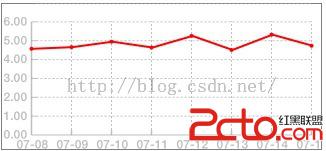
新建視圖類,在直接添加代碼:
// Only override drawRect: if you perform custom drawing.
// An empty implementation adversely affects performance during animation.
- (void)drawRect:(CGRect)rect
{
    // 獲取當前環境
    CGContextRef context = UIGraphicsGetCurrentContext();

    // 保存當前環境,便於以後恢復
    CGContextSaveGState(context);

    // 把數據組織起來
    for (int i = 0; i < self.dataArray.count; i++)
    {
        NSString * x_data = self.dataArray[i][@xxx];
        NSString * y_data = self.dataArray[i][@yyyy];
        NSString * rate_data = self.dataArray[i][@rrr];

        [x_array addObject:x_data];
        [y_array addObject:y_data];
        [rate_array addObject:rate_data];
    }
    // 矩形畫圖區域
    CGRect Rectangle = rect;
    // 定義一個矩形路徑
    UIBezierPath *path = [UIBezierPath bezierPathWithRect:Rectangle];
    // 將矩形路徑畫出來
    [path stroke];

    /////////////////////////////////////////////////////////////////
    // 公共數據
    float fdistance_left_frame = 30.0;                    // 左側X軸距離邊框的寬度,用於繪制文本
    float fdistance_bottom_frame = 15.0;                  // 左側Y軸距離邊框的寬度
    float fdistance_right_frame = 10.0;                   // 左側X軸距離邊框的寬度
    float fdraw_line_height = rect.size.height - fdistance_bottom_frame;  // 繪制坐標的高度
    float fdraw_line_width = rect.size.width - fdistance_left_frame
                                - fdistance_right_frame;  // 繪制坐標的寬度

    float f_x_axis_scale_number = 7.0;                    // X軸大刻度數
    float f_y_axis_scale_number = 7.0;                    // Y軸刻度數
    float x_unit_distance_scale = 0.0;                    // X軸刻度的偏移量
    float y_unit_distance_scale = 0.0;                    // Y軸刻度的偏移量
    float x_unit_scale = 0.0;                             // X軸刻度的跨度(一個比例單元)
    float y_unit_scale = 0.0;                             // Y軸刻度的跨度(一個比例單元)

    // 開始畫X軸
    float left_bottom_x = rect.origin.x + fdistance_left_frame;
    float left_bottom_y = rect.origin.y + fdraw_line_height;
    CGPoint point_origin = CGPointMake(left_bottom_x, left_bottom_y);              // 坐標軸原點

    // 定義一個開始路徑
    UIBezierPath * x_startPath = [UIBezierPath bezierPath];
    [x_startPath  setLineWidth:1.5];

    [x_startPath moveToPoint:point_origin];                                        // 設置起點(坐標原點)
    for (int x = 0; x < f_x_axis_scale_number; x++)                                // 畫直線
    {
        x_unit_scale = fdraw_line_height/f_x_axis_scale_number;                    // 一級等分大刻度
        x_unit_distance_scale = x * x_unit_scale;                                  // 相對原點的偏移點
        [x_startPath addLineToPoint:CGPointMake(left_bottom_x, left_bottom_y - x_unit_distance_scale)];

        // “|”X軸左側繪制文本
        float text_height_certer = left_bottom_y;
        float text_rect_top = text_height_certer - 8 - x_unit_distance_scale;
        float text_rect_bottom = text_height_certer + 8 - x_unit_distance_scale;    // +8 -8 ,給文字16個像素的高度
        float text_rect_height = 16;
        CGRect x_axis_rect = CGRectMake(2, text_rect_top, fdistance_left_frame, text_rect_height);

        CGContextSetLineWidth(context, 1.0);
        CGContextSetRGBFillColor (context, 0.5, 0.5, 0.5, 0.5);
        UIFont  *font = [UIFont boldSystemFontOfSize:12.0];                         // 字體用12號
        NSString * x_strtext = [NSString stringWithFormat:@%zi.00,x];             // 繪制X軸刻度值
        [x_strtext drawInRect:x_axis_rect withFont:font];

        if (0 == x)
        {// 為“0”時,不或那個繪制刻度,直接在底部繪制橫線“Y”軸
            float y_width = fdraw_line_width;
            CGContextSetRGBStrokeColor(context, 0.5, 0.5, 0.5, 0.5);//線條顏色
            CGContextMoveToPoint(context, left_bottom_x, left_bottom_y - x_unit_distance_scale);
            CGContextAddLineToPoint(context, left_bottom_x + y_width, left_bottom_y - x_unit_distance_scale);
            CGContextStrokePath(context);

            // 開始畫Y軸
            UIBezierPath * y_startPath = [UIBezierPath bezierPath];
            [y_startPath  setLineWidth:1.5];
            [y_startPath  moveToPoint:point_origin];                 // Y軸的起始點也是X軸的刻度起始點

            for (int y = 0; y < f_y_axis_scale_number + 1; y++)                          // 畫直線
            {
                y_unit_scale = fdraw_line_width/f_y_axis_scale_number;               // 一級等分大刻度
                y_unit_distance_scale = y * y_unit_scale;                            // 相對原點的偏移點
                [y_startPath addLineToPoint:CGPointMake(left_bottom_x, left_bottom_y - x_unit_distance_scale)];

                // “—”Y軸下部繪制文本
                float y_text_left_certer = left_bottom_x;
                float y_text_rect_left = y_text_left_certer - 15 + y_unit_distance_scale;
                float y_text_rect_top = left_bottom_y + 2;
                float y_text_rect_width = y_text_left_certer + 15 + y_unit_distance_scale;
                // +10 -10 ,給文字20個像素的寬度
                float y_text_rect_height = 16;

                CGRect y_axis_rect = CGRectMake(y_text_rect_left, y_text_rect_top, y_text_rect_width, y_text_rect_height);

                CGContextSetLineWidth(context, 1.5);                             // 線寬度
                CGContextSetRGBFillColor (context, 0.5, 0.5, 0.5, 0.5);
                UIFont  *font = [UIFont boldSystemFontOfSize:12.0];              // 字體用12號
//                NSString * y_strtext = [NSString stringWithFormat:@%zi.00,y];// 繪制Y軸刻度值

                NSString * y_strtext = [y_array objectAtIndex:f_y_axis_scale_number - y];
                y_strtext = [y_strtext substringFromIndex:5];                    // 繪制Y軸刻度值
                [y_strtext drawInRect:y_axis_rect withFont:font];

                if (y == 0){

                } else {
                    // “—”Y軸上部繪制刻度短線
                    float fscale_width = 5.0;
                    CGContextSetRGBStrokeColor(context, 0.5, 0.5, 0.5, 0.5);      // 線條顏色
                    CGContextMoveToPoint(context, left_bottom_x + y_unit_distance_scale, left_bottom_y );
                    CGContextAddLineToPoint(context, left_bottom_x + y_unit_distance_scale, left_bottom_y - fscale_width);
                    CGContextStrokePath(context);
                }

            }
            [y_startPath stroke];   // Draws line 根據坐標點連線

        } else
        {
            // |X軸繪制右側刻度短線
            float fscale_width = 5.0;
            CGContextSetRGBStrokeColor(context, 0.5, 0.5, 0.5, 0.5);// 線條顏色
            CGContextMoveToPoint(context, left_bottom_x, left_bottom_y - x_unit_distance_scale);
            CGContextAddLineToPoint(context, left_bottom_x + fscale_width, left_bottom_y - x_unit_distance_scale);
            CGContextStrokePath(context);
        }
//        // 繪制二級小刻度值
//        for (int xx = 0; xx < 5; xx++)
//        {
//            float fsmall_scale_width = 3.0;
//            CGContextSetRGBStrokeColor(context, 0.5, 0.5, 0.5, 0.5);// 線條顏色
//            CGContextSetLineWidth(context, 1.0);                    // 線寬度
//            float fsmall_scale_height = x_unit_distance_scale/10.0; // 每一小刻度 的高度不變
//            CGContextMoveToPoint(context, point_origin.x, point_origin.y - fsmall_scale_height);
//            CGContextAddLineToPoint(context, point_origin.x + fsmall_scale_width, point_origin.y - fsmall_scale_height);
//            CGContextStrokePath(context);
//        }

    }
    [x_startPath stroke];   // Draws line 根據坐標點連線

    [[UIColor blueColor] setFill];
    [x_startPath fill];


    // |X軸繪制虛線,橫向虛線
    CGFloat dashArray[] = {2.0, 2.0};
    CGContextSetLineDash(context, 0, dashArray, 2);
    CGContextSetRGBStrokeColor(context,0.5, 0.5, 0.5, 0.5);// 線條顏色
    for (int x = 1; x < f_x_axis_scale_number + 1; x++)    // 畫虛線
    {
        x_unit_distance_scale = x * (x_unit_scale);        // 一級等分大刻度
        CGContextMoveToPoint(context, left_bottom_x + 5, left_bottom_y - x_unit_distance_scale);
        CGContextAddLineToPoint(context, left_bottom_x + fdraw_line_width, left_bottom_y - x_unit_distance_scale);
    }
    for (int y = 1; y < f_y_axis_scale_number + 1; y++)    // 畫虛線
    {
        y_unit_distance_scale = y * (y_unit_scale);        // 一級等分大刻度
        CGContextMoveToPoint(context, point_origin.x + y_unit_distance_scale, point_origin.y - 5);
        CGContextAddLineToPoint(context, point_origin.x + y_unit_distance_scale, point_origin.y - fdraw_line_height + fdistance_bottom_frame + 3);
    }
    CGContextStrokePath(context);

    // 開始繪制曲線圖
    CGContextSetLineDash(context, 0.0,NULL, 0);            // 還原畫筆
    CGContextSetLineWidth(context,1.0);                    // 設置為實線畫筆
    CGContextSetRGBStrokeColor(context, 1.0, 0, 0, 0.5);   // 線條顏色

    for (int a = 0; a < x_array.count; a++)
    {
        // Y軸日期倒著遍歷,這裡數據也倒著遍歷
        float fdata = [[x_array objectAtIndex: x_array.count-1 - a] floatValue];
        CGPoint data_point = CGPointMake(point_origin.x + a * y_unit_scale, point_origin.y - fdata * x_unit_scale);                                 // 坐標軸原點

        if (0 == a)
        {
            CGContextMoveToPoint(context, data_point.x, data_point.y);
        }
        else
        {
            CGContextAddLineToPoint(context, data_point.x, data_point.y);
        }
        NSLog(@%zi == (%f, %f), a, data_point.x, data_point.y);

    }
    CGContextStrokePath(context);

    // 開始邊框圓點
    CGContextSetRGBStrokeColor(context, 1.0, 0.0, 0.0, 1.0);//畫筆線的顏色
    CGContextSetLineWidth(context, 2.0);//線的寬度
    //void CGContextAddArc(CGContextRef c,CGFloat x, CGFloat y,CGFloat radius,CGFloat startAngle,CGFloat endAngle, int clockwise)1弧度=180°/π (≈57.3°) 度=弧度×180°/π 360°=360×π/180 =2π 弧度
    // x,y為圓點坐標,radius半徑,startAngle為開始的弧度,endAngle為 結束的弧度,clockwise 0為順時針,1為逆時針。

    for (int a = 0; a < x_array.count; a++)
    {
        // Y軸日期倒著遍歷,這裡數據也倒著遍歷
        float fdata = [[x_array objectAtIndex: x_array.count-1 - a] floatValue];
        CGPoint data_point = CGPointMake(point_origin.x + a * y_unit_scale, point_origin.y - fdata * x_unit_scale);                                 // 坐標軸原點

        CGContextAddArc(context, data_point.x, data_point.y, 1, 0, 2 * PI, 0); //添加一個圓

    }
    CGContextDrawPath(context, kCGPathStroke); //繪制路徑
}

Bible  2015-07-15 17:24:10

// 文件頭部添加  宏定義
#define  PI 3.1415926
相關文章
+