iOS中Animation 動畫 UI_22
編輯:IOS開發綜合
1.iOS中我們能看到的控件都是UIView的子類,比如UIButton UILabel UITextField UIImageView等等
2.UIView能夠在屏幕的顯示是因為在創建它的時候內部自動添加一個CALayer圖層,通過這個圖層在屏幕上顯示的時候會調用一個drawRect: 的方法,完成繪圖,才能在屏幕上顯示
3.CALayer 本身就具有顯示功能,但是它不能響應用戶的交互事件,如果只是單純的顯示一個圖形,此時你可以使用CALayer創建或者是使用UIView創建,但是如果這個圖形想響應用戶交互事件,必須使用UIView或者子類
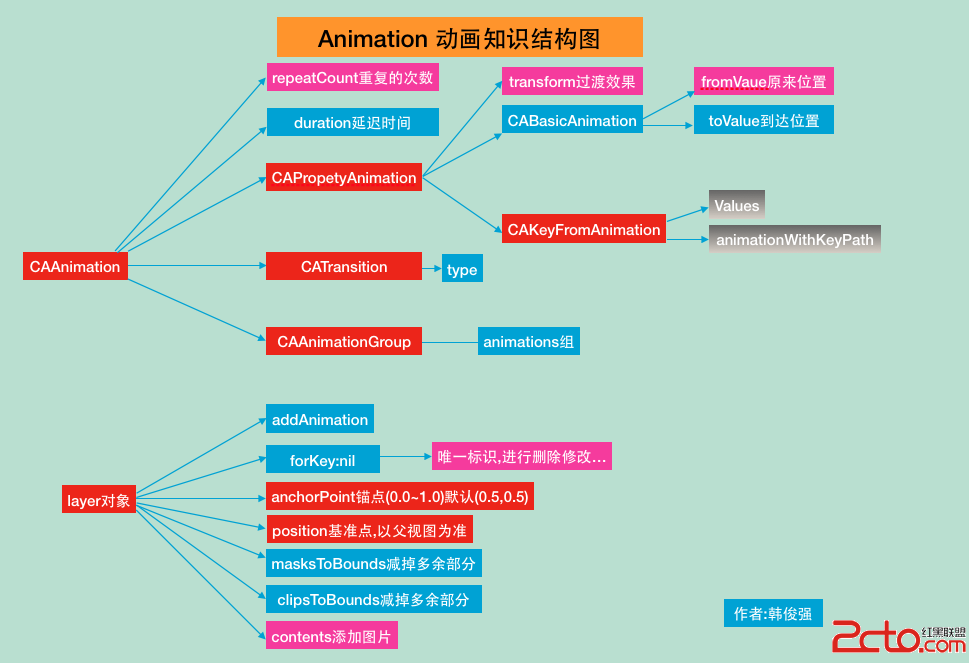
動畫知識框圖如下:
#import ViewController.h
#import UITextField+Shake.h
@interface ViewController ()
@property (retain, nonatomic) IBOutlet UIImageView *balloon;
@property (retain, nonatomic) IBOutlet UITextField *TF;
@property (retain, nonatomic) IBOutlet UIButton *bounces;
@property (retain, nonatomic) IBOutlet UIView *animationView;
@property (retain, nonatomic) IBOutlet UIImageView *cloud;
@end@implementation ViewController
- (void)viewDidLoad {
    [super viewDidLoad];
    //取到當前視圖控制器自帶view的圖層
    CALayer *layer = self.view.layer;
//    UIButton *button = [UIButton buttonWithType:UIButtonTypeSystem];
//    button.layer //button的圖層
    //layer 的color必須是CGColor
    self.animationView.layer.backgroundColor = [UIColor greenColor].CGColor;
}
//給TF創建一個類目:
UITextField+Shake.h #import@interface UITextField (Shake) - (void)shake; @end UITextField+Shake.m #import UITextField+Shake.h @implementation UITextField (Shake) //震動的方法 - (void)shake{ CAKeyframeAnimation *keyFrame = [CAKeyframeAnimation animationWithKeyPath:@position.x]; keyFrame.values = @[@(self.center.x + 10),@(self.center.x),@(self.center.x - 10)]; keyFrame.repeatCount = 10; keyFrame.duration = 0.03; [self.layer addAnimation:keyFrame forKey:nil]; } @end
開始動畫按鈕點擊事件
- (IBAction)handleAnimation:(UIButton *)sender {
    //UIView的屬性動畫
    [self handlePropertyAnimation];

    //UIView的屬性動畫 Block形式
    [self handlePrepertyAnimationBlock];

     //UIView的過渡動畫
    [self handleTrabsitionAnimation];

    //CALayer動畫
    [self handleCALayer];

    //CALayer 的基礎動畫
    [self handleBasicAnimation];
    //CALayer的關鍵幀動畫
    [self handleKeyFrameAnimation];
    //UITextField 調用輸入震動框方法
    [self.TF shake];

    //CALayer的過渡動畫
    [self handleLayerCATransactionAnimation];
    //CAAinmationGroup 分組動畫
    [self handleAnimatonGroup];

}
//UIView的屬性動畫 可動畫的屬性 : frame center bounds alpha backgroundColor transfrom
//修改屬性做動畫,動畫結束後屬性修改的結果是真實的作用到動畫的視圖上,不能恢復到之前的樣子
- (void)handlePropertyAnimation{
    //iOS4.0之前必須把要修改的可動畫屬性寫在begin 和 commit 之間
    //開始動畫
    [UIView beginAnimations:nil context:nil];
    //指定代理 動畫的代理不需要遵循協議,因為此代理就沒有制定協議
    [UIView setAnimationDelegate:self];
    //設置動畫的持續時間
    [UIView setAnimationDuration:3.0];
    //設置動畫的重復次數 給重復效果旋轉效果立即消失
    [UIView setAnimationRepeatCount:3.0];
    //設置動畫的反轉效果
    [UIView setAnimationRepeatAutoreverses:YES];
    //設置動畫的變化速度
    [UIView setAnimationCurve:UIViewAnimationCurveEaseInOut];

    //如果要實現這個方法必須設置代理,此方法在動畫結束後觸發
    [UIView setAnimationDidStopSelector:@selector(makeAnimationBack)];

    //修改屬性做動畫
    //1.center 修改中心點
    CGPoint center = self.animationView.center;
    center.y += 10;
    self.animationView.center =center;
    //2.修改透明度 alpha
    self.animationView.alpha = 0.0;
    //3.變形 tranform
    //<#CGAffineTransform t#> 之前形變量
    //旋轉的角度180/4
    self.animationView.transform = CGAffineTransformRotate(self.animationView.transform, M_PI_4);

    self.animationView.transform = CGAffineTransformScale(self.animationView.transform, 0.5, 0.5);

    //提交動畫
    [UIView commitAnimations];
}
//恢復到視圖之前的狀態
- (void)makeAnimationBack{
    //

    self.animationView.center = self.view.center;

    self.animationView.alpha = 1.0;
    //恢復到tranform最初狀態,最初狀態就在CGAffineTransformIdentity記錄
    self.animationView.transform = CGAffineTransformIdentity;

}

//UIView的屬性動畫 Block形式
- (void)handlePrepertyAnimationBlock{
    //iOS4.0之後使用block的形式做動畫


    __block typeof(self)weakSelf = self;
    //1.block 的第一種形式
    //01.動畫的持續時間
//    [UIView animateWithDuration:2 animations:^{
//        //1.修改中心點
//        CGPoint center = weakSelf.animationView.center;
//        center.y += 50;
//        weakSelf.animationView.center = center;
//        //2.透明度
//        weakSelf.animationView.alpha = 0.0;
//        //3.變形
//        weakSelf.animationView.transform = CGAffineTransformRotate(weakSelf.animationView.transform, M_PI_4);
//}];

    //2.block的第二種形式
    [UIView animateWithDuration:2 animations:^{
        //1.獲得中心點
        CGPoint center = weakSelf.animationView.center;
        //改變中心點
        center.y += 50;
        weakSelf.animationView.center =center;
        //2.透明度
        weakSelf.animationView.alpha = 0.0;
        //3.形變修改transform
        weakSelf.animationView.transform = CGAffineTransformScale(weakSelf.animationView.transform, 0.5, 0.2);


    } completion:^(BOOL finished) {
        //返回動畫之前的狀態
        [weakSelf makeAnimationBack];
    }];

    //3.block的第三種形式
    //01:持續時間
    //02:動畫執行的延遲時間
    //03:設置動畫的特效
    //04:修好的動畫屬性
    //05:動畫執行結束後的block塊
    [UIView animateWithDuration:3 delay:1 options:UIViewAnimationOptionAllowAnimatedContent animations:^{
        //1.獲得中心點
        CGPoint center = weakSelf.animationView.center;
        //改變中心點
        center.y += 50;
        weakSelf.animationView.center =center;
        //2.透明度
        weakSelf.animationView.alpha = 0.0;
        //3.形變修改transform
        weakSelf.animationView.transform = CGAffineTransformScale(weakSelf.animationView.transform, 0.5, 0.2);

    } completion:^(BOOL finished) {
         //返回動畫之前的狀態
        [weakSelf makeAnimationBack];
    }];

    //block的第四種形式
    //參數1:動畫持續時間
    //參數2:動畫的延遲時間
    //參數3:設置彈簧的強度 范圍(0.0~1.0)
    //參數4:設置彈簧的速度
    //參數5:動畫效果
    //參數6:改變動畫的屬性寫在這裡
    //參數7:結束動畫的時候調用的block
    [UIView animateWithDuration:2 delay:1 usingSpringWithDamping:0.5 initialSpringVelocity:500 options:UIViewAnimationOptionCurveEaseInOut animations:^{
        CGPoint center = weakSelf.bounces.center;
        center.y += 10;
        weakSelf.bounces.center = center;
        //transform
        weakSelf.bounces.transform = CGAffineTransformScale(weakSelf.bounces.transform, 1.2, 1.2);
    } completion:^(BOOL finished) {
        CGPoint center = weakSelf.bounces.center;
        center.y -= 10;
        weakSelf.bounces.center = center;
        weakSelf.bounces.transform = CGAffineTransformIdentity;

    }];
}
//UIView的過渡動畫
- (void)handleTrabsitionAnimation{


    __block typeof(self)weakSelf = self;
    //01:對哪個視圖添加過渡動畫
    //02:動畫時常
    //03:動畫效果
    [UIView transitionWithView:self.animationView duration:2 options:UIViewAnimationOptionAllowAnimatedContent animations:^{

        weakSelf.animationView.transform = CGAffineTransformRotate(weakSelf.animationView.transform, M_PI_4);

    } completion:nil];

}
//CALayer動畫,修改layer層的屬性做動畫並沒有真實的作用到這個視圖上,動畫知識一種假象
- (void)handleCALayer{
    //CALyer 動畫就是對layer做動畫
    //邊框的寬
    self.animationView.layer.borderWidth = 10.0;
    //邊框顏色
    self.animationView.layer.borderColor = [UIColor redColor].CGColor;
    //切圓角
//    self.animationView.layer.cornerRadius = 100;
    //取出layer多余的部分
//    self.animationView.layer.masksToBounds = YES;
    //減掉layer多出的部分
//    self.animationView.clipsToBounds = YES;
    //背景圖片
    self.animationView.layer.contents = (id)[UIImage imageNamed:@WDGJ785Q{`CKL4J}1{_4{(Y.jpg].CGImage;


    //視圖一創建出來的時候  錨點 基准點  中心點三個點是重合的
    //錨點 anchorPoint  決定layer層上的哪個點是position 錨點默認是(0.5,0.5),跟視圖的中心點重合
    self.animationView.layer.anchorPoint = CGPointMake(0.5, 0);
    self.animationView.transform = CGAffineTransformRotate(self.animationView.transform, M_PI_4);

    //基准點 Position 決定當前視圖的layer,在父視圖的位置,它以父視圖的坐標系為准
    self.animationView.layer.position = CGPointMake(160, 184);
}
//CALayer 的動畫基類:CAAnimation
//CABasicAnimation 基礎動畫
- (void)handleBasicAnimation{
    //CA動畫是根據KVC的原理,就修改layer的屬性,以達到做動畫的效果
    CABasicAnimation *basic = [CABasicAnimation animationWithKeyPath:@position.x];

    basic.fromValue = @(-80);
    basic.toValue = @(400);
    //設置動畫持續的時間
    basic.duration = 5.0;
    //設置動畫重復的次數
    basic.repeatCount = 1000;
    [self.cloud.layer addAnimation:basic forKey:nil];
}
//CAKeyFrameAnimation 關鍵幀動畫
- (void)handleKeyFrameAnimation{
    CAKeyframeAnimation *keyFrame = [CAKeyframeAnimation animationWithKeyPath:@position];
    CGPoint point1 = self.cloud.center;
    CGPoint point2 = CGPointMake(160, 100);
    CGPoint point3 = CGPointMake(270, self.cloud.center.y);

    //把一組要播放的動畫需求的數值,按順序放到數組中,此時動畫執行的效果,就會按照數組中數據的順序發生變化;
    //轉化point結構體類型 轉化成對象類型
    NSValue *value1 = [NSValue valueWithCGPoint:point1];
    NSValue *value2 = [NSValue valueWithCGPoint:point2];
    NSValue *value3 = [NSValue valueWithCGPoint:point3];
    keyFrame.repeatCount = 1000;
    keyFrame.duration = 15.0;
    keyFrame.values = @[value1,value2,value3,value1];
    [self.cloud.layer addAnimation:keyFrame forKey:nil];
}
//CATransition CALayer 的過度動畫
- (void)handleLayerCATransactionAnimation{

    /*

     各種動畫效果  其中除了'fade', `moveIn', `push' , `reveal' ,其他屬於似有的API(我是這麼認為的,可以點進去看下注釋).

     *  ↑↑↑上面四個可以分別使用'kCATransitionFade', 'kCATransitionMoveIn', 'kCATransitionPush', 'kCATransitionReveal'來調用.

     *  @cube                     立方體翻滾效果

     *  @moveIn                   新視圖移到舊視圖上面

     *  @reveal                   顯露效果(將舊視圖移開,顯示下面的新視圖)

     *  @fade                     交叉淡化過渡(不支持過渡方向)             (默認為此效果)

     *  @pageCurl                 向上翻一頁

     *  @pageUnCurl               向下翻一頁

     *  @suckEffect               收縮效果,類似系統最小化窗口時的神奇效果(不支持過渡方向)

     *  @rippleEffect             滴水效果,(不支持過渡方向)

     *  @oglFlip                  上下左右翻轉效果

     *  @rotate                   旋轉效果

     *  @push

     *  @cameraIrisHollowOpen     相機鏡頭打開效果(不支持過渡方向)

     *  @cameraIrisHollowClose    相機鏡頭關上效果(不支持過渡方向)

     */

    //創建過渡動畫對象
    CATransition *transition = [CATransition animation];
    //配置動畫過渡的樣式
    transition.type = @cameraIrisHollowClose;
    //將過渡動畫添加到layer上
    [self.view.layer  addAnimation:transition forKey:nil];

}
//CAAinmationGroup 分組動畫
- (void)handleAnimatonGroup{
    //1.創建第一個關鍵幀動畫,給熱氣球一個運動軌跡
    CAKeyframeAnimation *keyframePath = [CAKeyframeAnimation animationWithKeyPath:@position];
    //貝塞爾曲線
    //1.指定貝塞爾曲線的半徑
    CGFloat  radius = [UIScreen mainScreen].bounds.size.height / 2.0;
    //01:圓心
    //02:半徑
    //03:開始的角度
    //04:結束的角度
    //05:旋轉方向 (YES表示順時針 NO表示逆時針)
    UIBezierPath *path = [UIBezierPath bezierPathWithArcCenter:CGPointMake(0, radius) radius:radius startAngle:-M_PI_2 endAngle:M_PI_2 clockwise:YES];
    //將貝塞爾曲線作為運動軌跡
    keyframePath.path = path.CGPath;

    //2.創建第二組關鍵幀動畫,讓熱氣球在運動的時候  由小--->大--->小   ;
    CAKeyframeAnimation *keyFrameScale = [CAKeyframeAnimation animationWithKeyPath:@transform.scale];
    //通過一組數據修改熱氣球的大小
    keyFrameScale.values = @[@1.0,@1.2,@1.4,@1.6,@1.8,@1.6,@1.4,@1.2,@1.0];
    //創建動畫分組對象
    CAAnimationGroup *group = [CAAnimationGroup animation];
    //將兩個動畫效果添加到分組動畫中
    group.animations = @[keyframePath,keyFrameScale];

    group.duration = 8;
    group.repeatCount = 1000;


    [self.balloon.layer addAnimation:group forKey:nil];

}
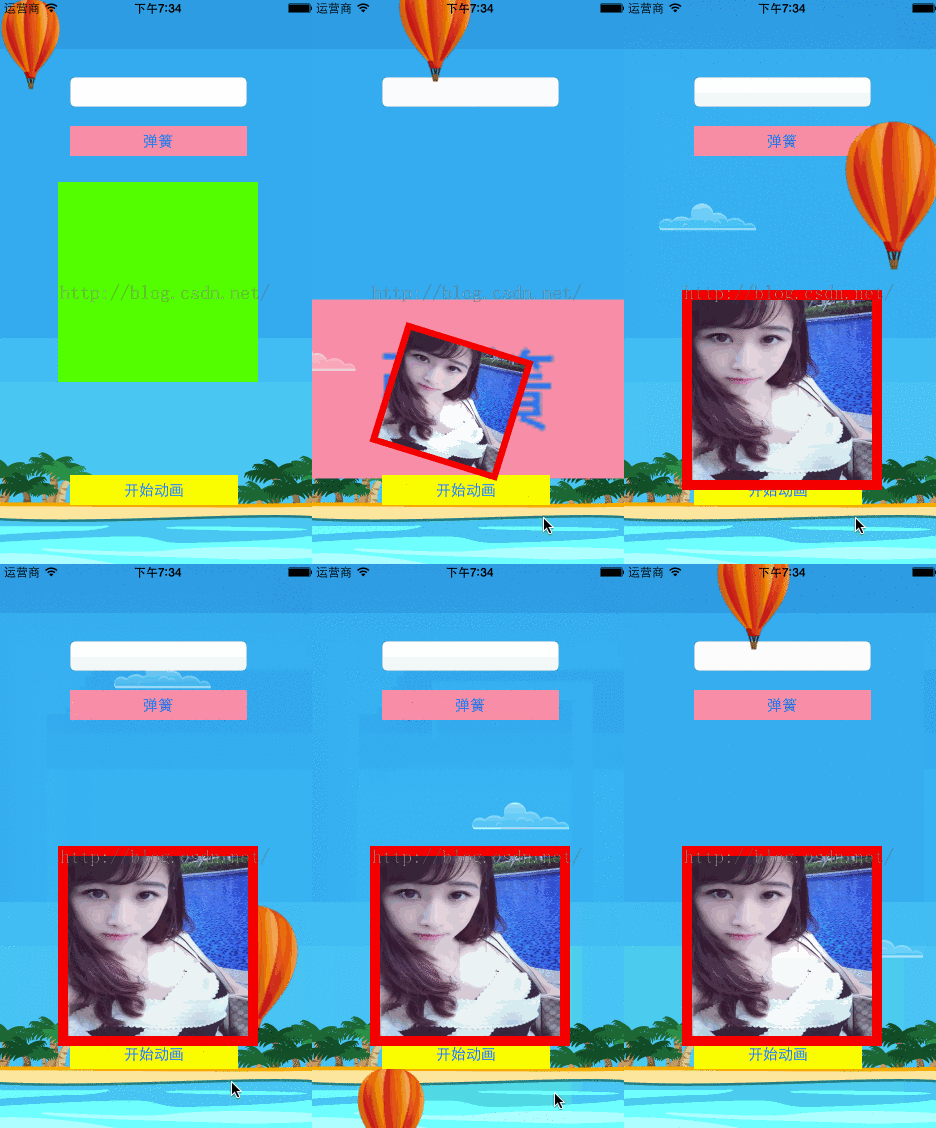
最終效果:

相關文章
+