IOS藍牙開發
藍牙常遇縮寫
MFI ======= make for ipad ,iphone, itouch 專們為蘋果設備制作的設備
BLE ==== buletouch low energy,藍牙4.0設備因為低耗電,所以也叫做BLE
peripheral,central == 外設和中心,發起連接的時central,被連接的設備為perilheral
service and characteristic === 服務和特征 每個設備會提供服務和特征,類似於服務端的api,但是機構不同。每個外設會有很多服務,每個服務中包含很多字段,這些字段的權限一般分為 讀read,寫write,通知notiy幾種,就是我們連接設備後具體需要操作的內容。
Description 每個characteristic可以對應一個或多個Description用戶描述characteristic的信息或屬性
MFI === 開發使用ExternalAccessory 框架
4.0 BLE === 開發使用CoreBluetooth 框架藍牙基礎知識
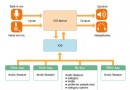
CoreBluetooth框架的核心其實是兩個東西,peripheral和central, 可以理解成外設和中心。對應他們分別有一組相關的API和類
這兩組api分別對應不同的業務場景,左側叫做中心模式,就是以你的app作為中心,連接其他的外設的場景,而右側稱為外設模式,使用手機作為外設別其他中心設備操作的場景。
服務和特征,特征的屬性(service and characteristic):每個設備都會有一些服務,每個服務裡面都會有一些特征,特征就是具體鍵值對,提供數據的地方。每個特征屬性分為這麼幾種:讀,寫,通知這麼幾種方式。
  //objcetive c特征的定義枚舉
  typedef NS_OPTIONS(NSUInteger, CBCharacteristicProperties) {
      CBCharacteristicPropertyBroadcast												= 0x01,
      CBCharacteristicPropertyRead													= 0x02,
      CBCharacteristicPropertyWriteWithoutResponse									= 0x04,
      CBCharacteristicPropertyWrite													= 0x08,
      CBCharacteristicPropertyNotify													= 0x10,
      CBCharacteristicPropertyIndicate												= 0x20,
      CBCharacteristicPropertyAuthenticatedSignedWrites								= 0x40,
      CBCharacteristicPropertyExtendedProperties										= 0x80,
      CBCharacteristicPropertyNotifyEncryptionRequired NS_ENUM_AVAILABLE(NA, 6_0)		= 0x100,
      CBCharacteristicPropertyIndicateEncryptionRequired NS_ENUM_AVAILABLE(NA, 6_0)	= 0x200
  };
外設、服務、特征間的關系
藍牙中心模式流程
1. 建立中心角色
2. 掃描外設(discover)
3. 連接外設(connect)
4. 掃描外設中的服務和特征(discover)
    - 4.1 獲取外設的services
    - 4.2 獲取外設的Characteristics,獲取Characteristics的值,獲取Characteristics的Descriptor和Descriptor的值
5. 與外設做數據交互(explore and interact)
6. 訂閱Characteristic的通知
7. 斷開連接(disconnect)
藍牙外設模式流程
1. 啟動一個Peripheral管理對象
2. 本地Peripheral設置服務,特性,描述,權限等等
3. Peripheral發送廣告
4. 設置處理訂閱、取消訂閱、讀characteristic、寫characteristic的委托方法
藍牙設備狀態
1. 待機狀態(standby):設備沒有傳輸和發送數據,並且沒有連接到任何設
2. 廣播狀態(Advertiser):周期性廣播狀態
3. 掃描狀態(Scanner):主動尋找正在廣播的設備
4. 發起鏈接狀態(Initiator):主動向掃描設備發起連接。
5. 主設備(Master):作為主設備連接到其他設備。
6. 從設備(Slave):作為從設備連接到其他設備。
藍牙設備的五種工作狀態
- 准備(standby)
- 廣播(advertising)
- 監聽掃描(Scanning
- 發起連接(Initiating)
- 已連接(Connected)
藍牙和版本的使用限制
- 藍牙2.0 === 越獄設備
- 藍牙4.0 ===IOS6 以上
- MFI認證設備(Make For ipod/ipad/iphone) === 無限制
名詞解釋
- GAAT : Generic Attribute Profile , GATT配置文件是一個通用規范,用於在BLE鏈路上發送和接收被稱為“屬性”的數據塊。目前所有的BLE應用都基於GATT。 藍牙SIG規定了許多低功耗設備的配置文件。配置文件是設備如何在特定的應用程序中工作的規格說明。注意一個設備可以實現多個配置文件。例如,一個設備可能包括心率監測儀和電量檢測。
- Characteristic 一個characteristic包括一個單一變量和0-n個用來描述characteristic變量的descriptor,characteristic可以被認為是一個類型,類 似於類。
- Descriptor Descriptor用來描述characteristic變量的屬性。例如,一個descriptor可以規定一個可讀的描述,或者一個characteristic變量可接受的范圍,或者一個characteristic變量特定的測量單位。 Service service是characteristic的集合。例如,你可能有一個叫“Heart Rate Monitor(心率監測儀)”的service,它包括了很多characteristics,如“heart rate measurement(心率測量)”等。你可以在bluetooth.org 找到一個目前支持的基於GATT的配置文件和服務列表。
ios連接外設的代碼實現流程
1. 建立中心角色
2. 掃描外設(discover)
3. 連接外設(connect)
4. 掃描外設中的服務和特征(discover)
    - 4.1 獲取外設的services
    - 4.2 獲取外設的Characteristics,獲取Characteristics的值,獲取Characteristics的Descriptor和Descriptor的值
5. 與外設做數據交互(explore and interact)
6. 訂閱Characteristic的通知
7. 斷開連接(disconnect)
准備環境
  1 xcode
  2 開發證書和手機(藍牙程序需要使用使用真機調試,使用模擬器也可以調試,但是方法很蛋疼,我會放在最後說)
  3 藍牙外設
實現步驟
1 導入CoreBluetooth頭文件,建立主設備管理類,設置主設備委托
    #import
    @interface ViewController : UIViewController


    @interface ViewController (){
        //系統藍牙設備管理對象,可以把他理解為主設備,通過他,可以去掃描和鏈接外設
        CBCentralManager *manager;
        //用於保存被發現設備
        NSMutableArray *peripherals;
    }

    - (void)viewDidLoad {
        [super viewDidLoad];
        /*
         設置主設備的委托,CBCentralManagerDelegate
            必須實現的:
            - (void)centralManagerDidUpdateState:(CBCentralManager *)central;//主設備狀態改變的委托,在初始化CBCentralManager的適合會打開設備,只有當設備正確打開後才能使用
            其他選擇實現的委托中比較重要的:
            - (void)centralManager:(CBCentralManager *)central didDiscoverPeripheral:(CBPeripheral *)peripheral advertisementData:(NSDictionary *)advertisementData RSSI:(NSNumber *)RSSI; //找到外設的委托
            - (void)centralManager:(CBCentralManager *)central didConnectPeripheral:(CBPeripheral *)peripheral;//連接外設成功的委托
            - (void)centralManager:(CBCentralManager *)central didFailToConnectPeripheral:(CBPeripheral *)peripheral error:(NSError *)error;//外設連接失敗的委托
            - (void)centralManager:(CBCentralManager *)central didDisconnectPeripheral:(CBPeripheral *)peripheral error:(NSError *)error;//斷開外設的委托
        */
         //初始化並設置委托和線程隊列,最好一個線程的參數可以為nil,默認會就main線程
         manager = [[CBCentralManager alloc]initWithDelegate:self queue:dispatch_get_main_queue()];
2 掃描外設(discover),掃描外設的方法我們放在centralManager成功打開的委托中,因為只有設備成功打開,才能開始掃描,否則會報錯。
        -(void)centralManagerDidUpdateState:(CBCentralManager *)central{

            switch (central.state) {
                case CBCentralManagerStateUnknown:
                    NSLog(@">>>CBCentralManagerStateUnknown");
                    break;
                case CBCentralManagerStateResetting:
                    NSLog(@">>>CBCentralManagerStateResetting");
                    break;
                case CBCentralManagerStateUnsupported:
                    NSLog(@">>>CBCentralManagerStateUnsupported");
                    break;
                case CBCentralManagerStateUnauthorized:
                    NSLog(@">>>CBCentralManagerStateUnauthorized");
                    break;
                case CBCentralManagerStatePoweredOff:
                    NSLog(@">>>CBCentralManagerStatePoweredOff");
                    break;
                case CBCentralManagerStatePoweredOn:
                    NSLog(@">>>CBCentralManagerStatePoweredOn");
                    //開始掃描周圍的外設
                    /*
                     第一個參數nil就是掃描周圍所有的外設,掃描到外設後會進入
                          - (void)centralManager:(CBCentralManager *)central didDiscoverPeripheral:(CBPeripheral *)peripheral advertisementData:(NSDictionary *)advertisementData RSSI:(NSNumber *)RSSI;
                     */
                    [manager scanForPeripheralsWithServices:nil options:nil];

                    break;
                default:
                    break;
            }

        }

        //掃描到設備會進入方法
        -(void)centralManager:(CBCentralManager *)central didDiscoverPeripheral:(CBPeripheral *)peripheral advertisementData:(NSDictionary *)advertisementData RSSI:(NSNumber *)RSSI{

            NSLog(@"當掃描到設備:%@",peripheral.name);
            //接下來可以連接設備

        }
3 連接外設(connect)
        //掃描到設備會進入方法
        -(void)centralManager:(CBCentralManager *)central didDiscoverPeripheral:(CBPeripheral *)peripheral advertisementData:(NSDictionary *)advertisementData RSSI:(NSNumber *)RSSI{

            //接下連接我們的測試設備,如果你沒有設備,可以下載一個app叫lightbule的app去模擬一個設備
            //這裡自己去設置下連接規則,我設置的是P開頭的設備
                   if ([peripheral.name hasPrefix:@"P"]){
                   /*
                       一個主設備最多能連7個外設,每個外設最多只能給一個主設備連接,連接成功,失敗,斷開會進入各自的委托
                    - (void)centralManager:(CBCentralManager *)central didConnectPeripheral:(CBPeripheral *)peripheral;//連接外設成功的委托
                    - (void)centralManager:(CBCentralManager *)central didFailToConnectPeripheral:(CBPeripheral *)peripheral error:(NSError *)error;//外設連接失敗的委托
                    - (void)centralManager:(CBCentralManager *)central didDisconnectPeripheral:(CBPeripheral *)peripheral error:(NSError *)error;//斷開外設的委托
                    */

                    //找到的設備必須持有它,否則CBCentralManager中也不會保存peripheral,那麼CBPeripheralDelegate中的方法也不會被調用!!
                    [peripherals addObject:peripheral];
                    //連接設備
                   [manager connectPeripheral:peripheral options:nil];
               }

        }


        //連接到Peripherals-成功
        - (void)centralManager:(CBCentralManager *)central didConnectPeripheral:(CBPeripheral *)peripheral
        {
            NSLog(@">>>連接到名稱為(%@)的設備-成功",peripheral.name);
        }

        //連接到Peripherals-失敗
        -(void)centralManager:(CBCentralManager *)central didFailToConnectPeripheral:(CBPeripheral *)peripheral error:(NSError *)error
        {
            NSLog(@">>>連接到名稱為(%@)的設備-失敗,原因:%@",[peripheral name],[error localizedDescription]);
        }

        //Peripherals斷開連接
        - (void)centralManager:(CBCentralManager *)central didDisconnectPeripheral:(CBPeripheral *)peripheral error:(NSError *)error{
            NSLog(@">>>外設連接斷開連接 %@: %@\n", [peripheral name], [error localizedDescription]);

        }
有一點非常容易出錯,大家請注意。在didDiscoverPeripheral這個委托中有這一行
   //找到的設備必須持有它,否則CBCentralManager中也不會保存peripheral,那麼CBPeripheralDelegate中的方法也不會被調用!!
    [peripherals addObject:peripheral];
請特別注意,如果不保存,會影響到後面的方法執行,這個地方很多人出錯,在我的藍牙交流群中每天幾乎都會因為這個問題導致無法連接和對外設後續的操作。
大家也可以看一下這個委托在xcode中的說明,重點看@discussion中的內容,裡面特別指出了需要retained對象。
/*!
 *  @method centralManager:didDiscoverPeripheral:advertisementData:RSSI:
 *
 *  @param central              The central manager providing this update.
 *  @param peripheral           A CBPeripheral object.
 *  @param advertisementData    A dictionary containing any advertisement and scan response data.
 *  @param RSSI                 The current RSSI of peripheral, in dBm. A value of 127 is reserved and indicates the RSSI
 *								was not available.
 *
 *  @discussion                 This method is invoked while scanning, upon the discovery of peripheral by central. A discovered peripheral must
 *                              be retained in order to use it; otherwise, it is assumed to not be of interest and will be cleaned up by the central manager. For
 *                              a list of advertisementData keys, see {@link CBAdvertisementDataLocalNameKey} and other similar constants.
 *
 *  @seealso                    CBAdvertisementData.h
 *
 */
- (void)centralManager:(CBCentralManager *)central didDiscoverPeripheral:(CBPeripheral *)peripheral advertisementData:(NSDictionary *)advertisementData RSSI:(NSNumber *)RSSI;
4掃描外設中的服務和特征(discover)
設備連接成功後,就可以掃描設備的服務了,同樣是通過委托形式,掃描到結果後會進入委托方法。但是這個委托已經不再是主設備的委托(CBCentralManagerDelegate),而是外設的委托(CBPeripheralDelegate),這個委托包含了主設備與外設交互的許多 回叫方法,包括獲取services,獲取characteristics,獲取characteristics的值,獲取characteristics的Descriptor,和Descriptor的值,寫數據,讀rssi,用通知的方式訂閱數據等等。
4.1獲取外設的services
        //連接到Peripherals-成功
        - (void)centralManager:(CBCentralManager *)central didConnectPeripheral:(CBPeripheral *)peripheral
        {
            NSLog(@">>>連接到名稱為(%@)的設備-成功",peripheral.name);
            //設置的peripheral委托CBPeripheralDelegate
            //@interface ViewController : UIViewController
            [peripheral setDelegate:self];
            //掃描外設Services,成功後會進入方法:-(void)peripheral:(CBPeripheral *)peripheral didDiscoverServices:(NSError *)error{
            [peripheral discoverServices:nil];

        }

        //掃描到Services
        -(void)peripheral:(CBPeripheral *)peripheral didDiscoverServices:(NSError *)error{
            //  NSLog(@">>>掃描到服務:%@",peripheral.services);
            if (error)
            {
                NSLog(@">>>Discovered services for %@ with error: %@", peripheral.name, [error localizedDescription]);
                return;
            }

            for (CBService *service in peripheral.services) {
                             NSLog(@"%@",service.UUID);
                             //掃描每個service的Characteristics,掃描到後會進入方法: -(void)peripheral:(CBPeripheral *)peripheral didDiscoverCharacteristicsForService:(CBService *)service error:(NSError *)error
                             [peripheral discoverCharacteristics:nil forService:service];
                         }

        }
### 4.2獲取外設的Characteristics,獲取Characteristics的值,獲取Characteristics的Descriptor和Descriptor的值
     //掃描到Characteristics
     -(void)peripheral:(CBPeripheral *)peripheral didDiscoverCharacteristicsForService:(CBService *)service error:(NSError *)error{
         if (error)
         {
             NSLog(@"error Discovered characteristics for %@ with error: %@", service.UUID, [error localizedDescription]);
             return;
         }

         for (CBCharacteristic *characteristic in service.characteristics)
         {
             NSLog(@"service:%@ 的 Characteristic: %@",service.UUID,characteristic.UUID);
         }

         //獲取Characteristic的值,讀到數據會進入方法:-(void)peripheral:(CBPeripheral *)peripheral didUpdateValueForCharacteristic:(CBCharacteristic *)characteristic error:(NSError *)error
         for (CBCharacteristic *characteristic in service.characteristics){
             {
                 [peripheral readValueForCharacteristic:characteristic];
             }
         }

         //搜索Characteristic的Descriptors,讀到數據會進入方法:-(void)peripheral:(CBPeripheral *)peripheral didDiscoverDescriptorsForCharacteristic:(CBCharacteristic *)characteristic error:(NSError *)error
         for (CBCharacteristic *characteristic in service.characteristics){
             [peripheral discoverDescriptorsForCharacteristic:characteristic];
         }


     }

    //獲取的charateristic的值
    -(void)peripheral:(CBPeripheral *)peripheral didUpdateValueForCharacteristic:(CBCharacteristic *)characteristic error:(NSError *)error{
        //打印出characteristic的UUID和值
        //!注意,value的類型是NSData,具體開發時,會根據外設協議制定的方式去解析數據
        NSLog(@"characteristic uuid:%@  value:%@",characteristic.UUID,characteristic.value);

    }

    //搜索到Characteristic的Descriptors
    -(void)peripheral:(CBPeripheral *)peripheral didDiscoverDescriptorsForCharacteristic:(CBCharacteristic *)characteristic error:(NSError *)error{

        //打印出Characteristic和他的Descriptors
         NSLog(@"characteristic uuid:%@",characteristic.UUID);
        for (CBDescriptor *d in characteristic.descriptors) {
            NSLog(@"Descriptor uuid:%@",d.UUID);
        }

    }
    //獲取到Descriptors的值
    -(void)peripheral:(CBPeripheral *)peripheral didUpdateValueForDescriptor:(CBDescriptor *)descriptor error:(NSError *)error{
        //打印出DescriptorsUUID 和value
        //這個descriptor都是對於characteristic的描述,一般都是字符串,所以這裡我們轉換成字符串去解析
        NSLog(@"characteristic uuid:%@  value:%@",[NSString stringWithFormat:@"%@",descriptor.UUID],descriptor.value);
    }
5 把數據寫到Characteristic中
    //寫數據
    -(void)writeCharacteristic:(CBPeripheral *)peripheral
                characteristic:(CBCharacteristic *)characteristic
                         value:(NSData *)value{

        //打印出 characteristic 的權限,可以看到有很多種,這是一個NS_OPTIONS,就是可以同時用於好幾個值,常見的有read,write,notify,indicate,知知道這幾個基本就夠用了,前連個是讀寫權限,後兩個都是通知,兩種不同的通知方式。
        /*
         typedef NS_OPTIONS(NSUInteger, CBCharacteristicProperties) {
         CBCharacteristicPropertyBroadcast												= 0x01,
         CBCharacteristicPropertyRead													= 0x02,
         CBCharacteristicPropertyWriteWithoutResponse									= 0x04,
         CBCharacteristicPropertyWrite													= 0x08,
         CBCharacteristicPropertyNotify													= 0x10,
         CBCharacteristicPropertyIndicate												= 0x20,
         CBCharacteristicPropertyAuthenticatedSignedWrites								= 0x40,
         CBCharacteristicPropertyExtendedProperties										= 0x80,
         CBCharacteristicPropertyNotifyEncryptionRequired NS_ENUM_AVAILABLE(NA, 6_0)		= 0x100,
         CBCharacteristicPropertyIndicateEncryptionRequired NS_ENUM_AVAILABLE(NA, 6_0)	= 0x200
         };

         */
        NSLog(@"%lu", (unsigned long)characteristic.properties);


        //只有 characteristic.properties 有write的權限才可以寫
        if(characteristic.properties & CBCharacteristicPropertyWrite){
            /*
                最好一個type參數可以為CBCharacteristicWriteWithResponse或type:CBCharacteristicWriteWithResponse,區別是是否會有反饋
            */
            [peripheral writeValue:value forCharacteristic:characteristic type:CBCharacteristicWriteWithResponse];
        }else{
            NSLog(@"該字段不可寫!");
        }


    }
6 訂閱Characteristic的通知
    //設置通知
    -(void)notifyCharacteristic:(CBPeripheral *)peripheral
                characteristic:(CBCharacteristic *)characteristic{
        //設置通知,數據通知會進入:didUpdateValueForCharacteristic方法
        [peripheral setNotifyValue:YES forCharacteristic:characteristic];

    }

    //取消通知
    -(void)cancelNotifyCharacteristic:(CBPeripheral *)peripheral
                 characteristic:(CBCharacteristic *)characteristic{

         [peripheral setNotifyValue:NO forCharacteristic:characteristic];
    }
7 斷開連接(disconnect)
    //停止掃描並斷開連接
    -(void)disconnectPeripheral:(CBCentralManager *)centralManager
                     peripheral:(CBPeripheral *)peripheral{
        //停止掃描
        [centralManager stopScan];
        //斷開連接
        [centralManager cancelPeripheralConnection:peripheral];
    }
溫馨提示:如果想實時獲取藍牙與外設是否還在連接狀態的話,一定要有
//Peripherals斷開連接 - (void)centralManager:(CBCentralManager *)central didDisconnectPeripheral:(CBPeripheral *)peripheral error:(NSError *)error{ NSLog(@">>>外設連接斷開連接 %@: %@\n", [peripheral name], [error localizedDescription]); }來實時發現手機藍牙與外設的連接狀,這樣就可以做到外設斷開後只要外設還是可以連接的 那麼就可以在這裡寫進入APP就自動連接可搜到的這個外設就可以了 本人親測的,有什麼問題可以找我