
iOS 5 UIKit 外觀自訂完整指南:一次客製化導覽列、分頁列與控制項
iOS 5 的 UIKit 加入 appearance 代理與多項外觀自訂 API,讓開發者可以一次調整全域元件樣式。本文以冲浪旅程範例為基礎,示範如何自訂背景、UINavigationBar、UIBarButtonItem、UITabBar、UISlider、UISegmentedControl、UISwitch、UILabel 與 UITextField。
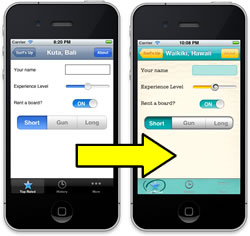
準備工作
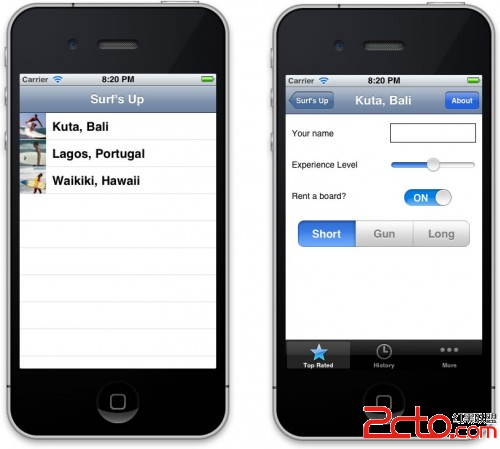
範例 App 已包含冲浪旅程列表與詳細頁面。編譯執行後,可先看到標準系統樣式。
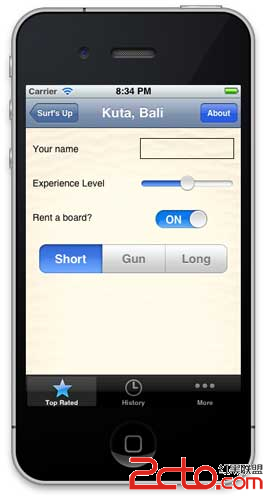
加入背景圖片
在 DetailViewController.m 的 viewDidLoad 中,使用 colorWithPatternImage 設定背景。
- (void)viewDidLoad {
    [super viewDidLoad];
    [[self view] setBackgroundColor:[UIColor colorWithPatternImage:[UIImage imageNamed:@"bg_sand"]]];
}
自訂 UINavigationBar
iOS 5 可透過 UINavigationBar 的 backgroundImage 與 UIImage 的 resizableImageWithCapInsets 建立可縮放圖片,再用 appearance 代理套用到所有導覽列。
UIImage *gradientImage44 = [[UIImage imageNamed:@"surf_gradient_textured_44"] resizableImageWithCapInsets:UIEdgeInsetsMake(0, 0, 0, 0)];
UIImage *gradientImage32 = [[UIImage imageNamed:@"surf_gradient_textured_32"] resizableImageWithCapInsets:UIEdgeInsetsMake(0, 0, 0, 0)];
[[UINavigationBar appearance] setBackgroundImage:gradientImage44 forBarMetrics:UIBarMetricsDefault];
[[UINavigationBar appearance] setBackgroundImage:gradientImage32 forBarMetrics:UIBarMetricsLandscapePhone];
標題文字也可透過 setTitleTextAttributes: 設定字型、顏色與陰影。
自訂 UIBarButtonItem
按鈕圖片通常要保留左右邊緣不伸縮,因此 cap insets 的左右可設為 5。返回按鈕則使用 setBackButtonBackgroundImage:forState:barMetrics:。
UIImage *button30 = [[UIImage imageNamed:@"button_textured_30"] resizableImageWithCapInsets:UIEdgeInsetsMake(0, 5, 0, 5)];
[[UIBarButtonItem appearance] setBackgroundImage:button30 forState:UIControlStateNormal barMetrics:UIBarMetricsDefault];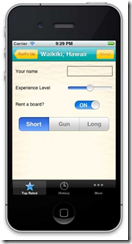
自訂 UITabBar、UISlider 與 UISegmentedControl
UITabBar 可設定背景圖與選取指示圖;UISlider 可設定最大、最小軌道與 thumb 圖;UISegmentedControl 則需要處理選取、未選取與相鄰分隔狀態。
[[UITabBar appearance] setBackgroundImage:tabBackground];
[[UITabBar appearance] setSelectionIndicatorImage:[UIImage imageNamed:@"tab_select_indicator"]];

[[UISlider appearance] setMinimumTrackImage:minImage forState:UIControlStateNormal];
[[UISlider appearance] setMaximumTrackImage:maxImage forState:UIControlStateNormal];
[[UISlider appearance] setThumbImage:thumbImage forState:UIControlStateNormal];
在 iOS 5 中,UISwitch 尚無完整的外觀代理自訂方式,但可直接設定 onTintColor。UILabel 與 UITextField 則可透過 Interface Builder 或自訂 drawRect: 完成樣式調整。
整體而言,iOS 5 的外觀自訂核心在於 appearance 代理與可縮放圖片。將共用樣式集中管理,能讓整個 App 的視覺風格保持一致,也減少逐頁修改的成本。