
iOS 開發實戰:解決 UITextField 被鍵盤遮擋的問題
編輯:iOS 開發綜合
開發 App 時經常會碰到一個惱人的狀況:當 UITextField 位於畫面下方,一旦鍵盤彈出就會把輸入框蓋住。由於 iOS 並沒有內建的自動處理機制,必須由開發者自行撰寫邏輯來應對。本文就來分享一種簡單實用的做法,讓輸入框在鍵盤出現時自動上移。
一、設計思路
核心做法是監聽鍵盤的「即將顯示」與「即將隱藏」通知,在鍵盤彈起時計算出輸入框應該上移的位置並加上平滑動畫,鍵盤收起時再把輸入框移回原位。同時加上一個點擊手勢,讓使用者點畫面空白處也能收起鍵盤。
二、程式碼實作
ZYViewController.h:
#import <UIKit/UIKit.h>

@interface ZYViewController : UIViewController<UITextFieldDelegate>

@property(nonatomic,strong) UITextField *myTextField;

@end
ZYViewController.m:
@synthesize myTextField;

- (void)viewDidLoad
{
    [super viewDidLoad];
    myTextField = [[UITextField alloc] init];//初始化 UITextField
    myTextField.frame = CGRectMake(35, 230, 250, 35);
    myTextField.delegate = self;//設置代理
    myTextField.borderStyle = UITextBorderStyleRoundedRect;
    myTextField.contentVerticalAlignment = UIControlContentVerticalAlignmentCenter;//垂直居中
    myTextField.placeholder = @"Please entry your content!";//內容為空時的預設文字
    myTextField.returnKeyType = UIReturnKeyDone;//回車鍵樣式
    myTextField.keyboardType = UIKeyboardTypeNumbersAndPunctuation;//鍵盤樣式
    [self.view addSubview:myTextField];

    //註冊鍵盤出現與隱藏的通知
    [[NSNotificationCenter defaultCenter] addObserver:self
                                             selector:@selector(keyboadWillShow:)
                                                 name:UIKeyboardWillShowNotification
                                               object:nil];
    [[NSNotificationCenter defaultCenter] addObserver:self
                                             selector:@selector(keyboardWillHide:)
                                                 name:UIKeyboardWillHideNotification
                                               object:nil];
    //加入手勢,點擊螢幕其他區域即可關閉鍵盤
    UITapGestureRecognizer *gesture = [[UITapGestureRecognizer alloc] initWithTarget:self action:@selector(hideKeyboard)];
    gesture.numberOfTapsRequired = 1;
    [self.view addGestureRecognizer:gesture];
}

//鍵盤出現時觸發
-(void) keyboadWillShow:(NSNotification *)note{
    NSDictionary *info = [note userInfo];
    CGSize keyboardSize = [[info objectForKey:UIKeyboardFrameEndUserInfoKey] CGRectValue].size;//鍵盤的 frame
    CGFloat offY = (460-keyboardSize.height)-myTextField.frame.size.height;//螢幕總高度 - 鍵盤高度 - UITextField 高度
    [UIView beginAnimations:nil context:NULL];//加入動畫,讓位移更平滑
    [UIView setAnimationDuration:0.3];//動畫時間,單位為秒
    myTextField.frame = CGRectMake(35, offY, 250, 35);//把 y 座標移到 offY
    [UIView commitAnimations];
}

//鍵盤消失時觸發
-(void)keyboardWillHide:(NSNotification *)note{
    [UIView beginAnimations:nil context:NULL];
    [UIView setAnimationDuration:0.3];
    myTextField.frame = CGRectMake(35, 230, 250, 35);//輸入框復原
    [UIView commitAnimations];
}

//收起鍵盤
-(void)hideKeyboard{
    [myTextField resignFirstResponder];
}

#pragma mark - UITextFieldDelegate
- (BOOL)textFieldShouldReturn:(UITextField *)textField
{
    [textField resignFirstResponder];//取消第一響應者
    return YES;
}

-(void)viewDidDisappear:(BOOL)animated{
    [super viewDidDisappear:animated];
    [[NSNotificationCenter defaultCenter] removeObserver:self];//移除觀察者
}
三、運行結果
初始狀態:
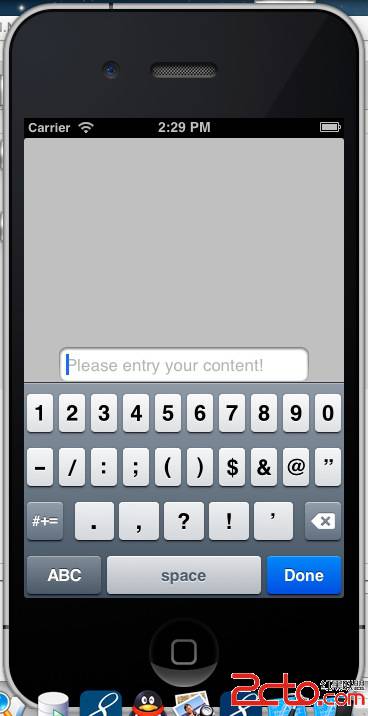
點擊輸入框、鍵盤彈出後,輸入框會自動上移到鍵盤上方:
透過這樣的通知監聽搭配動畫,就能有效避免鍵盤遮擋輸入內容的尷尬情況。
- 上一篇文章: iOS 開發實戰:打包 IPA 並安裝到越獄真機的完整流程
- 下一篇文章: iOS 開發實戰:UIProgressView 進度條控件用法