
iOS 開發(5)之 UISegmentedControl 分段選擇控件
編輯:iOS 開發綜合
1 前言
UISegmentedControl 的行為類似一排互斥的單選按鈕:所有選項並排顯示,同一時間只有一項處於選中狀態,非常適合用來做分類切換,例如「全部/未讀/已讀」這類篩選。它的項目可以是文字,也可以是圖片,兩者甚至能混用。本文就從建立、樣式調整一路做到事件回呼。
2 UISegmentedControl 簡介
.h 文件
#import <UIKit/UIKit.h>

@interface ZYViewController : UIViewController

@property(nonatomic,strong) UISegmentedControl *mySegmentedControl;

@end
.m 文件:
@synthesize mySegmentedControl;

- (void)viewDidLoad
{
    [super viewDidLoad];
    self.view.backgroundColor = [UIColor whiteColor];

    // 項目數組:文字與圖片可以混雜使用
    NSArray *segments = [[NSArray alloc] initWithObjects:@"iPhone",
                         [UIImage imageNamed:@"ipad.png"],
                         @"iPod", @"iMac", nil];
    // NSArray *segments = [[NSArray alloc] initWithObjects:@"iPhone",@"iPad",@"iPod",@"iMac",nil];

    self.mySegmentedControl = [[UISegmentedControl alloc] initWithItems:segments];

    // 調整外觀尺寸
    CGRect segmentedFrame = self.mySegmentedControl.frame;
    segmentedFrame.size.height = 64.0f;
    segmentedFrame.size.width  = 300.0f;
    self.mySegmentedControl.frame = segmentedFrame;
    self.mySegmentedControl.center = self.view.center;

    self.mySegmentedControl.segmentedControlStyle = UISegmentedControlStyleBar; // 條列樣式
    self.mySegmentedControl.momentary = YES;   // 點完立刻回到未選狀態

    [self.mySegmentedControl addTarget:self
                                action:@selector(segmentChanged:)
                      forControlEvents:UIControlEventValueChanged];

    [self.view addSubview:self.mySegmentedControl];
}

-(void)segmentChanged:(UISegmentedControl *)paramSender{
    if ([paramSender isEqual:self.mySegmentedControl]) {
        NSInteger selectedSegmentIndex = [paramSender selectedSegmentIndex];      // 取得索引
        NSString *selectedSegmentText  = [paramSender titleForSegmentAtIndex:selectedSegmentIndex]; // 取得文字
        NSLog(@"Segment %ld with %@ text is selected", (long)selectedSegmentIndex, selectedSegmentText);
    }
}
momentary 這個屬性特別值得留意:設為 YES 後,控件不會維持選中高亮,而是像按鈕一樣按下去就彈回,適合當作觸發動作的入口;設為 NO 則會保留選中狀態,適合當作真正的分類切換器。
運行後結果
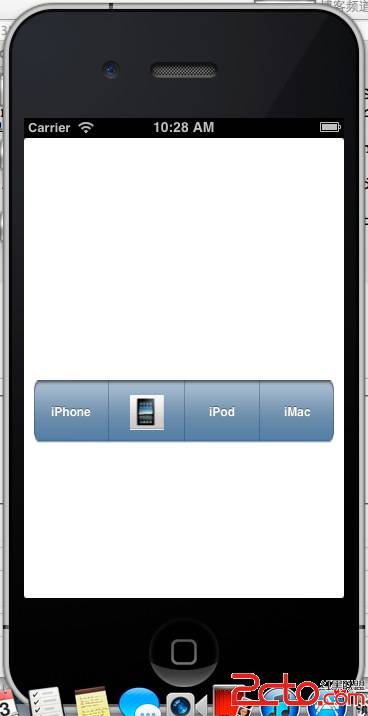
依序點擊各個項目,控制台輸出如下:
2013-04-23 10:30:00.543 UISegmentedControllerTest[985:c07] Segment 0 with iPhone text is selected
2013-04-23 10:30:01.045 UISegmentedControllerTest[985:c07] Segment 1 with (null) text is selected
2013-04-23 10:30:01.501 UISegmentedControllerTest[985:c07] Segment 2 with iPod text is selected
2013-04-23 10:30:01.862 UISegmentedControllerTest[985:c07] Segment 3 with iMac text is selected
第二項印出 (null) 是因為該項目用的是圖片而非文字,titleForSegmentAtIndex: 自然取不到字串,這屬於正常現象。