
iOS 7 文本轉語音實戰:AVSpeechSynthesizer 快速上手
編輯:iOS 開發綜合
iOS 7 加入的這項能力相當實用。通過官方提供的 API,僅僅幾行代碼就能把一段文字念出來,完全不需要引入第三方庫。本文以 Xcode 5.0 為環境示範。
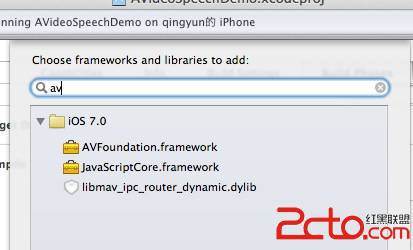
第一步:引入 AVFoundation
工程建立完成後,先把 AVFoundation.framework 添加到項目中,否則後續會出現符號找不到的鏈接錯誤。
核心三行代碼
AVSpeechSynthesizer *av = [[AVSpeechSynthesizer alloc] init];
AVSpeechUtterance *utterance = [[AVSpeechUtterance alloc] initWithString:@"Hello qingjoin"];
[av speakUtterance:utterance];
合成器負責朗讀,AVSpeechUtterance 則承載待朗讀的文本。把 utterance 交給 speakUtterance:,語音就會入隊播放。有官方 API 撐著,確實省下不少功夫。
完整 Demo
別忘了在頭文件中引入 <AVFoundation/AVSpeechSynthesis.h>,這是不少人編譯報錯的原因。
#import "ViewController.h"

@interface ViewController ()
@end

@implementation ViewController

- (void)viewDidLoad
{
    [super viewDidLoad];
    _textS.delegate = self;
}

- (void)didReceiveMemoryWarning
{
    [super didReceiveMemoryWarning];
}

- (IBAction)textToSpeechBtnPress:(id)sender
{
    AVSpeechSynthesizer *av = [[AVSpeechSynthesizer alloc] init];
    AVSpeechUtterance *utterance = [[AVSpeechUtterance alloc] initWithString:_textS.text];
    [av speakUtterance:utterance];
}

- (BOOL)textFieldShouldReturn:(UITextField *)textField
{
    [textField resignFirstResponder];
    return YES;
}

@end
運行時的控制台輸出
2013-06-28 14:54:07.817 AVideoSpeechDemo[5468:60b] Enqueue: <AXSpeechAction: 0x166d9820> hello :Pitch 1.000000 : Language: (null)
2013-06-28 14:54:22.791 AVideoSpeechDemo[5468:60b] Enqueue: <AXSpeechAction: 0x166f94f0> hello, qingjoin :Pitch 1.000000 : Language: (null)
2013-06-28 15:06:42.424 AVideoSpeechDemo[5468:60b] Enqueue: <AXSpeechAction: 0x166f3af0> 你好,我是qingjoin ! hello :Pitch 1.000000 : Language: (null)
可以看到每一次點擊都會把內容放入朗讀佇列,中英混排同樣能正常發音。

還可以調什麼
除了文本本身,AVSpeechUtterance 還暴露了 rate(語速)、pitchMultiplier(音高)、volume(音量)與 voice(發音人)等屬性。想要區分中英文口音,可以在初始化時指定 language,例如 zh-CN 或 en-US。若需要連續朗讀多段內容,記得為 AVSpeechSynthesizer 實現 AVSpeechSynthesizerDelegate,在一段播完的回落裡再送下一段,避免內容被直接覆蓋。