iOS 橫竖屏適配方案(一):iOS 6 前後的兩種開發模式
編輯:iOS 開發綜合
引言
iPhone 的橫竖屏針對 iOS 系統版本分為兩種開發方式:一種是 iOS 6 之前的使用模式,一種是 iOS 6 的新模式,兩者的區別還是蠻大的。
支持自動旋轉
iOS 6 之前,通常使用 shouldAutorotateToInterfaceOrientation 來單獨控制某個 UIViewController 的方向。需要哪個 viewController 支持旋轉,只要覆寫這個方法即可。如下示例,設定之後,屏幕旋轉時只支持橫屏:
- (BOOL)shouldAutorotateToInterfaceOrientation:(UIInterfaceOrientation)interfaceOrientation {
    return UIInterfaceOrientationIsLandscape(interfaceOrientation);
}
iOS 6 之後,改用下面兩個方法控制自動旋轉:
- (BOOL)shouldAutorotate {
    NSLog(@"讓不讓我旋轉?");
    return YES;
}

- (NSUInteger)supportedInterfaceOrientations {
    NSLog(@"讓我旋轉哪些方向");
    return UIInterfaceOrientationMaskAllButUpsideDown;
}
自動旋轉觸發後,系統會自動呼叫另外兩個方法:
- (void)willRotateToInterfaceOrientation:(UIInterfaceOrientation)toInterfaceOrientation duration:(NSTimeInterval)duration {
    [super willRotateToInterfaceOrientation:toInterfaceOrientation duration:duration];
    NSLog(@"將要旋轉了?");
}

- (void)didRotateFromInterfaceOrientation:(UIInterfaceOrientation)fromInterfaceOrientation {
    [super didRotateFromInterfaceOrientation:fromInterfaceOrientation];
    NSLog(@"如果讓我旋轉,我已經旋轉完了!");
}
控制首次啟動的方向
要讓程式第一次啟動時立刻顯示橫屏還是豎屏,可以設定設備支持的方向。要注意兩者的差別:如果是 iOS 6 之前,下面設定的設備支持方向可在應用裡面再被修改;如果是 iOS 6 之後,它會作為硬性條件,也就是一旦設定,應用裡面的程式碼也無法再使用這個方向。
私有 API 強制切換方向
傳說中可以用私有 API 實現切換 ViewController 時強制橫屏:
if ([[UIDevice currentDevice] respondsToSelector:@selector(setOrientation:)]) {
    [[UIDevice currentDevice] performSelector:@selector(setOrientation:)
                                   withObject:(id)UIInterfaceOrientationLandscapeRight];
}
用 XIB 設計界面時改變橫豎顯示
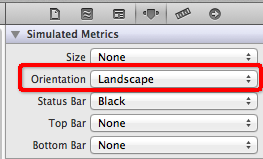
使用 XIB 進行界面設計時,也可以直接改變 XIB 的橫豎顯示方式: