
iOS 開發:UIView 與 UIViewController 的設計原則小結
編輯:iOS 開發綜合
針對 UIView 與 UIViewController 的設計原則,這裡整理個人目前的思考,日後再持續補充。
是否把 UIView 獨立成類別
我的想法是:如果某視圖只對當前 controller 適用,就沒有必要獨立成類;反之,若是通用元件,就值得獨立出來以實現復用。
不需復用的 view,直接寫在 controller 的 loadView 方法中即可:
-(void) loadView {
    UIView *rootview = [[UIView alloc] init];
    UIButton *button = [UIButton buttonWithType:UIButtonTypeRoundedRect];
    button.frame = CGRectMake(200, 200, 80, 80);
    [button setTitle:@"click" forState:UIControlStateNormal];
    [button addTarget:self action:@selector(clicked) forControlEvents:UIControlEventTouchUpInside];
    [rootview addSubview:button];
    self.view = rootview;
}
若 view 需要復用,則獨立成類別:
-(void) loadView {
    CGRect screenSize = [[UIScreen mainScreen] bounds];
    YLSSimplePasswordView *passwordView = [[YLSSimplePasswordView alloc] initWithFrame:screenSize Delegate:self];
    self.view = passwordView;
}
View 的布局與行為應由 Controller 控制
要實現 View 復用,必須把 view 的布局與行為委託給 Controller 控制。布局通常透過 initWithFrame: 完成,由 controller 傳入 CGRect 決定 view 在頁面中的位置與尺寸;同時自訂 view 定義若干 delegate 方法,交由 controller 實作。
一般來說,view 不需要持有 controller 的參照,只需持有 protocol 的參照即可:
id<YLSSimplePasswordViewDelegate> myDelegate;
View 內部建議使用相對布局
view 有 frame 與 bounds 兩個屬性,分別表示它在 superview 中的座標系,以及自身的座標系。實務上 frame 更好用。例如下方這排按鈕,若直接對它們設定 frame,就得使用 root view 的座標系來計算,相當不便。
更好的做法,是把它們放進一個容器 view,此時設定 frame 就是相對於容器 view 的座標系,計算容易許多:
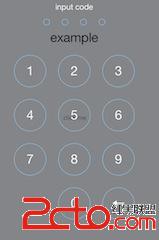
UIView *buttonViews = [[UIView alloc] init]; // 作為 button 的容器
buttonViews.frame = CGRectMake((width-300)/2, 180, 300, 410);
YLSPasswordButton *button1 = [[YLSPasswordButton alloc] initWithTitle:@"1" Value:@"1" Color:pointColor Origin:CGPointMake(0, 0) Delegate:self];
YLSPasswordButton *button2 = [[YLSPasswordButton alloc] initWithTitle:@"2" Value:@"2" Color:pointColor Origin:CGPointMake(110, 0) Delegate:self];
YLSPasswordButton *button3 = [[YLSPasswordButton alloc] initWithTitle:@"3" Value:@"3" Color:pointColor Origin:CGPointMake(220, 0) Delegate:self];
[buttonViews addSubview:button1];
[buttonViews addSubview:button2];
[buttonViews addSubview:button3];
[self addSubview:buttonViews];
先簡單總結這些。感覺 View 的布局與自適應最麻煩,以後還需多加整理。
- 上一篇文章: iOS 學習筆記(5):視圖層次結構、查找、常用屬性與清理
- 下一篇文章: iOS 安全攻防(十九):基於腳本實現動態庫注入