
iOS 學習筆記(5):視圖層次結構、查找、常用屬性與清理
編輯:iOS 開發綜合
本篇整理 UIView 的層次結構、查找機制、常用屬性,以及記憶體清理觀念(作者:hmjiangqq,Email:jiangqqlmj@163.com)。
(一)視圖的層次結構
1. UIView 的層次結構可理解為「視圖樹」(View Hierarchy)。
2. 一個視圖就是一個容器;當某視圖包含其他視圖時,兩者便建立父子關係。被包含者稱為「子視圖(subview)」,包含者稱為「父視圖/超視圖(superview)」。
3. 視覺上,子視圖會覆蓋父視圖的內容;設定透明屬性後即可看見父視圖。
4. 每個父視圖都有一個有序陣列存放其子視圖,存放順序會影響顯示效果。例如兩個兄弟視圖重疊時,後加入者會顯示在上層。
5. 一個視圖可嵌入多個 subview,但只能有一個 superview。
常用方法:呼叫 addSubview 時會對其進行保留(等同 retain);呼叫 removeFromSuperview 時則會釋放(等同 release)。基本的添加與刪除方法如下:
- (void)removeFromSuperview;
- (void)insertSubview:(UIView *)view atIndex:(NSInteger)index;
- (void)exchangeSubviewAtIndex:(NSInteger)index1 withSubviewAtIndex:(NSInteger)index2;
- (void)addSubview:(UIView *)view;
- (void)insertSubview:(UIView *)view belowSubview:(UIView *)siblingSubview;
- (void)insertSubview:(UIView *)view aboveSubview:(UIView *)siblingSubview;
- (void)bringSubviewToFront:(UIView *)view;
- (void)sendSubviewToBack:(UIView *)view;
實例程式碼:
UIView *view1 = [[UIView alloc] initWithFrame:CGRectMake(60, 100, 200, 100)];
view1.backgroundColor = [UIColor redColor];
[self.window addSubview:view1];
[view1 release];
UIView *view2 = [[UIView alloc] initWithFrame:CGRectMake(0, 0, 50, 50)];
view2.backgroundColor = [UIColor blueColor];
[self.window addSubview:view2];
[view2 release];
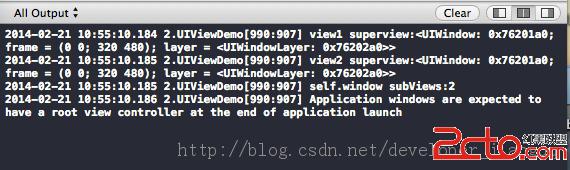
NSLog(@"view1 superview:%@", [view1 superview]);
NSLog(@"self.window subViews:%d", [[self.window subviews] count]);
(二)視圖的查找
1. UIView 提供一個 tag 屬性(整數),可用來標示視圖物件。
2. 透過 viewWithTag: 方法即可檢索被標示的子視圖;若未設定 tag,預設值為 0。
UIView *view3 = [[UIView alloc] initWithFrame:CGRectMake(60, 250, 200, 100)];
view3.tag = 100;
view3.backgroundColor = [UIColor yellowColor];
[self.window addSubview:view3];
[view3 release];
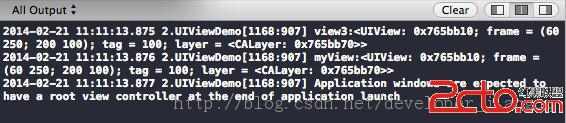
UIView *myView = [self.window viewWithTag:100];
myView.alpha = 0.1;
最後提醒:系統會呼叫 dealloc 方法來釋放物件資源,切勿手動呼叫 dealloc。可在 dealloc 中釋放自訂物件,並記得呼叫 [super dealloc]。