
iOS 網路請求:GET 與 POST 的原理與實作
編輯:iOS 開發綜合
GET 與 POST 是 HTTP 協議中最常見的兩種請求方式,理解它們的差異對於 iOS 網路開發至關重要。
GET 請求
GET 的語義是獲取指定 URL 上的資源。它會將資料按照 variable=value 的形式附加到 action 所指向的 URL 後面,兩者用「?」連接,各變數之間用「&」連接。由於資料被放在請求的 URL 中,因此在傳輸過程中並不安全,且受 URL 長度限制,能傳輸的資料量較小。
1、GET 直接從伺服器拿資料,性能好、效率高。
2、參數會顯示在網址列,直觀上安全性不高;但由於 GET 不向伺服器提交資料,實際安全性反而較高。
3、實際應用場景:資料查詢。
POST 請求
POST 的語義是對指定資源「追加/添加」資料。它會將資料放在資料體中,按照變數與值相對應的方式傳到 action 所指向的 URL。所有資料對使用者來說不可見,且可以傳輸大量資料(上傳檔案只能使用 POST)。
1、POST 需要先建立資料體,將資料體提交給伺服器,才能獲得響應,因此性能相對較差、效率較低。
2、參數不會顯示在網址列,直觀上安全性高;但由於 POST 會向伺服器提交資料,可能存在安全漏洞,實際安全性未必更高。
3、實際應用場景:使用者登入、上傳檔案等需要與伺服器進行資料互動的操作。
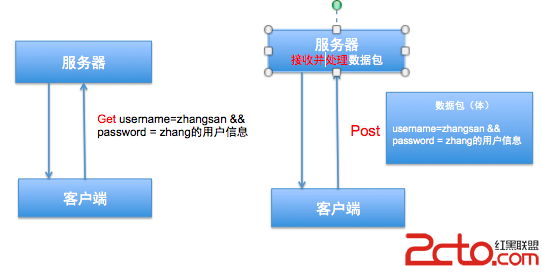
GET 與 POST 的資料互動流程如下圖:
以下是 POST 與 GET 方法的關鍵程式碼,以一個簡單的使用者名與密碼登入介面為例(介面程式碼從略):
#pragma mark - GET 方法登入
- (IBAction)getLogin {
    NSString *userName = userName.text;
    NSString *password = password.text;
    // 1. 網路位址 URL,參數直接附加在網址後
    NSString *urlString = [NSString stringWithFormat:@"https://192.168.3.251/~apple/itcast/login.php?username=%@&password=%@", userName, password];
    urlString = [urlString stringByAddingPercentEscapesUsingEncoding:NSUTF8StringEncoding];
    NSURL *url = [NSURL URLWithString:urlString];
    // 2. 請求
    NSURLRequest *request = [NSURLRequest requestWithURL:url];
    // 3. 連接
    NSURLConnection *connection = [NSURLConnection connectionWithRequest:request delegate:self];
    // 4. 啟動連接
    [connection start];
    // 5. 實例化接收資料
    _serverData = [NSMutableData data];
}

#pragma mark - POST 登入
- (IBAction)postLogin {
    NSString *userName = userName.text;
    NSString *password = password.text;
    // 1. 網路位址 URL
    NSString *urlString = [NSString stringWithFormat:@"https://192.168.3.251/~apple/itcast/login.php"];
    NSURL *url = [NSURL URLWithString:urlString];
    // 2. 請求,生成資料體添加到請求
    NSMutableURLRequest *request = [NSMutableURLRequest requestWithURL:url];
    // 指定請求方法,預設是 GET
    request.HTTPMethod = @"POST";
    // 生成資料體
    NSString *bodyStr = [NSString stringWithFormat:@"username=%@&password=%@", userName, password];
    request.HTTPBody = [bodyStr dataUsingEncoding:NSUTF8StringEncoding];
    // 3. 連接
    NSURLConnection *connection = [NSURLConnection connectionWithRequest:request delegate:self];
    // 4. 啟動連接
    [connection start];
    // 5. 實例化接收資料
    _serverData = [NSMutableData data];
}

#pragma mark - 網路請求代理方法
// 開始接收資料,拼接資料
- (void)connection:(NSURLConnection *)connection didReceiveData:(NSData *)data {
    [_serverData appendData:data];
}
// 資料接收完成處理
- (void)connectionDidFinishLoading:(NSURLConnection *)connection {
    NSString *result = [[NSString alloc] initWithData:_serverData encoding:NSUTF8StringEncoding];
    NSLog(@"%@", result);
    [self showMessageWithResult:result];
    _serverData = nil;
}
// 錯誤處理
- (void)connection:(NSURLConnection *)connection didFailWithError:(NSError *)error {
    NSLog(@"%@", error.localizedDescription);
}

#pragma mark - 處理伺服器返回資料
- (void)showMessageWithResult:(NSString *)result {
    // 判斷「使用者名」所在位置
    NSRange range = [result rangeOfString:@"使用者名"];
    NSLog(@"%@", NSStringFromRange(range));
    NSString *message = nil;
    if (range.location > 0) {
        // 登入成功
        NSString *userName = [result substringFromIndex:range.location + range.length];
        message = [NSString stringWithFormat:@"歡迎歸來:%@", userName];
    } else {
        // 網路登入時,千萬不要告訴使用者具體哪裡錯了
        message = @"使用者名或者密碼錯誤!";
    }
    UIAlertView *alert = [[UIAlertView alloc] initWithTitle:@"提示" message:message delegate:nil cancelButtonTitle:@"OK" otherButtonTitles:nil, nil];
    [alert show];
}
掌握 GET 與 POST 各自的特性與適用場景,並熟悉 NSURLConnection 的代理回調流程,就能在 iOS 開發中游刃有餘地處理各類網路請求需求。