
iOS 7 Bug 解析:OTA 部署下出現無法刪除的「影子圖標」
本文記錄一個僅在 iOS 7.0 以上版本中出現的 OTA 部署問題。
問題重現步驟
1、對同一個 App 使用 Product → Archive 選單,以企業簽名編譯兩次,產出 app1.ipa 與 app2.ipa,並將它們的 Bundle Identifier 分別設為 xxx.xxx.app1 與 xxx.xxx.app2。
2、編寫 app1.plist 與 app2.plist 兩個檔案:一個的 url 指向 app1.ipa,另一個指向 app2.ipa,但兩者的 Bundle Identifier 則統一設為 xxx.xxx.app。也就是說,兩個 plist 檔除了 url 部分外,其餘內容完全相同。
3、編寫一個 html 頁面,包含兩個安裝連結。
4、將 app1.ipa、app2.ipa、app1.plist、app2.plist 與 html 檔都放到伺服器上。
5、在 iOS 7 設備上打開 html 頁面,點擊第一個連結安裝 app1.ipa,此時安裝正常。
6、再次打開 html 頁面,點擊第二個連結安裝 app2.ipa。由於 app2 的描述檔(app2.plist)與 ipa 包(app2.ipa)中的 Bundle Identifier 不一致,安裝成功後除了正常的 App 圖標外,還會多出一個特殊的圖標,且用戶無法刪除它:
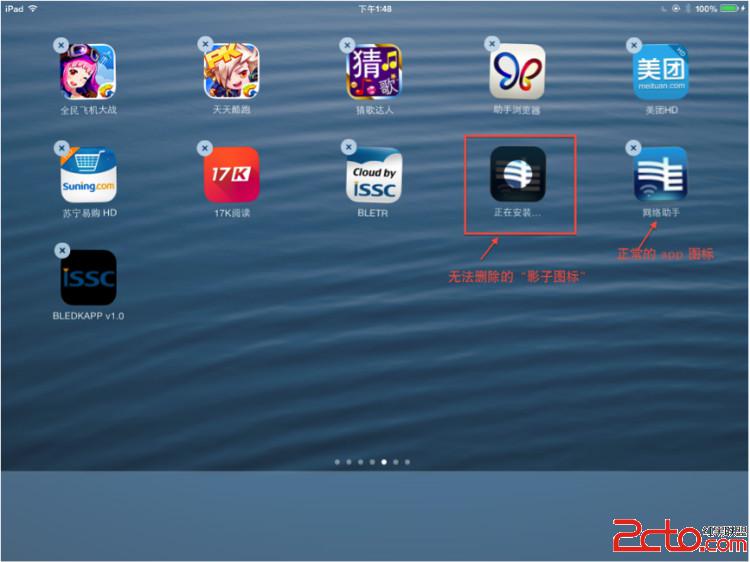
這個無法刪除的圖標,暫且稱之為「影子圖標」。
解決辦法
問題的根源在於 ipa 檔內實際的 Bundle ID 與 plist 檔中 metadata 的 bundle-identifier 不一致。最簡單的解法是讓兩者保持一致,也就是把 plist 中的 bundle-identifier 改為與 ipa 內實際的 Bundle ID 相同。
app1.plist 的內容如下:
<?xml version="1.0" encoding="UTF-8"?>
<!DOCTYPE plist PUBLIC "-//Apple//DTD PLIST 1.0//EN" "https://www.apple.com/DTDs/PropertyList-1.0.dtd">
<plist version="1.0">
<dict>
    <key>items</key>
    <array>
        <dict>
            <key>assets</key>
            <array>
                <dict>
                    <key>kind</key>
                    <string>software-package</string>
                    <key>url</key>
                    <string>https://192.168.1.105:9999/app1.ipa</string>
                </dict>
            </array>
            <key>metadata</key>
            <dict>
                <key>bundle-identifier</key>
                <string>xxx.xxx.app1</string>
                <key>bundle-version</key>
                <string>1.0.0</string>
                <key>kind</key>
                <string>software</string>
                <key>subtitle</key>
                <string>網路助手</string>
                <key>title</key>
                <string>網路助手</string>
            </dict>
        </dict>
    </array>
</dict>
</plist>
要得到 app2.plist,只需把其中的 url 部分改為:
<key>url</key>
<string>https://192.168.1.105:9999/app2.ipa</string>
總結來說,只要確保 OTA 部署時 ipa 內實際的 Bundle ID 與 plist 中的 bundle-identifier 完全一致,就能避免這種「影子圖標」問題的發生。