
iOS 刪除 Documents 檔案的危險陷阱:空字串會清空整個目錄
編輯:iOS 開發綜合
刪除 Sandbox 中 Documents 目錄下的檔案是很常見的操作。以下是我封裝的一組工具方法,順便記錄一個差點釀成事故的坑。
- (void)viewDidLoad {
    [super viewDidLoad];
    NSString *fileName = @"test";
    NSString *filePath = [self getDirectoryOfDocumentFileWithName:fileName];
    NSLog(@"%@", filePath);
    if (filePath) {
        [self removeFileAtPath:filePath];
    }
}

- (NSString *)getDirectoryOfDocumentFolder {
    NSArray *paths = NSSearchPathForDirectoriesInDomains(NSDocumentDirectory, NSUserDomainMask, YES);
    NSString *documentsPath = paths[0];
    if (!documentsPath) {
        NSLog(@"Documents 目錄不存在");
    }
    return documentsPath;
}

- (NSString *)getDirectoryOfDocumentFileWithName:(NSString *)fileName {
    NSString *documentsPath = [self getDirectoryOfDocumentFolder];
    if (documentsPath) {
        return [documentsPath stringByAppendingPathComponent:fileName];
    }
    return nil;
}

- (BOOL)isFileExitsAtPath:(NSString *)filePath {
    return [[NSFileManager defaultManager] fileExistsAtPath:filePath isDirectory:NULL];
}

- (void)removeFileAtPath:(NSString *)filePath {
    NSError *error = nil;
    if ([self isFileExitsAtPath:filePath]) {
        [[NSFileManager defaultManager] removeItemAtPath:filePath error:&error];
        if (error) {
            NSLog(@"移除檔案失敗,錯誤資訊:%@", error);
        } else {
            NSLog(@"成功移除檔案");
        }
    } else {
        NSLog(@"檔案不存在");
    }
}
在 Documents 下建立一個名為 test 的目錄後執行,主控台輸出:
2014-03-15 13:02:54.527 RemoveDocument[849:70b] /Users/apple/Library/Application Support/iPhone Simulator/7.0.3/Applications/AA0DC0B6-EED1-4F2F-B470-326B7A5CB656/Documents/test
2014-03-15 13:02:54.529 RemoveDocument[849:70b] 成功移除檔案
一切正常。
但假如 fileName 是空字串
// NSString *fileName = @"test";
NSString *fileName = @"";
再執行一次,輸出變成:
2014-03-15 13:01:14.381 RemoveDocument[816:70b] .../Documents
2014-03-15 13:01:14.383 RemoveDocument[816:70b] 成功移除檔案
打開模擬器目錄一看:
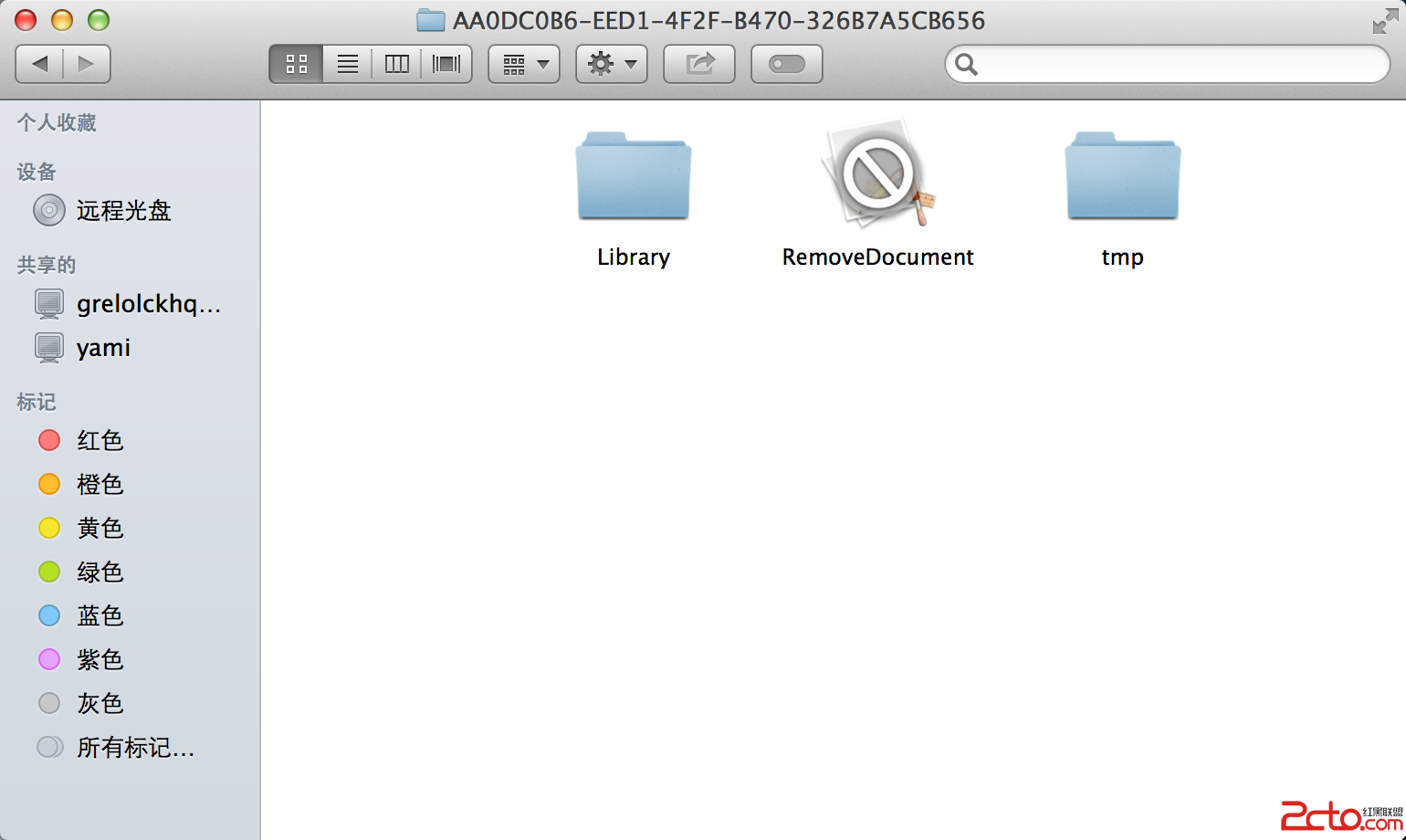
整個 Documents 目錄都被刪掉了。
原因是 stringByAppendingPathComponent: 在傳入 @"" 時,回傳的是當前路徑本身,也就是 Documents 目錄路徑。接著 removeItemAtPath: 拿到這個路徑,自然就把整個目錄連同裡面的資料(資料庫、使用者設定、離線檔案)一起清光。
這種行為非常危險,而且不會有任何警告或錯誤——程式會很開心地告訴你「成功移除檔案」。
保險的做法:先擋掉空值
- (NSString *)getDirectoryOfDocumentFileWithName:(NSString *)fileName {
    if (fileName == nil || [fileName isEqualToString:@""]) {
        return nil;
    }
    NSString *documentsPath = [self getDirectoryOfDocumentFolder];
    if (documentsPath) {
        return [documentsPath stringByAppendingPathComponent:fileName];
    }
    return nil;
}
判斷也可以放在呼叫端,視需求決定。
更進一步的防呆建議
- 在刪檔前比對父目錄。若計算出的路徑等於 Documents 目錄本身,直接拒絕執行。
- 檢查是否為目錄。
fileExistsAtPath:isDirectory:傳入BOOL指標可以分辨檔案與目錄;若你的邏輯只打算刪檔案,遇到目錄就該中止。 - 路徑要正規化。使用者的檔名可能包含
..這類字元,建議先standardizingPath並確認結果仍在預期目錄之下。
這類「空字串造成的路徑退化」問題不只出現在 iOS,凡是把外部輸入直接拼接成路徑的地方,都值得加上一層白名單檢查。
- 上一篇文章: iOS 7 導航欄與狀態列客製化完全指南
- 下一篇文章: iOS 多執行緒核心:NSRunLoop 是什麼、怎麼用