
iOS UITableView 自帶滑動刪除效果的實作
編輯:iOS 開發綜合
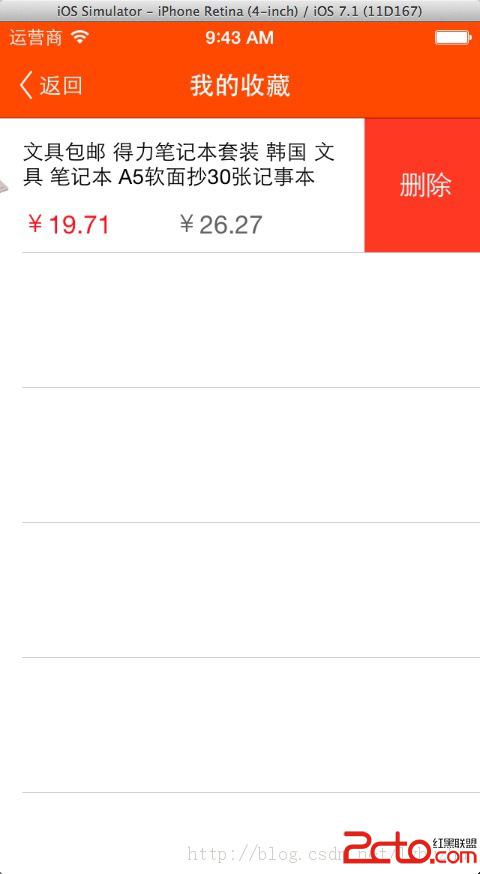
說實話,UITableView cell 自帶的滑動刪除效果,在 iOS 7 之前長得有點抱歉;但扁平化之後,這個互動其實相當漂亮。而且實作難度非常低。
實作方式
主要都是在 UITableView 的委派方法裡完成。第一步是允許編輯:
- (BOOL)tableView:(UITableView *)tableView canEditRowAtIndexPath:(NSIndexPath *)indexPath {
    return YES;
}
第二步是處理刪除按鈕的點擊:
- (void)tableView:(UITableView *)tableView
commitEditingStyle:(UITableViewCellEditingStyle)editingStyle
forRowAtIndexPath:(NSIndexPath *)indexPath {
    if (editingStyle == UITableViewCellEditingStyleDelete) {
        // 在這裡從資料來源移除該筆資料,接著
        // [tableView deleteRowsAtIndexPaths:@[indexPath] withRowAnimation:UITableViewRowAnimationAutomatic];
    }
}
預設的刪除按鈕文字是英文的 Delete,想改成中文只要再實作一個方法:
- (NSString *)tableView:(UITableView *)tableView
titleForDeleteConfirmationButtonForRowAtIndexPath:(NSIndexPath *)indexPath {
    return @"刪除";
}
效果
幾個實務提醒
資料來源要先更新:最常見的崩潰原因是先呼叫 deleteRowsAtIndexPaths: 卻忘了從陣列移除資料,導致 dataSource 的數量與 tableView 的列數不一致。順序應該是:先改資料,再呼叫刪除動畫。
客製化文字與圖示:iOS 8 之後可以改用 trailingSwipeActionsConfigurationForRowAtIndexPath: 或 editActionsForRowAtIndexPath:,這兩個方法能一次定義多個滑動操作(刪除、置頂、標記等),並自訂按鈕顏色與圖示,比單一刪除按鈕靈活得多。
順序問題:若要同時實作排序(canMoveRowAtIndexPath:)與刪除,兩者的編輯模式會互相影響,建議先確認 editingStyle 的實際值再決定要執行哪一段邏輯。