
iOS 技巧:讀取本機通訊錄並解析原始碼
編輯:iOS 開發綜合
本文示範如何讀取本機通訊錄並顯示在 table 列表中。需要注意的是,從 iOS 6 開始,蘋果對通訊錄、日曆等系統資源加入了權限控制,讀取通訊錄時必須先加上請求授權的程式碼。
一、加入 framework
在專案中匯入 AddressBook.framework 與 AddressBookUI.framework。
二、讀取通訊錄
先在介面中宣告一個陣列並於 init 中初始化:
NSMutableArray *addressBookTemp;

- (id)initWithNibName:(NSString *)nibNameOrNil bundle:(NSBundle *)nibBundleOrNil {
    addressBookTemp = [NSMutableArray array];
}
接著定義一個 model,用來存放通訊錄中的各項屬性。新建一個繼承自 NSObject 的類,在 .h 中:
@interface TKAddressBook : NSObject {
    NSInteger sectionNumber;
    NSInteger recordID;
    NSString *name;
    NSString *email;
    NSString *tel;
}
@property NSInteger sectionNumber;
@property NSInteger recordID;
@property (nonatomic, retain) NSString *name;
@property (nonatomic, retain) NSString *email;
@property (nonatomic, retain) NSString *tel;
@end
在 .m 中進行 synthesize:
@implementation TKAddressBook
@synthesize name, email, tel, recordID, sectionNumber;
@end
最後是取得聯絡人。iOS 6 之後需先取得授權,這裡用 dispatch_semaphore 同步等待授權結果:
// 新建一個通訊錄
ABAddressBookRef addressBooks = nil;
if ([[UIDevice currentDevice].systemVersion floatValue] >= 6.0) {
    addressBooks = ABAddressBookCreateWithOptions(NULL, NULL);
    // 獲取通訊錄權限
    dispatch_semaphore_t sema = dispatch_semaphore_create(0);
    ABAddressBookRequestAccessWithCompletion(addressBooks, ^(bool granted, CFErrorRef error) {
        dispatch_semaphore_signal(sema);
    });
    dispatch_semaphore_wait(sema, DISPATCH_TIME_FOREVER);
    dispatch_release(sema);
} else {
    addressBooks = ABAddressBookCreate();
}
// 獲取通訊錄中的所有人
CFArrayRef allPeople = ABAddressBookCopyArrayOfAllPeople(addressBooks);
三、顯示在 table 中
// 行數
- (NSInteger)numberOfSectionsInTableView:(UITableView *)tableView {
    return 1;
}

// 列數
- (NSInteger)tableView:(UITableView *)tableView numberOfRowsInSection:(NSInteger)section {
    return [addressBookTemp count];
}
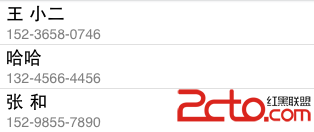
列表效果如下:
- 上一篇文章: iOS 7 的 UIScrollView 尺寸位移問題與修正
- 下一篇文章: iOS 綁定 tableview 後變數值憑空消失的排查記錄