
iOS 自訂 UITableViewCell 教學
編輯:iOS 開發綜合
若要在 UITableView 中使用自訂樣式,常見做法是建立自訂 UITableViewCell,並搭配 XIB 設定版面。這樣可以讓每一列的元件與排版更靈活。

實作重點
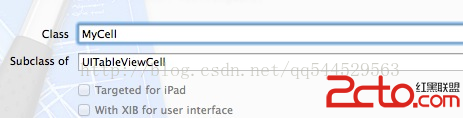
- 建立一個繼承 UITableViewCell 的類別,例如 SettingViewCell。
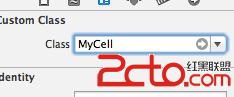
- 新增空的 XIB 檔,並把 File's Owner 或 cell 的 class 設為自訂類別。
- 在 TableViewController 中,使用 dequeueReusableCellWithIdentifier 取得可重複使用的 cell。
- 若沒有可重複使用的 cell,就從 XIB 載入新的 cell。
- (UITableViewCell *)tableView:(UITableView *)tableView cellForRowAtIndexPath:(NSIndexPath *)indexPath {
    static NSString *cellIdentifier = @"mycell";
    SettingViewCell *cell = (SettingViewCell *)[tableView dequeueReusableCellWithIdentifier:cellIdentifier];

    if (cell == nil) {
        NSArray *array = [[NSBundle mainBundle] loadNibNamed:@"SettingViewCell" owner:self options:nil];
        cell = [array objectAtIndex:0];
        [cell setSelectionStyle:UITableViewCellSelectionStyleGray];
    }

    NSString *text = _listArray[indexPath.row];
    [[cell settingName] setText:text];
    return cell;
}
使用自訂 Cell 時,記得設定 reuseIdentifier,並在資料源方法中回傳 cell,才能正常顯示與重用。
- 上一篇文章: iOS 單例模式:dispatch_once 實作
- 下一篇文章: Android 仿 iOS 回彈效果:ScrollView 回彈總結