
iOS 學習筆記(3):進度條與等待動畫的啟動與停止
編輯:iOS 開發綜合
「正在載入」與「已完成 30%」是兩種不同的回饋語意。前者用 UIActivityIndicatorView,後者用 UIProgressView。這篇示範兩者的建立、啟動、停止,以及用 NSTimer 驅動進度條。
一、在 Storyboard 中建立元件
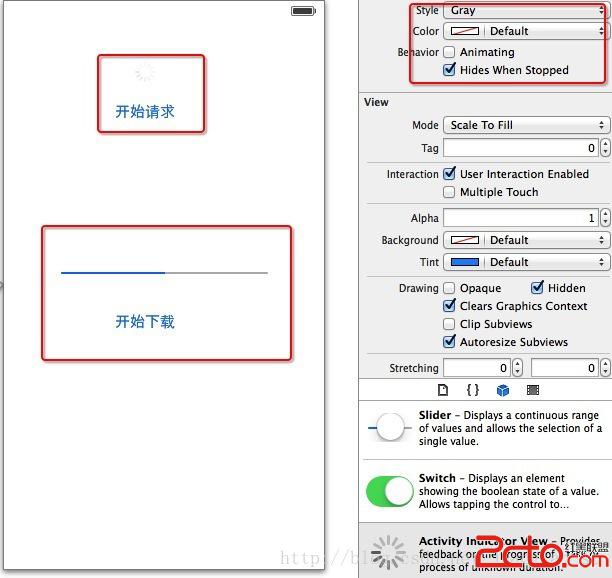
從物件庫拖一個 Activity Indicator View 與一個 Progress View 到畫面上:
二、標頭檔
#import <UIKit/UIKit.h>

@interface ViewController : UIViewController
@property (weak, nonatomic) IBOutlet UIActivityIndicatorView *activWaitNetWork;
@property (weak, nonatomic) IBOutlet UIProgressView *pgrsDownLoad;
@property (nonatomic, strong) NSTimer *timer;

- (IBAction)onclickStartRequest:(id)sender;
- (IBAction)onclickDownLoad:(id)sender;
@end
三、實作
#import "ViewController.h"

@implementation ViewController

#pragma mark - 等待動畫

- (IBAction)onclickStartRequest:(id)sender {
    // 正在轉就停止,否則開始轉
    if ([activWaitNetWork isAnimating]) {
        [activWaitNetWork stopAnimating];
    } else {
        [activWaitNetWork startAnimating];
    }
}

#pragma mark - 進度條

- (IBAction)onclickDownLoad:(id)sender {
    // 每次點擊都從 0 重新開始
    pgrsDownLoad.progress = 0;

    // 每秒更新一次進度
    timer = [NSTimer scheduledTimerWithTimeInterval:1.0
                                            target:self
                                          selector:@selector(update)
                                          userInfo:nil
                                           repeats:YES];
}

- (void)update {
    pgrsDownLoad.progress = pgrsDownLoad.progress + 0.1;

    // 進度到 100% 時停止計時器並提示
    if (pgrsDownLoad.progress >= 1.0) {
        [timer invalidate];
        self.timer = nil;

        UIAlertController *alert =
            [UIAlertController alertControllerWithTitle:@"溫馨提示"
                                                message:@"文件下載完成"
                                         preferredStyle:UIAlertControllerStyleAlert];
        [alert addAction:[UIAlertAction actionWithTitle:@"確定"
                                                  style:UIAlertActionStyleDefault
                                                handler:nil]];
        [self presentViewController:alert animated:YES completion:nil];
    }
}

@end
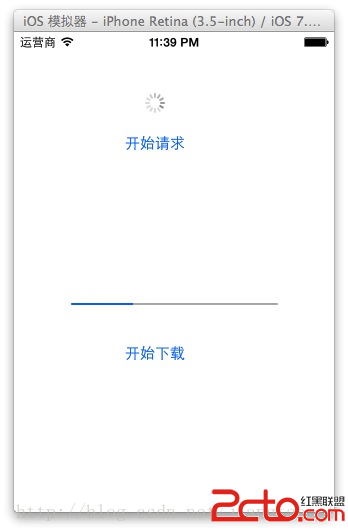
四、執行結果
五、實務上要注意的幾件事
用浮點比較要小心。範例中的 progress == 1 在累加 0.1 十次後,因為浮點誤差可能永遠不成立,導致計時器不會停止。改成 >= 1.0 才是安全寫法。
計時器記得清理。NSTimer 會強引用 target,若在 ViewController 消失時沒有 invalidate,可能延遲物件釋放。建議在 viewWillDisappear: 或 dealloc 中統一 stop。
真實場景用另一套 API。實際的網路下載應該用 NSURLSession 的 didWriteData:totalBytesWritten:totalBytesExpectedToWrite: 回呼來更新進度,比用計時器假裝前進準確得多。iOS 7 之後也可以改用 NSProgress 或 operationQueue 的 KVO 來觀察。
Activity Indicator 記得設 hidesWhenStopped。勾選這個屬性後,停止動畫時會自動隱藏,不必另外控制 alpha。