
在 iOS 的 UIAlertView 中嵌入 UIActivityIndicatorView 打造等待加載動畫
編輯:iOS 開發綜合
在做登入或等待伺服器回應這類操作時,若能即時給使用者一個「正在處理中」的視覺回饋,體驗會好很多。本文示範如何把一個旋轉的菊花(UIActivityIndicatorView)放進 UIAlertView 裡,並搭配非同步請求呈現等待效果。
一、建立頭檔 SignInViewController.h
#import <UIKit/UIKit.h>

@interface SignInViewController : UIViewController<UIAlertViewDelegate>{
    UIAlertView *remoteAlertView;
}
@end
二、實作 SignInViewController.m
#import "SignInViewController.h"

@interface SignInViewController ()
@end

@implementation SignInViewController

- (void)dealloc{
    if (remoteAlertView) {
        [remoteAlertView release];
    }
    [super dealloc];
}

// 在方法內:
// 遠端 webservice 方法
RemoteLogic *remoteLogic = [[RemoteLogic alloc] init];

// 啟動動畫
[self remoteAnimation:@"正在獲取伺服器時間,請稍候..."];

// 非同步載入資料
dispatch_async(dispatch_get_global_queue(DISPATCH_QUEUE_PRIORITY_DEFAULT, 0), ^{
    // 取得 webservice 資料
    delegate.serverTime = remoteLogic.getServerTime;
    dispatch_async(dispatch_get_main_queue(), ^{
        // 關閉動畫
        [remoteAlertView dismissWithClickedButtonIndex:0 animated:YES];
        // 取得資料後的操作
        // do something
    });
});

#pragma mark - Animation
- (void)remoteAnimation:(NSString *)message{
    if (remoteAlertView) {
        [remoteAlertView release];
    }
    remoteAlertView = [[UIAlertView alloc] initWithTitle:@"提示"
                                               message:message
                                              delegate:self
                                     cancelButtonTitle:nil
                                     otherButtonTitles:nil, nil];

    UIActivityIndicatorView *aiView = [[UIActivityIndicatorView alloc]
        initWithFrame:CGRectMake(125.0, 80.0, 30.0, 30.0)];
    aiView.activityIndicatorViewStyle = UIActivityIndicatorViewStyleWhiteLarge;

    // 判斷系統版本是否為 7.0 以上;iOS 7.0 起 UIAlertView 已棄用 addSubview 方法
    if ([[[UIDevice currentDevice] systemVersion] compare:@"7.0"] != NSOrderedAscending) {
        [remoteAlertView setValue:aiView forKey:@"accessoryView"];
    }else{
        [remoteAlertView addSubview:aiView];
    }

    [remoteAlertView show];
    [aiView startAnimating];
    [aiView release];
}
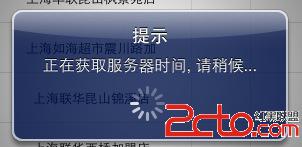
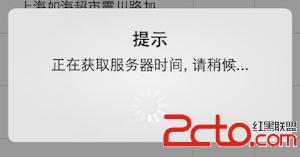
三、執行效果
以下分別為 iOS 5.1 與 iOS 7.1.2 上的呈現畫面:
- 上一篇文章: iOS 音頻播放(二):AudioSession 觀念與實作詳解
- 下一篇文章: iOS 中 View 之間傳值的幾種常見做法