
iOS 6 之後,NSAttributedString 終於不必再依賴 CoreText
編輯:iOS 開發綜合
寫 iOS 的人大概都有過這樣的經驗:想讓同一段文字裡的每個字都長得不一樣——有的粗體、有的加底線、有的換顏色——就必須動用 NSMutableAttributedString。而在 iOS 6 以前,這件事還附帶一個前置作業:得先把 CoreText.framework 拉進專案,否則連編譯都過不了。
iOS 6 之後,Apple 把這套能力直接放進 UIKit,framework 不用再手動加,程式碼也跟著乾淨不少。以下用一個簡單的示例把常用的屬性都跑一遍。
addAttribute:所有樣式的起點
整個 API 的核心只有一個方法:
- (void)addAttribute:(NSString *)name value:(id)value range:(NSRange)range;
三個參數分別是屬性名稱、對應的值,以及這個樣式要套用的範圍。把 range 給成整段字串,就是全字套用;想讓「前三個字紅色、後面黑色」,就分兩次呼叫。
- (void)testOfNSMutableAttributedStringAndNSAttributedString {

#pragma mark 測試數據 0
    NSString *testString = @"NSMutableAttributed---0";
    UILabel *testLabel = [[UILabel alloc] initWithFrame:CGRectMake(60, 100, 200, 40)];
    NSMutableAttributedString *testAttriString = [[NSMutableAttributedString alloc] initWithString:testString];

    // 刪除線
    [testAttriString addAttribute:NSStrikethroughStyleAttributeName
                           value:[NSNumber numberWithInt:NSUnderlineStyleSingle]
                           range:NSMakeRange(0, testAttriString.length)];
    // 下劃線
    [testAttriString addAttribute:NSUnderlineStyleAttributeName
                           value:[NSNumber numberWithInt:NSUnderlineStyleSingle]
                           range:NSMakeRange(0, testAttriString.length)];
    // 字體與大小
    [testAttriString addAttribute:NSFontAttributeName
                           value:[UIFont fontWithName:@"Helvetica-Bold" size:15]
                           range:NSMakeRange(0, testAttriString.length)];
    // 筆畫粗細
    [testAttriString addAttribute:NSStrokeWidthAttributeName
                           value:[NSNumber numberWithInt:NSUnderlineStyleDouble]
                           range:NSMakeRange(0, testAttriString.length)];
    // 背景顏色
    [testAttriString addAttribute:NSBackgroundColorAttributeName
                           value:[UIColor yellowColor]
                           range:NSMakeRange(0, testAttriString.length)];
    // 這個屬性實際上看不太出差別
    [testAttriString addAttribute:NSVerticalGlyphFormAttributeName
                           value:[NSNumber numberWithInt:1]
                           range:NSMakeRange(0, testAttriString.length)];
    // 文字顏色(同時會影響刪除線與下劃線的顏色)
    [testAttriString addAttribute:NSForegroundColorAttributeName
                           value:[UIColor redColor]
                           range:NSMakeRange(0, testAttriString.length)];
    testLabel.attributedText = testAttriString;

#pragma mark 測試數據 1
    NSString *testString1 = @"NSMutableAttributed---1";
    UILabel *testLabel1 = [[UILabel alloc] initWithFrame:CGRectMake(60, 200, 200, 40)];
    NSMutableAttributedString *testAttriString1 = [[NSMutableAttributedString alloc] initWithString:testString1];

    // 讓文字本體與刪除線、下劃線不同色
    // NSStrokeColorAttributeName 單獨設定沒有效果,必須搭配 NSStrokeWidthAttributeName
    [testAttriString1 addAttribute:NSStrikethroughStyleAttributeName
                            value:[NSNumber numberWithInt:NSUnderlineStyleSingle]
                            range:NSMakeRange(0, testAttriString1.length)];
    [testAttriString1 addAttribute:NSForegroundColorAttributeName
                            value:[UIColor redColor]
                            range:NSMakeRange(0, testAttriString1.length)];
    [testAttriString1 addAttribute:NSStrokeColorAttributeName
                            value:[UIColor cyanColor]
                            range:NSMakeRange(0, testAttriString1.length)];
    [testAttriString1 addAttribute:NSStrokeWidthAttributeName
                            value:[NSNumber numberWithInt:NSUnderlineStyleDouble]
                            range:NSMakeRange(0, testAttriString1.length)];
    testLabel1.attributedText = testAttriString1;

#pragma mark 測試數據 2
    NSString *testString2 = @"NSMutableAttributed---2";
    UILabel *testLabel2 = [[UILabel alloc] initWithFrame:CGRectMake(60, 300, 200, 40)];
    NSMutableAttributedString *testAttriString2 = [[NSMutableAttributedString alloc] initWithString:testString2];

    // 陰影
    NSShadow *shadow = [[NSShadow alloc] init];
    [shadow setShadowColor:[UIColor colorWithRed:0.053 green:0.088 blue:0.205 alpha:1.000]];
    [shadow setShadowBlurRadius:4.0];
    [shadow setShadowOffset:CGSizeMake(2, 2)];
    [testAttriString2 addAttribute:NSShadowAttributeName value:shadow range:NSMakeRange(0, [testAttriString2 length])];
    testLabel2.backgroundColor = [UIColor clearColor];
    testLabel2.attributedText = testAttriString2;

    [self.view addSubview:testLabel];
    [self.view addSubview:testLabel1];
    [self.view addSubview:testLabel2];
}
幾個實作時會踩到的眉角
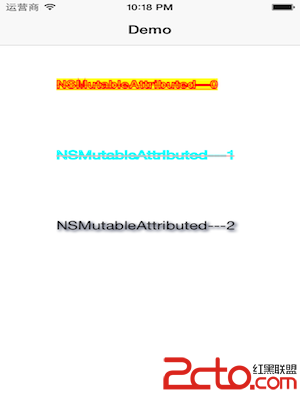
第一,NSForegroundColorAttributeName 會連帶影響刪除線與下劃線的顏色。如果你希望「文字紅色、刪除線青色」,只設定 NSStrokeColorAttributeName 是沒有作用的,必須和 NSStrokeWidthAttributeName 一起下,兩者搭配才會生效。
第二,屬性值幾乎都要用 NSNumber 包裝,字體則要給 UIFont,陰影要給 NSShadow。型別給錯不會編譯失敗,只會在執行期靜靜地什麼都不發生,這是新手最容易卡住的地方。
第三,套用之後記得把結果交給 attributedText 而不是 text,指派給 text 的話樣式會全部被丟掉。
整體來說,iOS 6 之後這套 API 的門檻已經低了很多,做新聞列表、術語標註、價格強調這類需求都相當順手。