
iOS 為移動動畫中的 View 添加 touch 事件
問題的根源:frame 已經是終值
對 Core Animation 來說,不論顯式動畫還是隱式動畫,設定的 frame 都是立即生效的。也就是說,當你讓一個 UIView 做移動動畫時,畫面上看起來位置在連續變化,但它的 model layer 的 frame 早已是最終值。此時即使這個 View 是 UIButton 的實例,可觸發 touch 事件的範圍仍是最終 frame 所在的位置。
舉例來說,一個 Button 的 frame 是 (0,0,100,100),要把它從 (0,0) 移到 (200,200):
如果你使用的是顯式動畫(CAKeyframeAnimation、CABasicAnimation),透過指定 path 或 values 來做,frame 並未改變,touch 範圍仍是 (0,0,100,100)。
如果你使用的是隱式動畫,直接修改 frame 來做,那麼 touch 範圍會是 (200,200,100,100)。
兩種情況都與「畫面上看到的圖形」不一致,因此需要靠 hitTest 來自行判斷。
建立動畫 Layer
CGSize layerSize = CGSizeMake(100, 100);
CALayer *movingLayer = [CALayer layer];
movingLayer.bounds = CGRectMake(0, 0, layerSize.width, layerSize.height);
[movingLayer setBackgroundColor:[UIColor orangeColor].CGColor];
movingLayer.anchorPoint = CGPointMake(0, 0);
[self.view.layer addSublayer:movingLayer];
self.movingLayer = movingLayer;
這裡只有 anchorPoint 需要多留意,因為它會影響 position 的取值。對 Layer 而言,frame 只是個便捷包裝,真正存在的只有 bounds 與 position;而且設定 frame 與設定 anchorPoint 的先後順序不同,剛開始看到的結果也會不同。
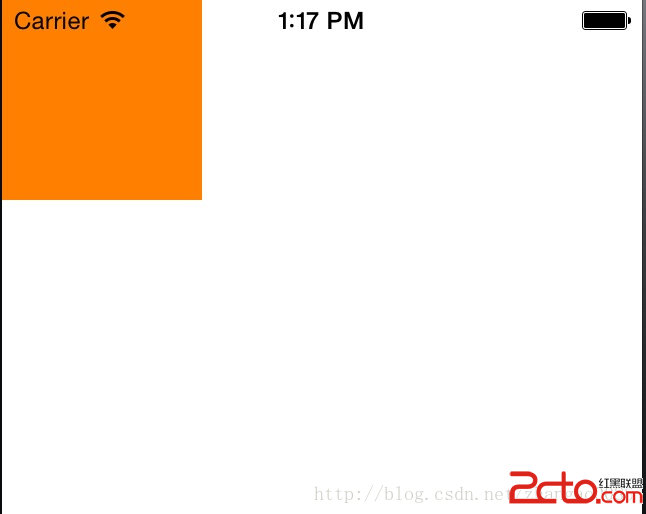
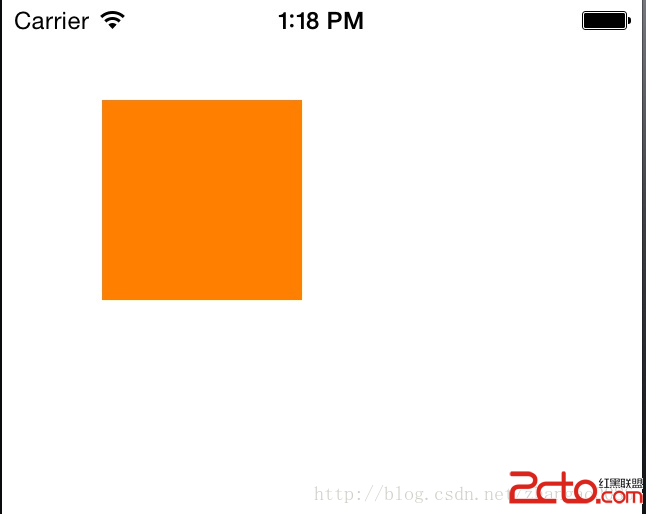
左圖是先設 anchorPoint、後設 position 的結果,兩者的座標原點對不上,畫面就跑到預期之外的位置去了。
下面這張圖說明 anchorPoint 的取值:
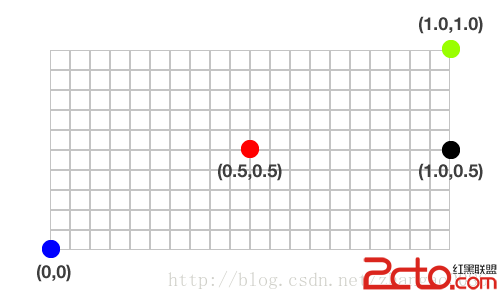
position 是以 anchorPoint 為原點的,預設原點在正中央,自然就會出現上圖那種 x、y 軸的偏移。其實只要在動畫中把 position 做個偏移,就不需要設定 anchorPoint;我之所以設定它,只是為了讓動畫從 (0,0) 跑到終點這件事看起來更直觀,並非非設不可。最後用一個 weak 屬性引用這個動畫 Layer,並把它加入 self.view.layer。
建立動畫
CAKeyframeAnimation *moveLayerAnimation = [CAKeyframeAnimation animationWithKeyPath:@"position"];
// 也可以改用 fromValue / toValue
// moveLayerAnimation.fromValue = [NSValue valueWithCGPoint:CGPointMake(0, 0)];
// moveLayerAnimation.toValue = [NSValue valueWithCGPoint:CGPointMake(320 - self.movingLayer.bounds.size.width, 0)];

moveLayerAnimation.values = @[
    [NSValue valueWithCGPoint:CGPointMake(0, 0)],
    [NSValue valueWithCGPoint:CGPointMake(320 - self.movingLayer.bounds.size.width, 0)]
];
moveLayerAnimation.duration = 2.0;
moveLayerAnimation.autoreverses = YES;
moveLayerAnimation.repeatCount = INFINITY;
moveLayerAnimation.timingFunction = [CAMediaTimingFunction functionWithName:kCAMediaTimingFunctionLinear];
[self.movingLayer addAnimation:moveLayerAnimation forKey:@"move"];
若改用 CABasicAnimation,只要以 fromValue、toValue 取代 values,timingFunction 一樣給線性即可,不需要其他轉換。
加上手勢識別
self.tapGesture = [[UITapGestureRecognizer alloc] initWithTarget:self action:@selector(click:)];
[self.view addGestureRecognizer:self.tapGesture];

- (void)click:(UITapGestureRecognizer *)tapGesture {
    CGPoint touchPoint = [tapGesture locationInView:self.view];
    if ([self.movingLayer.presentationLayer hitTest:touchPoint]) {
        NSLog(@"點中了動畫中的 Layer");
    }
}
關鍵在於 presentationLayer,而不是 movingLayer 本身。
Core Animation 的三棵樹
Core Animation 用三個集合完成動畫:
Layer Tree:存放 Layer 的最終值,不考慮動畫是否正在發生。你對一個 Layer 設定 backgroundColor、position、alpha 等屬性後,這裡的值立刻改變。
Presentation Tree:存放動畫過程中「目前正在顯示」的值,行為與 Layer Tree 相反。
Render Tree:專門負責把 Presentation Tree 的內容渲染到螢幕,也是與 Core Animation 互動的唯一紐帶。這一層由系統內部處理,我們無法介入。
也就是說,Layer Tree 與 Presentation Tree 都近似於模型物件,只負責儲存狀態。當我們需要讀取「動畫進行中」的狀態時,呼叫 layer 的 presentationLayer 屬性即可 —— 它會從 Presentation Tree 回傳代表當前動態狀態的 Layer,接著對它呼叫 hitTest,就能判斷這是不是一次有效點擊。
Demo 下載可參考原文連結。
- 上一篇文章: 《iOS 應用逆向工程》學習筆記(二):iOS 系統目錄結構
- 下一篇文章: 《iOS 應用逆向工程》學習筆記(四):iOS 上的三類程式