
iOS 開發學習:提醒處理(一)警告視圖的實作
編輯:iOS 開發綜合
這個範例用到了視圖庫中的 Navigation Controller 導航控制器,搭配一個 UITableViewController 來做列表的增刪。
提醒操作的關鍵是 UIAlertViewDelegate 協定中的 alertView:clickedButtonAtIndex: 方法,語法形式如下:
- (void)alertView:(UIAlertView *)alertView clickedButtonAtIndex:(NSInteger)buttonIndex;
其中 (UIAlertView *)alertView 用來指定是哪一個警告視圖,(NSInteger)buttonIndex 則是被點擊按鈕的索引。
核心程式碼
TableViewController.h
#import <UIKit/UIKit.h>

@interface TableViewController : UITableViewController
    <UITableViewDataSource, UITableViewDelegate, UIAlertViewDelegate> {
    NSMutableArray *a;
}

- (IBAction)aa:(id)sender;
- (IBAction)bb:(id)sender;

@end
TableViewController.m 的主要片段:
- (IBAction)aa:(id)sender {
    UIAlertView *alert = [[UIAlertView alloc] initWithTitle:@"編輯"
                                                  message:@"請選擇項目"
                                                 delegate:self
                                        cancelButtonTitle:@"Cancel"
                                        otherButtonTitles:@"Add", @"Delete", nil];
    [alert show];
}

- (void)alertView:(UIAlertView *)alertView clickedButtonAtIndex:(NSInteger)buttonIndex {
    NSString *b = [alertView buttonTitleAtIndex:buttonIndex];

    if ([b isEqualToString:@"Delete"]) {
        [self setEditing:YES];
    }

    if ([b isEqualToString:@"Add"]) {
        UIAlertView *a1 = [[UIAlertView alloc] initWithTitle:@"添加"
                                                    message:@"確定要添加聯繫人嗎"
                                                   delegate:self
                                          cancelButtonTitle:@"Ok"
                                          otherButtonTitles:nil];
        [a1 show];
    }
}

- (IBAction)bb:(id)sender {
    [self setEditing:NO];
}

// 進入刪除模式後,滑動出現的刪除鈕真正被按下時
- (void)tableView:(UITableView *)tableView
    commitEditingStyle:(UITableViewCellEditingStyle)editingStyle
     forRowAtIndexPath:(NSIndexPath *)indexPath {
    if (editingStyle == UITableViewCellEditingStyleDelete) {
        [a removeObjectAtIndex:indexPath.row];
        [tableView deleteRowsAtIndexPaths:[NSArray arrayWithObject:indexPath]
                       withRowAnimation:UITableViewRowAnimationAutomatic];
    }
}
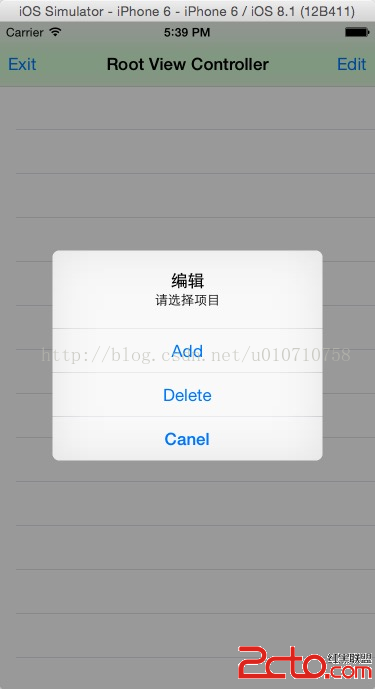
兩個值得改進的地方
第一,回呼方法裡宣告的 UIAlertView *alert 遮蔽了類別的成員變數 a,雖然不影響編譯,但可讀性很差,實務上應該避免同名。
第二,用 buttonTitleAtIndex: 取字串再比對,一旦按鈕文字被修改或做本地化,邏輯就會斷掉。更穩健的作法是直接比對 buttonIndex,並用 NS_ENUM 給索引取個有意義的名稱,例如 AlertActionAdd、AlertActionDelete。
另外,setEditing: 切換到刪除模式之後,UITableViewController 會自動幫你處理「滑動顯示刪除鈕」與「進入編輯樣式」的視覺呈現,這是它繼承自 UIViewController 的便利之處。而 commitEditingStyle: 則是使用者真正按下刪除鈕時才會呼叫,資料源的移除與 table view 的列刪除必須成對出現,否則畫面與資料就會不同步,甚至直接崩潰。
- 上一篇文章: 淺析 iOS 開發中 Block 語法的妙用
- 下一篇文章: iOS:POST 請求遇到中文參數時的編碼處理