
利用 Method Swizzling 動態替換 Adobe AIR ANE 的 AppDelegate
編輯:iOS 開發綜合
開發背景
用 Adobe AIR 開發遊戲之後,往往還得針對 iOS 與 Android 各自接入支付、推送等 SDK。本文要處理的是 iOS 端的痛點:AIR runtime 的 AppDelegate 生命週期回呼難以插手,導致原生推送與支付功能無法正常接入。以下用 hook 機制徹底解決這個問題。
Hook 的知識背景
Objective-C 裡呼叫一個方法,本質上是向某個物件送出一則訊息,而尋找方法的唯一依據是 selector 名稱。利用 Objective-C 的動態特性,可以在 runtime 階段偷換 selector 對應的 IMP,達到掛鉤(hook)的目的。
每個類別都有一份方法列表,存放 selector 名稱與方法實作的對應關係。IMP 有點類似函式指標,指向具體的 Method 實作。
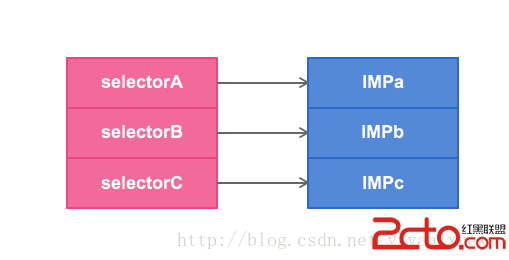
可用的 runtime 工具不少:
method_exchangeImplementations:交換兩個方法的 IMP。class_replaceMethod:替換類別上的方法。method_setImplementation:直接指定某個方法的 IMP。
手法雖有不同,本質都是偷換 selector 與 IMP 的對應關係。
實作思路
- 在
MDChangeDelegateHelper的+load階段就對 AIR 的 AppDelegate 類別進行 hook,確保在該 delegate 被建立之前,方法已經完成替換。 - 需要準備三個 selector:AppDelegate 原本的方法
oldSEL;Helper 提供的預設實作defaultSEL(用來補上原本不存在的方法);Helper 的目標實作newSEL。 - 交換之後的對應關係為:
oldSEL → newMethod、newSEL → oldMethod。於是當系統呼叫oldSEL時,實際跑的是 Helper 裡的hookedXXX;而在hookedXXX內部呼叫newSEL,又會回到原本 AIR 的實作,原流程因此得以保留。
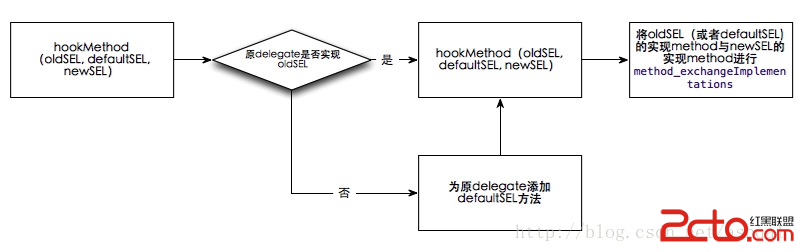
程式碼實作
#import "MDChangeDelegateHelper.h"
#import <UIKit/UIKit.h>
#import <objc/runtime.h>

void hookMethod(SEL oldSEL, SEL defaultSEL, SEL newSEL) {
    // AIR 的 AppDelegate 類別名稱為 CTAppController
    Class aClass = objc_getClass("CTAppController");
    if (aClass == 0) {
        NSLog(@"找不到 AIR 的類別!");
        return;
    }
    Class bClass = [MDChangeDelegateHelper class];

    // 把 Helper 的實作補進 AIR 的類別中
    class_addMethod(aClass, newSEL, class_getMethodImplementation(bClass, newSEL), nil);
    class_addMethod(aClass, oldSEL, class_getMethodImplementation(bClass, defaultSEL), nil);

    Method oldMethod = class_getInstanceMethod(aClass, oldSEL);
    assert(oldMethod);
    Method newMethod = class_getInstanceMethod(aClass, newSEL);
    assert(newMethod);

    method_exchangeImplementations(oldMethod, newMethod);
}

@implementation MDChangeDelegateHelper

+ (void)load {
    NSLog(@"MDChangeDelegateHelper load");

    hookMethod(@selector(application:didFinishLaunchingWithOptions:),
               @selector(defaultApplication:didFinishLaunchingWithOptions:),
               @selector(hookedApplication:didFinishLaunchingWithOptions:));

    hookMethod(@selector(application:handleOpenURL:),
               @selector(defaultApplication:handleOpenURL:),
               @selector(hookedApplication:handleOpenURL:));

    hookMethod(@selector(application:openURL:sourceApplication:annotation:),
               @selector(defaultApplication:openURL:sourceApplication:annotation:),
               @selector(hookedApplication:openURL:sourceApplication:annotation:));

    hookMethod(@selector(application:supportedInterfaceOrientationsForWindow:),
               @selector(defaultApplication:supportedInterfaceOrientationsForWindow:),
               @selector(hookedApplication:supportedInterfaceOrientationsForWindow:));

    hookMethod(@selector(applicationDidBecomeActive:),
               @selector(defaultApplicationDidBecomeActive:),
               @selector(hookedApplicationDidBecomeActive:));

    hookMethod(@selector(init), @selector(init), @selector(hookedInit));
}

#pragma mark - Hook 後的實作

- (BOOL)hookedApplication:(UIApplication *)application
didFinishLaunchingWithOptions:(NSDictionary *)dic {
    NSLog(@"hooked didFinishLaunchingWithOptions");
    [self hookedApplication:application didFinishLaunchingWithOptions:dic];
    return YES;
}

- (id)hookedInit {
    NSLog(@"hooked init");
    return [self hookedInit];
}

- (BOOL)hookedApplication:(UIApplication *)application handleOpenURL:(NSURL *)url {
    NSLog(@"hooked handleOpenURL");
    [self hookedApplication:application handleOpenURL:url];
    return YES;
}

- (BOOL)hookedApplication:(UIApplication *)application
                  openURL:(NSURL *)url
          sourceApplication:(NSString *)sourceApplication
                 annotation:(id)annotation {
    NSLog(@"hooked openURL sourceApplication annotation");
    [self hookedApplication:application openURL:url
            sourceApplication:sourceApplication
                   annotation:annotation];
    return YES;
}

- (NSUInteger)hookedApplication:(UIApplication *)application
supportedInterfaceOrientationsForWindow:(UIWindow *)window {
    NSLog(@"hooked supportedInterfaceOrientationsForWindow");
    [self hookedApplication:application supportedInterfaceOrientationsForWindow:window];
    return 0;
}

- (void)hookedApplicationDidBecomeActive:(UIApplication *)application {
    [self hookedApplicationDidBecomeActive:application];
    NSLog(@"hooked applicationDidBecomeActive");
}

#pragma mark - 預設實作(原類別未實作時的後備)

- (BOOL)defaultApplication:(UIApplication *)application
didFinishLaunchingWithOptions:(NSDictionary *)dic { return YES; }

- (BOOL)defaultApplication:(UIApplication *)application
               handleOpenURL:(NSURL *)url { return YES; }

- (BOOL)defaultApplication:(UIApplication *)application
                   openURL:(NSURL *)url
           sourceApplication:(NSString *)sourceApplication
                  annotation:(id)annotation { return YES; }

- (NSUInteger)defaultApplication:(UIApplication *)application
supportedInterfaceOrientationsForWindow:(UIWindow *)window { return 0; }

- (void)defaultApplicationDidBecomeActive:(UIApplication *)application {}

- (id)init {
    self = [super init];
    if (self) {}
    return self;
}

@end
實作時的兩個注意點
- 執行期印出的 AIR AppDelegate 類別名稱是
CTAppController,因此 hook 的目標就鎖定這個類別。 - 對
init做替換時會發現CTAppController並未實作init,必須在 Helper 中補一份基礎實作,否則物件根本無法建立。
這種做法的風險在於依賴 AIR runtime 的內部類別名稱,一旦 Adobe 更新 runtime 就可能失效,因此建議把 hook 邏輯集中封裝,方便日後維護與移除。
- 上一篇文章: iOS:如何大量匯入照片到模擬器相簿
- 下一篇文章: iOS:使用 Block 實作函式回呼