
iOS 自定義鋸齒形背景 View:使用 Quartz2D 繪製
編輯:iOS 開發綜合
在 iOS 中,若需要繪製鋸齒形背景,可使用 Quartz2D 建立路徑並填色。本文說明如何建立可自訂顏色、鋸齒數量與高度的 SawtoothView。
1. 設計需求
設計稿可能要求上下兩個區塊以鋸齒形交界。若直接讓兩個 View 重疊,可能會出現鋸齒未被完全覆蓋的問題。
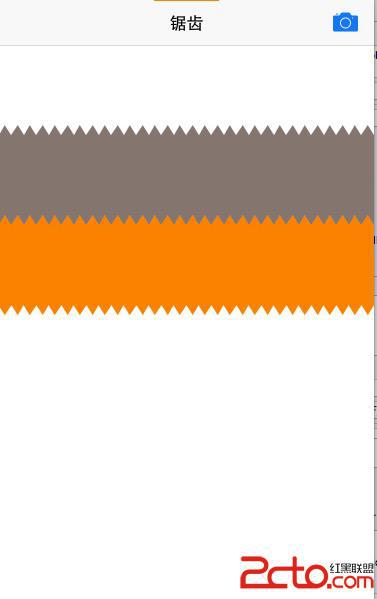
2. 重疊問題
若將下方 View 上移覆蓋上方 View,結果可能不如預期。
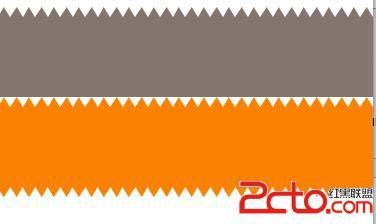
3. 重繪下方鋸齒
解決方式是在下方 View 重新繪製與上方 View 相同顏色的鋸齒,再將其向上移動覆蓋交界。
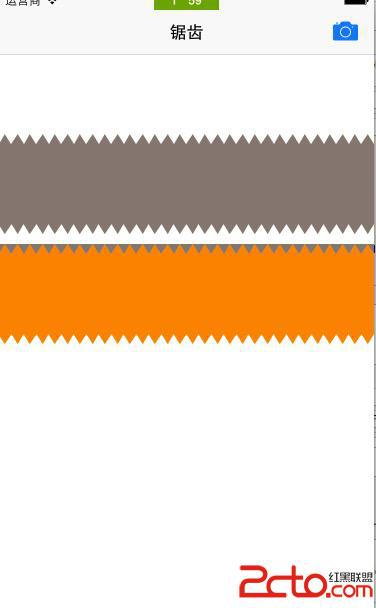
4. 最終效果
5. 建立 SawtoothView
可建立一個 UIView 子類別,並覆寫 drawRect:。繪製時先取得 CGContext,再建立鋸齒路徑:
CGContextRef ctx = UIGraphicsGetCurrentContext();

CGFloat itemWidth = kScreen_Width / waveCount;
CGFloat itemHeight = 10;

CGContextMoveToPoint(ctx, 0, itemHeight);
for (int i = 0; i != waveCount; i++) {
    int nextX = (i + 1) * itemWidth;
    CGContextAddLineToPoint(ctx, nextX - itemWidth * 0.5, 0);
    CGContextAddLineToPoint(ctx, nextX, itemHeight);
}
接著畫出底部輪廓並填色:
CGContextAddLineToPoint(ctx, kScreen_Width, viewHeight - itemHeight);

for (int i = waveCount + 1; i != 0; i--) {
    int preX = (i - 1) * itemWidth;
    CGContextAddLineToPoint(ctx, preX - itemWidth * 0.5, viewHeight);
    CGContextAddLineToPoint(ctx, preX - itemWidth, viewHeight - itemHeight);
}

CGContextSetFillColorWithColor(ctx, bgColor.CGColor);
CGContextFillPath(ctx);
6. 自訂方法
可提供一個設定方法,讓外部指定背景色、頂部顏色、鋸齒數量與高度:
- (void)setColor:(UIColor *)color
        topColor:(UIColor *)topColor
       waveCount:(int)count
      waveHeight:(CGFloat)height;
7. 使用方式
SawtoothView *sawtoothView1 = [SawtoothView new];
sawtoothView1.frame = CGRectMake(0, CGRectGetMaxY(titleLabel.frame) + 10, kScreen_Width, 100);
[sawtoothView1 setColor:[UIColor warmGrayColor] topColor:[UIColor clearColor] waveCount:30 waveHeight:100];
[self.view addSubview:sawtoothView1];
8. 注意事項
若使用兩個鋸齒 View 覆蓋交界,要注意第二個 View 的 y 值。通常可將第二個 View 向上移動一個鋸齒高度,讓上層鋸齒被完整覆蓋。