
iOS 動態繪製曲線動畫的實現
編輯:iOS 開發綜合
近期需要實現一個功能:在屏幕上動態繪製一條曲線,用以描述數據在一段時間內的變化趨勢。效果大致如下:
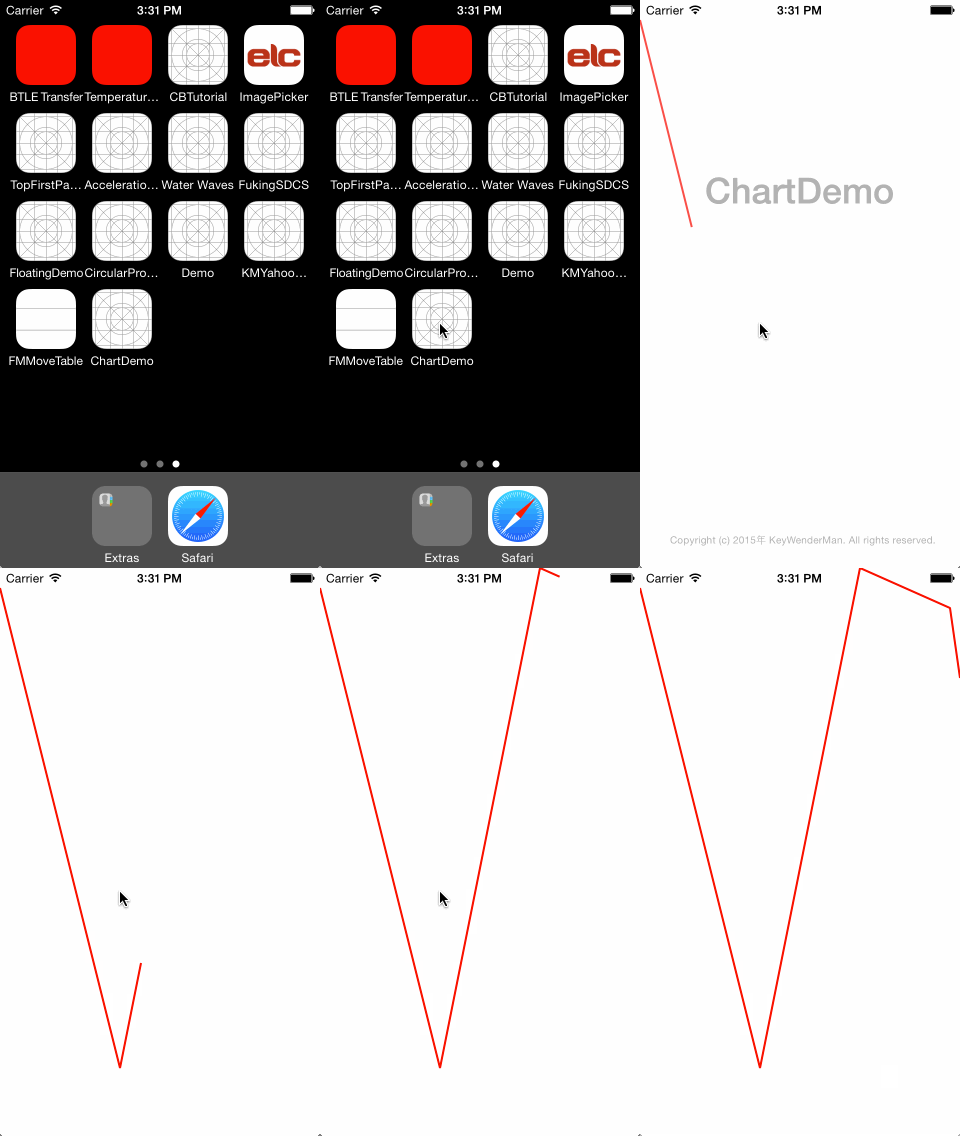
要完成這個效果,需要用到三個類:UIBezierPath、CAShapeLayer 與 CABasicAnimation。其中 UIBezierPath 用於繪製曲線路徑,CAShapeLayer 為 Path 提供展示位置,而 CABasicAnimation 則用來創建並添加動畫。
首先用 UIBezierPath 定義曲線路徑:
UIBezierPath *path = [UIBezierPath bezierPath]; [path moveToPoint:CGPointMake(0.0,20.0)]; [path addLineToPoint:CGPointMake(120.0, 500.0)]; [path addLineToPoint:CGPointMake(220, 0)]; [path addLineToPoint:CGPointMake(310, 40)]; [path addLineToPoint:CGPointMake(SCREEN_WIDTH, 110)];
接著為 CAShapeLayer 設置各項屬性,並把 path 賦值給它。若缺少這個賦值,layer 就無法把效果畫出來,也是一個不完整的 layer:
CAShapeLayer *pathLayer = [CAShapeLayer layer]; pathLayer.frame = self.view.bounds; pathLayer.path = path.CGPath; pathLayer.strokeColor = [[UIColor redColor] CGColor]; pathLayer.fillColor = nil; pathLayer.lineWidth = 2.0f; pathLayer.lineJoin = kCALineJoinBevel; [self.view.layer addSublayer:pathLayer];
最後把動畫賦值給 layer。在動畫中,我們可以調整一些參數來控制繪製效果:
CABasicAnimation *pathAnimation = [CABasicAnimation animationWithKeyPath:@"strokeEnd"]; pathAnimation = [CABasicAnimation animationWithKeyPath:@"strokeEnd"]; pathAnimation.duration = 2.0; pathAnimation.fromValue = [NSNumber numberWithFloat:0.0f]; pathAnimation.toValue = [NSNumber numberWithFloat:1.0f]; [pathLayer addAnimation:pathAnimation forKey:@"strokeEnd"];
運行以上代碼,即可獲得前面圖片中的動態繪製效果。
- 上一篇文章: 記錄 iOS 開發中遇到的各類 Bug 與坑點
- 下一篇文章: iOS 獲取 UIView 完整層級結構的方法