
iOS JSON 解析完全指南:格式對照、方案選擇與實戰範例
JSON 是行動端與伺服器溝通的事實標準。本文從格式基礎談到解析方案選擇,再透過登入與影片列表兩個實例把流程跑完。
什麼是 JSON
JSON 是一種輕量級的資料交換格式。伺服器回傳給用戶端的資料,除了檔案下載之外,大多是 JSON 或 XML。
它的結構與 Objective-C 中的字典、陣列幾乎一一對應:
{ "name" : "jack", "age" : 10 }
{ "names" : ["jack", "rose", "jim"] }
標準 JSON 有個硬性規定:key 必須使用雙引號,單引號、 naked key 都算不合法。實務上後端 occasionally 會回傳不標準的 JSON,這時用嚴格解析器就會失敗,需要事前溝通或加一層容錯。
JSON 與 OC 型別對照
大括號 { } → NSDictionary
中括號 [ ] → NSArray
雙引號 " " → NSString
數字(10、10.8)→ NSNumber
另外要特別小心 null:它會被解析成 NSNull,而 NSNull 無法當作字串或數字使用,直接取值很容易在執行期 crash。處理時應先判斷 [obj isKindOfClass:[NSNull class]]。
解析方案
iOS 上常見的四種方案:第三方庫 JSONKit、SBJson、TouchJSON,以及蘋果原生的 NSJSONSerialization。效能表現上,NSJSONSerialization 最佳。
除非有維護老專案的必要,新專案直接用原生方案就好,不必再引入額外依賴:
// JSON 資料 → OC 物件
+ (id)JSONObjectWithData:(NSData *)data
                 options:(NSJSONReadingOptions)opt
                   error:(NSError **)error;

// OC 物件 → JSON 資料
+ (NSData *)dataWithJSONObject:(id)obj
                       options:(NSJSONWritingOptions)opt
                         error:(NSError **)error;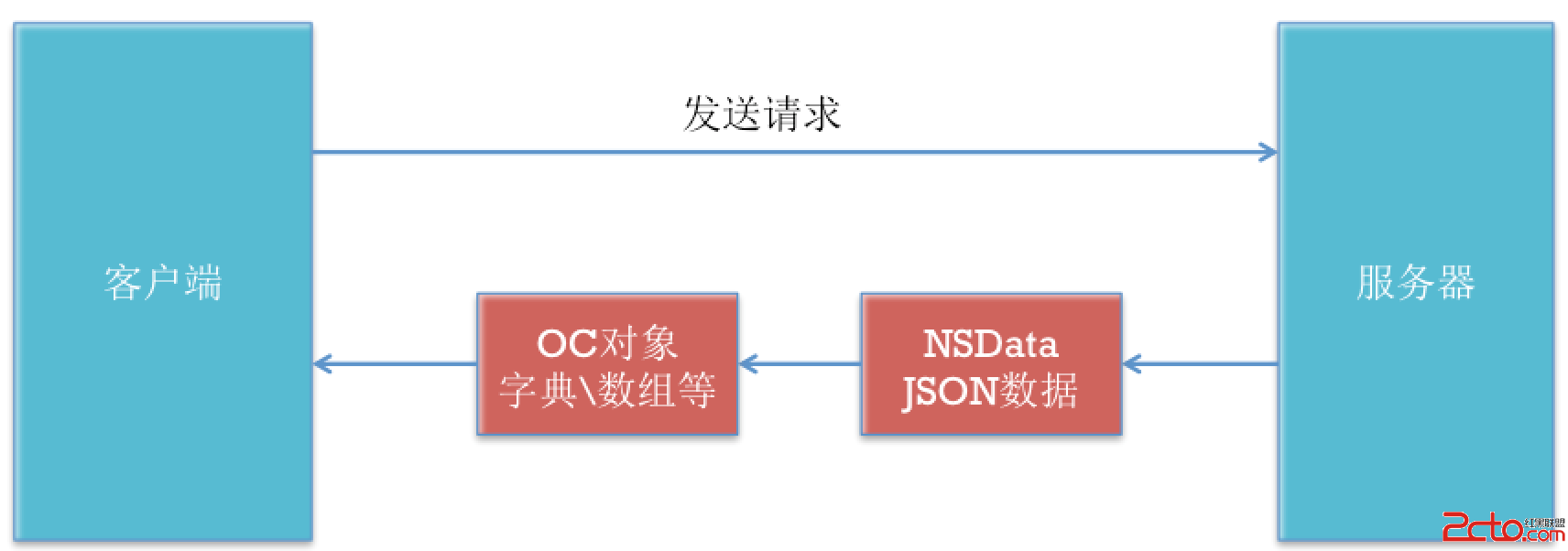
實例一:登入並解析回應
- (IBAction)login {
    // 1. 取得並檢查使用者名稱
    NSString *usernameText = self.username.text;
    if (usernameText.length == 0) {
        [MBProgressHUD showError:@"請輸入使用者名稱"];
        return;
    }

    // 2. 取得並檢查密碼
    NSString *pwdText = self.pwd.text;
    if (pwdText.length == 0) {
        [MBProgressHUD showError:@"請輸入密碼"];
        return;
    }

    // 3. 送出請求
    NSString *urlStr = [NSString stringWithFormat:
        @"https://localhost:8080/Server/login?username=%@&pwd=%@", usernameText, pwdText];
    NSURL *url = [NSURL URLWithString:urlStr];
    NSURLRequest *request = [NSURLRequest requestWithURL:url];

    NSOperationQueue *queue = [NSOperationQueue mainQueue];
    [NSURLConnection sendAsynchronousRequest:request
                                       queue:queue
                           completionHandler:^(NSURLResponse *response,
                                               NSData *data,
                                               NSError *connectionError) {
        if (connectionError || data == nil) {
            [MBProgressHUD showError:@"請求失敗"];
            return;
        }

        // 解析 JSON
        NSDictionary *dict = [NSJSONSerialization JSONObjectWithData:data
                                                            options:NSJSONReadingMutableLeaves
                                                              error:nil];
        NSString *error = dict[@"error"];
        if (error) {
            // {"error":"使用者名稱不存在"}
            [MBProgressHUD showError:error];
        } else {
            // {"success":"登入成功"}
            [MBProgressHUD showSuccess:dict[@"success"]];
        }
    }];
}
實例二:影片列表
模型類
@interface Video : NSObject
@property (nonatomic, assign) int id;
@property (nonatomic, assign) int length;   // 時長
@property (nonatomic, copy)   NSString *image;  // 影片截圖
@property (nonatomic, copy)   NSString *name;
@property (nonatomic, copy)   NSString *url;    // 播放路徑
+ (instancetype)videoWithDict:(NSDictionary *)dict;
@end

@implementation Video
+ (instancetype)videoWithDict:(NSDictionary *)dict {
    Video *video = [[self alloc] init];
    [video setValuesForKeysWithDictionary:dict];
    return video;
}
@end
列表控制器
#define Url(path) [NSURL URLWithString:[NSString stringWithFormat:@"https://localhost:8080/Server/%@", path]]

@implementation VideosViewController

- (void)viewDidLoad {
    [super viewDidLoad];

    NSURL *url = Url(@"video");
    NSURLRequest *request = [NSURLRequest requestWithURL:url];

    [NSURLConnection sendAsynchronousRequest:request
                                      queue:[NSOperationQueue mainQueue]
                          completionHandler:^(NSURLResponse *response,
                                              NSData *data,
                                              NSError *connectionError) {
        if (connectionError || data == nil) {
            [MBProgressHUD showError:@"網路繁忙,請稍後再試!"];
            return;
        }

        NSDictionary *dict = [NSJSONSerialization JSONObjectWithData:data
                                                            options:NSJSONReadingMutableLeaves
                                                              error:nil];
        for (NSDictionary *videoDict in dict[@"videos"]) {
            [self.videos addObject:[Video videoWithDict:videoDict]];
        }
        [self.tableView reloadData];
    }];
}

- (UITableViewCell *)tableView:(UITableView *)tableView
         cellForRowAtIndexPath:(NSIndexPath *)indexPath {
    static NSString *ID = @"video";
    UITableViewCell *cell = [tableView dequeueReusableCellWithIdentifier:ID];
    if (!cell) {
        cell = [[UITableViewCell alloc] initWithStyle:UITableViewCellStyleSubtitle
                                      reuseIdentifier:ID];
    }

    Video *video = self.videos[indexPath.row];
    cell.textLabel.text       = video.name;
    cell.detailTextLabel.text = [NSString stringWithFormat:@"時長 : %d 分鐘", video.length];

    NSURL *url = Url(video.image);
    [cell.imageView sd_setImageWithURL:url placeholderImage:[UIImage imageNamed:@"placehoder"]];
    return cell;
}

- (void)tableView:(UITableView *)tableView didSelectRowAtIndexPath:(NSIndexPath *)indexPath {
    Video *video = self.videos[indexPath.row];
    NSURL *url = Url(video.url);
    MPMoviePlayerViewController *playerVc =
        [[MPMoviePlayerViewController alloc] initWithContentURL:url];
    [self presentViewController:playerVc animated:YES completion:nil];
}

@end
幾個實務建議
把 JSON 轉成模型的固定套路是:資料源負責解析、模型負責承載、Cell 只負責顯示。切忌把字典一路傳到 Cell 裡取值,那樣一旦欄位名稱變動,得改一整片。
另外,NSURLConnection 的 sendAsynchronousRequest: 在 iOS 9 之後已被標記為 deprecated,新專案請改用 NSURLSession 的 dataTaskWithRequest:completionHandler:,並搭配 AFNetworking 或 SDWebImage 處理圖片載入與快取。上面範例中的 setValuesForKeysWithDictionary: 雖方便,但若 JSON 欄位與屬性名稱不一致就會拋例外,欄位多時建議改用手動賦值或 Mantle、YYModel 這類模型框架。
- 上一篇文章: iOS 取得裝置資訊:設備識別碼、名稱、系統版本與 App 版本
- 下一篇文章: iOS 取得軟鍵盤高度並自動調整版面