
PhoneGap 運行 www 包踩坑記:三個彈框的由來
編輯:iOS 開發綜合
近來公司要求學習用 PhoneGap 打包專案。核心內容就是 HTML5 + JS,上手不難,但把別人給的 www 包在 iOS 上跑起來時,我遇到了一連串問題,其中一個詭異的「連續彈三次框」折騰了整個下午。
嘗試一:用 UIWebView 手動載入
主管(做 Android 的)給了一個 www 包,要我用手機跑一下看效果,並建議用 WebView 載入。於是我寫了這樣一段:
// 載入本地 HTML
webView = [[UIWebView alloc] initWithFrame:CGRectMake(0, 0,
                                      self.view.bounds.size.width,
                                      self.view.bounds.size.height)];

NSString *htmlFile = [[NSBundle mainBundle] pathForResource:@"login" ofType:@"html"];
NSString *htmlString = [NSString stringWithContentsOfFile:htmlFile
                                                encoding:NSUTF8StringEncoding
                                                   error:nil];

NSString *path = [[NSBundle mainBundle] bundlePath];
NSURL *baseURL = [NSURL fileURLWithPath:path];

[webView loadHTMLString:htmlString baseURL:baseURL];
// 把 baseURL 指向 bundle,頁面內才能載入 bundle 裡的其他資源(圖片、音樂等)

[self.view addSubview:webView];
界面確實能顯示,但問題一堆:相對路徑、跨域請求、Cordova 插件全部失效。查了資料才發現,用 PhoneGap 跑 www 包時,Xcode 端其實一句代碼都不用寫。
正解:靠 config.xml 配置入口
config.xml 是全局配置文件,把要顯示的起始頁寫進 <content src="..."> 即可:
<?xml version="1.0" encoding="UTF-8"?>
<!--
  Licensed to the Apache Software Foundation (ASF) under one or more
  contributor license agreements.  See the NOTICE file distributed
  with this work for additional information regarding copyright ownership.
  The ASF licenses this file to you under the Apache License, Version 2.0
  (the "License"); you may not use this file except in compliance with
  the License.  You may obtain a copy of the License at

  https://www.apache.org/licenses/LICENSE-2.0

  Unless required by applicable law or agreed to in writing, software
  distributed under the License is distributed on an "AS IS" BASIS,
  WITHOUT WARRANTIES OR CONDITIONS OF ANY KIND, either express or implied.
  See the License for the specific language governing permissions and
  limitations under the License.
-->
<widget id="io.cordova.helloCordova" version="2.0.0"
        xmlns="https://www.w3.org/ns/widgets">
    <name>Hello Cordova</name>

    <description>
        A sample Apache Cordova application that responds to the deviceready event.
    </description>

    <!-- <content src="https://mysite.com/myapp.html" /> for external pages -->
    <content src="login/login.html" />

    <!-- Preferences for iOS -->
    <preference name="AllowInlineMediaPlayback" value="false" />
    <preference name="AutoHideSplashScreen" value="true" />
    <preference name="BackupWebStorage" value="cloud" />
</widget>改完執行,卻跳出連續三個彈框。逐一按取消也能得到預期效果、任務算是完成,但連按三次取消,實在說不過去。
圖 1:
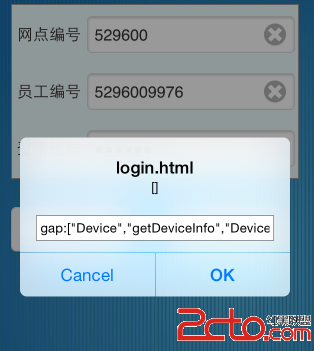
圖 2:

圖 3:

找出元凶:混進來的 Android 資源
主管也說不上原因。後來在 Stack Overflow 上找到線索,大意是「把 Android 的東西帶了進來」,說得比較模糊。我仔細翻了一遍工程,發現裡面有兩個可疑文件:

推測是這個 www 包原本給 Android 用,裡面夾帶了 Android 專屬的資源或配置,Cordova 在 iOS 上載入時找不到對應能力,於是逐層報錯彈框。把其中一個文件移出到桌面後再次執行——乾淨了,三個彈框全部消失。
運行結果
1、
2、
3、
一點總結
跨平台混合開發最常見的坑,就是「一份代碼打所有平台」的假設。Cordova 的配置、插件白名單、資源目錄結構在 iOS 與 Android 上並不相同,拿另一個平台的產物直接跑,出各種怪症狀幾乎是必然。遇到莫名其妙的彈框或報錯,第一步永遠是打開工程目錄,看看有沒有不屬於當前平台的东西。
- 上一篇文章: iOS 集成 Flurry 移動應用統計平台
- 下一篇文章: iOS 狀態欄 StateBar 文字黑白控制