
iOS 專案集成 ShareSDK:第三方登入、分享與關注
編輯:iOS 開發綜合
社交分享與第三方登入幾乎是每個 App 的標配。ShareSDK 把新浪微博、騰訊微博、QQ、QQ 空間、微信等平台的授權與分享 API 統一封裝,接入成本相當低。本文以 2.8.8 版為例,走一遍完整流程。
步驟一:下載 SDK
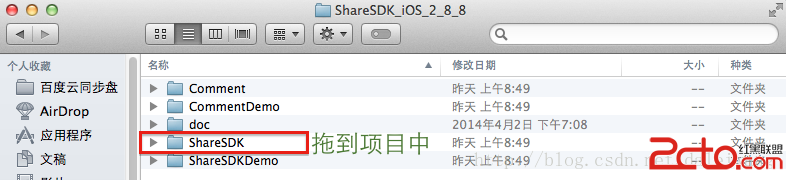
步驟二:引入所需平台庫
依實際要支援的平台勾選對應的庫,細節參考官方文檔。
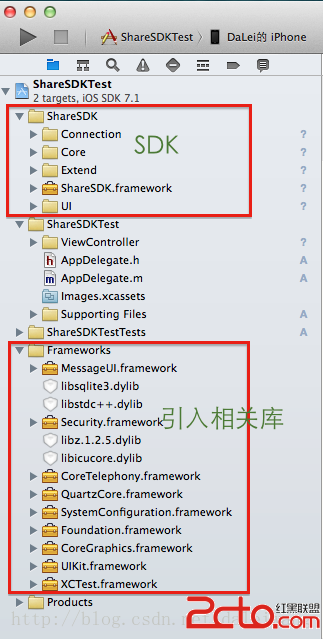
步驟三:AppDelegate 的三件事
接入工作集中在 AppDelegate:註冊 ShareSDK、註冊各平台帳號、處理 URL 回調。
//
//  AppDelegate.m
//  ShareSDKTest
//

#import "AppDelegate.h"
#import "RootViewController.h"
#import <ShareSDK/ShareSDK.h>
#import "WeiboApi.h"
#import <TencentOpenAPI/QQApiInterface.h>
#import <TencentOpenAPI/TencentOAuth.h>
#import "WXApi.h"

@implementation AppDelegate

@synthesize rootVC;

- (BOOL)application:(UIApplication *)application
didFinishLaunchingWithOptions:(NSDictionary *)launchOptions {

    self.window = [[UIWindow alloc] initWithFrame:[[UIScreen mainScreen] bounds]];
    if (self.rootVC == nil) {
        self.rootVC = [[RootViewController alloc] initWithNibName:@"RootViewController" bundle:nil];
    }
    UINavigationController *rootNav =
        [[UINavigationController alloc] initWithRootViewController:self.rootVC];
    self.window.rootViewController = rootNav;
    self.window.backgroundColor = [UIColor whiteColor];
    [self.window makeKeyAndVisible];

    // 1. 註冊 ShareSDK
    [ShareSDK registerApp:@"1a2e7ab5fb6c"];

    // 2. 註冊各平台帳號(以下 AppKey / AppSecret 需替換為自己申請的)
    // 新浪微博:https://open.weibo.com
    [ShareSDK connectSinaWeiboWithAppKey:@"3201194191"
                               appSecret:@"0334252914651e8f76bad63337b3b78f"
                             redirectUri:@"https://appgo.cn"];

    // 騰訊微博:https://dev.t.qq.com
    [ShareSDK connectTencentWeiboWithAppKey:@"801307650"
                                  appSecret:@"ae36f4ee3946e1cbb98d6965b0b2ff5c"
                                redirectUri:@"https://www.sharesdk.cn"
                                   wbApiCls:[WeiboApi class]];

    // QQ 空間:https://connect.qq.com/intro/login/
    [ShareSDK connectQZoneWithAppKey:@"100371282"
                           appSecret:@"aed9b0303e3ed1e27bae87c33761161d"
                   qqApiInterfaceCls:[QQApiInterface class]
                      tencentOAuthCls:[TencentOAuth class]];

    // 微信
    [ShareSDK connectWeChatWithAppId:@"wx4868b35061f87885"
                           wechatCls:[WXApi class]];

    // QQ
    [ShareSDK connectQQWithQZoneAppKey:@"100371282"
                   qqApiInterfaceCls:[QQApiInterface class]
                      tencentOAuthCls:[TencentOAuth class]];

    return YES;
}

#pragma mark - 微信回調

- (BOOL)application:(UIApplication *)application handleOpenURL:(NSURL *)url {
    return [ShareSDK handleOpenURL:url wxDelegate:self];
}

- (BOOL)application:(UIApplication *)application
            openURL:(NSURL *)url
  sourceApplication:(NSString *)sourceApplication
         annotation:(id)annotation {
    return [ShareSDK handleOpenURL:url
                 sourceApplication:sourceApplication
                        annotation:annotation
                        wxDelegate:self];
}

#pragma mark - WXApiDelegate

/*! @brief 收到一個來自微信的請求,第三方應用處理完後調用 sendResp 向微信發送結果 */
- (void)onReq:(BaseReq *)req {
}

/*! @brief 發送一個 sendReq 後,收到微信的回應 */
- (void)onResp:(BaseResp *)resp {
}

@end
步驟四:信息分享
- (IBAction)share:(id)sender {
    NSString *imagePath = [[NSBundle mainBundle] pathForResource:@"card" ofType:@"png"];

    // 構造分享內容
    id<ISSContent> publishContent = [ShareSDK content:@"分享內容測試"
                                        defaultContent:@"默認分享內容,沒內容時顯示"
                                               image:[ShareSDK imageWithPath:imagePath]
                                               title:@"pmmq"
                                                 url:@"https://www.sharesdk.cn"
                                         description:@"這是一條測試信息"
                                           mediaType:SSPublishContentMediaTypeNews];

    [ShareSDK showShareActionSheet:nil
                         shareList:nil
                           content:publishContent
                     statusBarTips:YES
                       authOptions:nil
                      shareOptions:nil
                            result:^(ShareType type, SSResponseState state,
                                     id<ISSPlatformShareInfo> statusInfo,
                                     id<ICMErrorInfo> error, BOOL end) {
        if (state == SSResponseStateSuccess) {
            NSLog(@"分享成功");
        } else if (state == SSResponseStateFail) {
            NSLog(@"分享失敗");
        }
    }];
}
步驟五:登入、登出、取得授權資訊、關注用戶
//
//  LoginViewController.m
//

#import "LoginViewController.h"
#import <ShareSDK/ShareSDK.h>

@interface LoginViewController ()
- (IBAction)loginWithSina:(id)sender;
- (IBAction)loginWithQQ:(id)sender;
- (IBAction)loginoutWithSina:(id)sender;
- (IBAction)loginoutWithQQ:(id)sender;
- (IBAction)guanzhuUs:(id)sender;
- (void)reloadStateWithType:(ShareType)type;
@end

@implementation LoginViewController

- (IBAction)loginWithSina:(id)sender {
    [ShareSDK getUserInfoWithType:ShareTypeSinaWeibo
                     authOptions:nil
                          result:^(BOOL result, id<ISSPlatformUser> userInfo,
                                   id<ICMErrorInfo> error) {
        if (result) {
            // 登入成功後判斷該用戶 ID 是否已在自己的數據庫中:
            // 有則直接登入,沒有則建立新用戶
            [self reloadStateWithType:ShareTypeSinaWeibo];
        }
    }];
}

- (IBAction)loginWithQQ:(id)sender {
    [ShareSDK getUserInfoWithType:ShareTypeQQSpace
                     authOptions:nil
                          result:^(BOOL result, id<ISSPlatformUser> userInfo,
                                   id<ICMErrorInfo> error) {
        if (result) {
            [self reloadStateWithType:ShareTypeQQSpace];
        }
    }];
}

- (IBAction)loginoutWithSina:(id)sender {
    [ShareSDK cancelAuthWithType:ShareTypeSinaWeibo];
    [self reloadStateWithType:ShareTypeSinaWeibo];
}

- (IBAction)loginoutWithQQ:(id)sender {
    [ShareSDK cancelAuthWithType:ShareTypeQQSpace];
    [self reloadStateWithType:ShareTypeQQSpace];
}

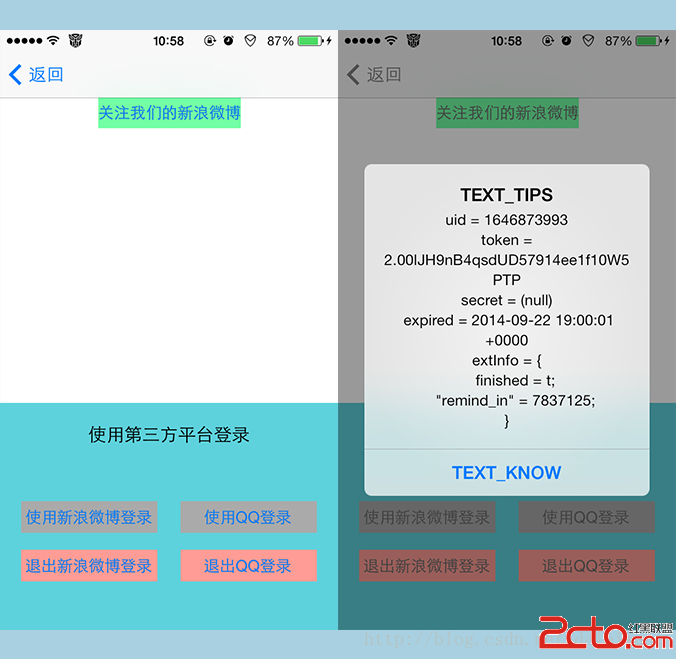
// 顯示授權資訊,包括授權 ID、有效期等
- (void)reloadStateWithType:(ShareType)type {
    id<ISSPlatformCredential> credential = [ShareSDK getCredentialWithType:type];

    UIAlertView *alertView =
        [[UIAlertView alloc] initWithTitle:NSLocalizedString(@"TEXT_TIPS", @"提示")
                                   message:[NSString stringWithFormat:
                                            @"uid = %@ token = %@ secret = %@ expired = %@ extInfo = %@",
                                            [credential uid],
                                            [credential token],
                                            [credential secret],
                                            [credential expired],
                                            [credential extInfo]]
                                  delegate:nil
                         cancelButtonTitle:NSLocalizedString(@"TEXT_KNOW", @"知道了")
                         otherButtonTitles:nil];
    [alertView show];
}

// 關注用戶
- (IBAction)guanzhuUs:(id)sender {
    [ShareSDK followUserWithType:ShareTypeSinaWeibo   // 平台類型
                          field:@"ShareSDK"          // 關注用戶的名稱或 ID
                      fieldType:SSUserFieldTypeName  // 指定上一個參數是名稱還是 ID
                    authOptions:nil                   // 授權選項
                   viewDelegate:nil                   // 授權視圖委託
                         result:^(SSResponseState state,
                                  id<ISSPlatformUser> userInfo,
                                  id<ICMErrorInfo> error) {
        if (state == SSResponseStateSuccess) {
            NSLog(@"關注成功");
        } else if (state == SSResponseStateFail) {
            NSLog(@"關注失敗:%@", error.errorDescription);
        }
    }];
}

@end
上述 reloadStateWithType: 中的授權資訊判斷,可以直接在 App 啟動時呼叫:若 credential 不為空且未過期,就能幫用戶自動完成登入,省去重複授權。
步驟六:SSO 授權與 URL Scheme
第三方登入通常有兩種形態:一種是彈出 WebView 載入微博或 QQ 的網頁授權頁;另一種是跳轉到本機已安裝的微博/QQ App 完成授權,也就是 SSO。後者體驗明顯更好——用戶不需要在 WebView 裡重新輸入帳號密碼。
SSO 需要在 Info.plist 中配置對應平台的 URL Scheme,並在 AppDelegate 實作回調方法(即步驟三的 handleOpenURL: 系列)。
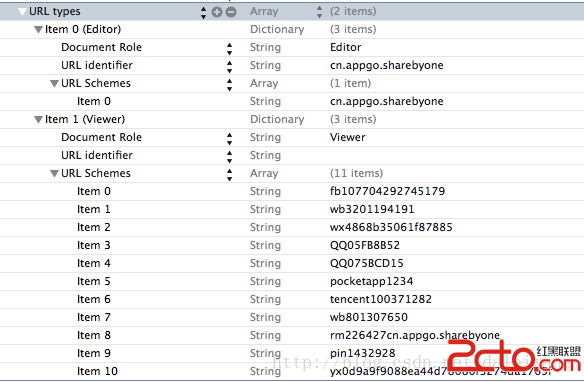
步驟七:實測畫面
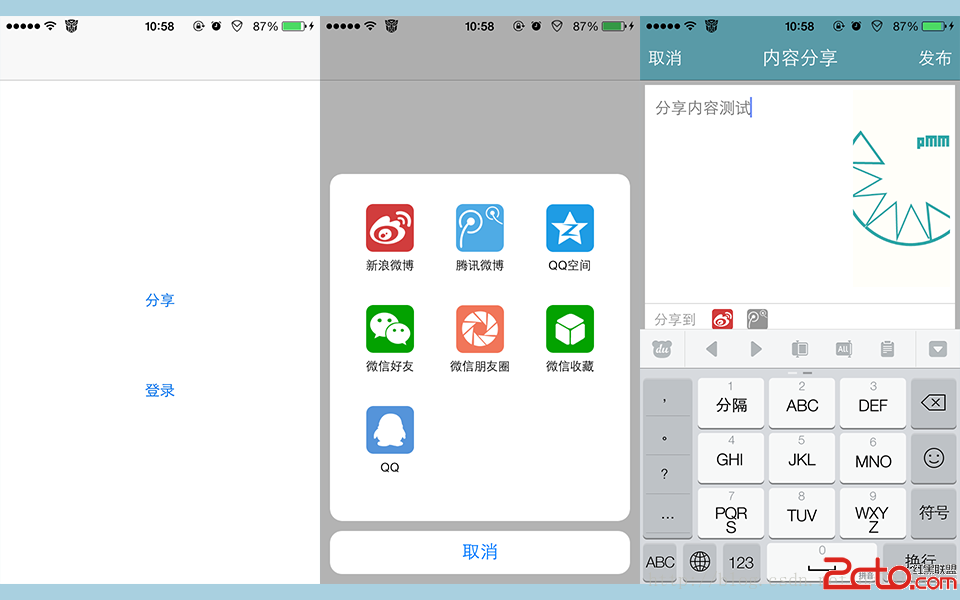
最後提醒:文中出現的 AppKey、AppSecret 均為示範用途,正式上線務必替換成自己申請的憑證,並避免把 AppSecret 硬編碼在前端可還原的位置。