
iOS 開發實戰:封裝一個圓形展開的下拉菜單
編輯:iOS 開發綜合
效果預覽
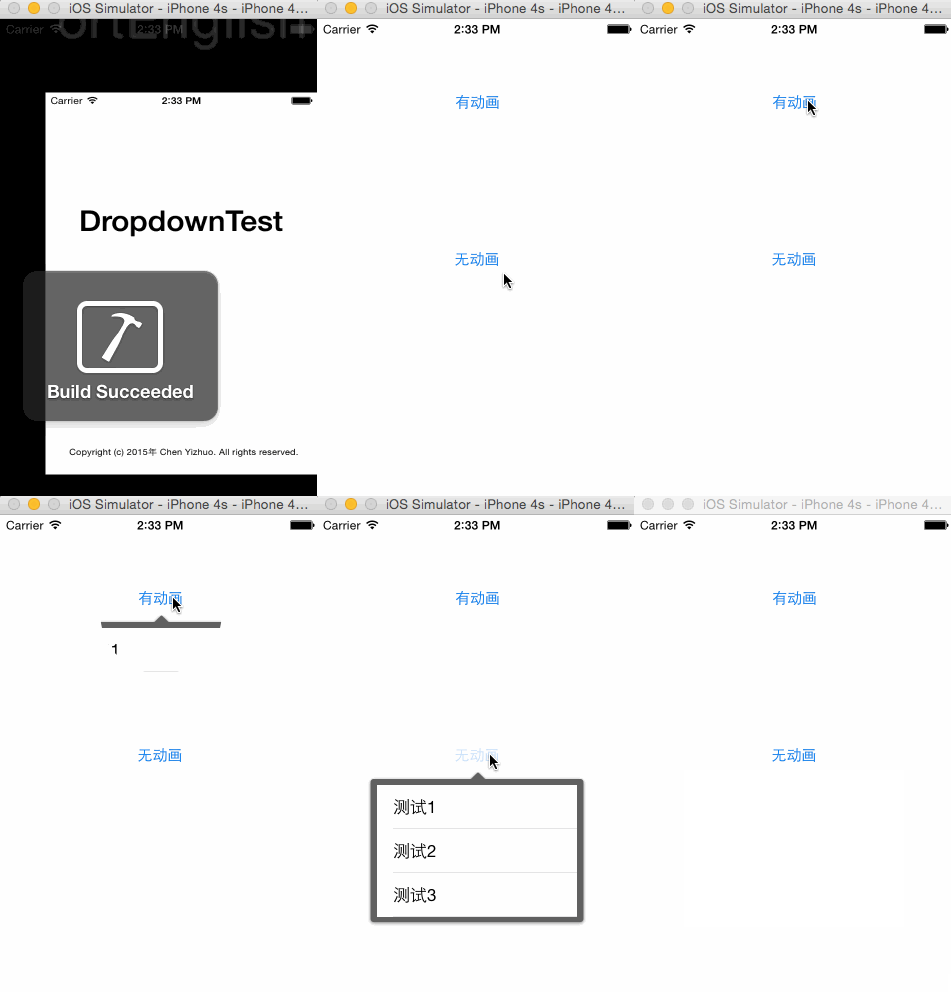
實作思路
1、圖片的拉伸
UIImage *image = [UIImage imageNamed:@"popover_background"];
image = [image resizableImageWithCapInsets:UIEdgeInsetsMake(24, 0, 24, 0) resizingMode:UIImageResizingModeStretch];
resizableImageWithCapInsets:resizingMode: 方法的第二個參數用來決定調整模式,分為平鋪(Tile)與拉伸(Stretch)兩種。這裡採用拉伸,可以保證帶箭頭的背景框能依照內容大小正確地將其包圍。
2、圓形過渡動畫
透過 UIBezierPath 建立一個從小圓到大圓的遮罩動畫,營造出菜單由中心展開的效果:
CGRect originalRect = CGRectMake(point.x, point.y, 1, 1);
self.startPath = [UIBezierPath bezierPathWithOvalInRect:originalRect];

CGPoint extremePoint = CGPointMake(point.x, point.y + contentView.frame.size.height);
CGFloat radius = sqrtf(extremePoint.x * extremePoint.x + extremePoint.y * extremePoint.y);
UIBezierPath *endPath = [UIBezierPath bezierPathWithOvalInRect:CGRectInset(originalRect, -radius, -radius)];

self.shapeLayer = [CAShapeLayer layer];
self.shapeLayer.path = endPath.CGPath;
self.layer.mask = self.shapeLayer;

if (animated) {
    CABasicAnimation *animation = [CABasicAnimation animationWithKeyPath:@"path"];
    animation.fromValue = (__bridge id)(self.startPath.CGPath);
    animation.toValue = (__bridge id)(endPath.CGPath);
    animation.duration = 0.3f;
    [self.shapeLayer addAnimation:animation forKey:@"begin"];
}
3、視圖層級與其他細節
① 視圖層級關係:主要有兩個控件,contentView 是使用者傳入的 view(通常是一個 tableview),需自行規範其寬高;另一個是作為背景的 imageView,同時充當 contentView 的容器。整個控件本身是一個背景透明的 View,作為 mask 使用——當菜單展開時,使用者點擊背景即可收回菜單。使用者傳入 contentView 後,會重設其原點並更新 imageView 大小使其包圍整個 contentView,最後將整體加到 window 中,確保菜單永遠位於最上層。
② 坐標系轉換:當使用者傳入一個控件來決定菜單顯示位置時,會用到坐標系轉換。[viewA convertRect:viewA.bounds toView:viewB] 可取得 viewA 在 viewB 坐標系下的 bounds。
③ 在 CAAnimationDelegate 中區分多個動畫物件:添加動畫時先為其設置標誌 key,例如 [self.shapeLayer addAnimation:animation forKey:@"end"],再在代理方法中比對即可。
- (void)animationDidStop:(CAAnimation *)anim finished:(BOOL)flag {
    if (anim == [self.shapeLayer animationForKey:@"end"]) {
        self.shapeLayer.path = self.startPath.CGPath;
        [self removeFromSuperview];
    }
}
透過 CAShapeLayer 的圓形遮罩動畫搭配背景圖拉伸,就能封裝出一個既美觀又可重複使用的下拉菜單控件。
- 上一篇文章: iOS 開發踩坑筆記:載入 xib 常見問題與解法
- 下一篇文章: iOS 數據存儲入門:沙盒機制與常見存儲方式