
iOS 本地驗證碼實作:用 CoreGraphics 手繪 CaptchaView
編輯:iOS 開發綜合
註冊、登入、支付確認這些環節經常需要驗證碼。傳輸簡訊的動態碼通常借助第三方服務,而「點擊圖片換一張」的圖形驗證碼則完全可以在本地繪製出來。本文示範如何封裝一個可點擊刷新的 CaptchaView。
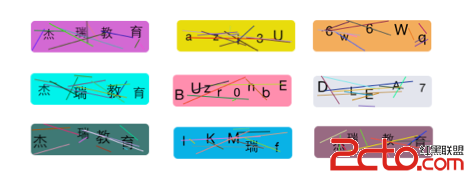
一、引入 CoreGraphics.framework
手繪依賴 CoreGraphics,記得加入框架並引入頭檔。


二、封裝 CaptchaView
驗證碼元件繼承自 UIView,使用時直接放進畫面即可。
CaptchaView.h
#import <UIKit/UIKit.h>

@interface CaptchaView : UIView
@property (nonatomic, retain) NSArray        *changeArray;  // 字符素材
@property (nonatomic, retain) NSMutableString *changeString; // 驗證碼字串
@end
CaptchaView.m
#import "CaptchaView.h"

#define kRandomColor [UIColor colorWithRed:arc4random() % 256 / 256.0 \
                                     green:arc4random() % 256 / 256.0 \
                                      blue:arc4random() % 256 / 256.0 \
                                     alpha:1.0];
#define kLineCount 6
#define kLineWidth 1.0
#define kCharCount 6
#define kFontSize  [UIFont systemFontOfSize:arc4random() % 5 + 15]

@implementation CaptchaView

@synthesize changeString, changeArray;

- (instancetype)initWithFrame:(CGRect)frame {
    if (self = [super initWithFrame:frame]) {
        self.layer.cornerRadius = 5.0;   // 圓角
        self.layer.masksToBounds = YES;
        self.backgroundColor = kRandomColor;
        [self changeCaptcha];            // 產生第一組驗證碼
    }
    return self;
}

#pragma mark - 更換驗證碼
- (void)changeCaptcha {
    // 全部可選字符,也可替換為中文
    self.changeArray = [[NSArray alloc] initWithObjects:
        @"0",@"1",@"2",@"3",@"4",@"5",@"6",@"7",@"8",@"9",
        @"A",@"B",@"C",@"D",@"E",@"F",@"G",@"H",@"I",@"J",@"K",@"L",@"M",
        @"N",@"O",@"P",@"Q",@"R",@"S",@"T",@"U",@"V",@"W",@"X",@"Y",@"Z",
        @"a",@"b",@"c",@"d",@"e",@"f",@"g",@"h",@"i",@"j",@"k",@"l",@"m",
        @"n",@"o",@"p",@"q",@"r",@"s",@"t",@"u",@"v",@"w",@"x",@"y",@"z",
        @"傑",@"瑞",@"教",@"育", nil];

    // 已知容量時用 initWithCapacity 可避免反覆配置記憶體
    self.changeString = [[NSMutableString alloc] initWithCapacity:kCharCount];

    // 隨機挑字並拼接
    for (int i = 0; i < kCharCount; i++) {
        NSInteger index = arc4random() % ([self.changeArray count] - 1);
        NSString *getStr = [self.changeArray objectAtIndex:index];
        [self.changeString appendString:getStr];
    }
    // 若改由後端下發驗證碼,在此處賦值即可
}

#pragma mark - 點擊刷新
- (void)touchesBegan:(NSSet *)touches withEvent:(UIEvent *)event {
    [self changeCaptcha];
    [self setNeedsDisplay];   // 觸發 drawRect:
}

#pragma mark - 繪製
- (void)drawRect:(CGRect)rect {
    [super drawRect:rect];

    self.backgroundColor = kRandomColor;

    NSString *text = self.changeString;
    CGSize cSize = [@"S" sizeWithAttributes:@{NSFontAttributeName:[UIFont systemFontOfSize:20]}];
    int width  = rect.size.width  / text.length - cSize.width;
    int height = rect.size.height - cSize.height;

    // 逐字繪製,每個字的位置與大小都隨機
    float pX, pY;
    for (int i = 0; i < text.length; i++) {
        pX = arc4random() % width + rect.size.width / text.length * i;
        pY = arc4random() % height;
        NSString *textC = [NSString stringWithFormat:@"%C", [text characterAtIndex:i]];
        [textC drawAtPoint:CGPointMake(pX, pY) withAttributes:@{NSFontAttributeName:kFontSize}];
    }

    // 取得目前繪圖上下文
    CGContextRef context = UIGraphicsGetCurrentContext();
    CGContextSetLineWidth(context, kLineWidth);

    // 畫出隨機干擾線
    for (int i = 0; i < kLineCount; i++) {
        CGContextSetStrokeColorWithColor(context, [kRandomColor CGColor]);
        pX = arc4random() % (int)rect.size.width;
        pY = arc4random() % (int)rect.size.height;
        CGContextMoveToPoint(context, pX, pY);
        pX = arc4random() % (int)rect.size.width;
        pY = arc4random() % (int)rect.size.height;
        CGContextAddLineToPoint(context, pX, pY);
        CGContextStrokePath(context);
    }
}

@end
三、在介面上使用並驗證
ViewController.m
#import "ViewController.h"
#import "CaptchaView.h"

@interface ViewController () <UITextFieldDelegate, UIAlertViewDelegate> {
    CaptchaView *_captchaView;
    UITextField *_input;
}
@end

@implementation ViewController

- (void)viewDidLoad {
    [super viewDidLoad];

    // 驗證碼視圖
    _captchaView = [[CaptchaView alloc] initWithFrame:CGRectMake(20, 40, 150, 40)];
    [self.view addSubview:_captchaView];

    // 提示文字
    UILabel *label = [[UILabel alloc] initWithFrame:CGRectMake(190, 40, 100, 40)];
    label.text = @"點擊圖片換驗證碼";
    label.font = [UIFont systemFontOfSize:12];
    label.textColor = [UIColor grayColor];
    [self.view addSubview:label];

    // 輸入框
    _input = [[UITextField alloc] initWithFrame:CGRectMake(20, 100, 150, 40)];
    _input.layer.borderColor = [UIColor lightGrayColor].CGColor;
    _input.layer.borderWidth = 2.0;
    _input.layer.cornerRadius = 5.0;
    _input.font = [UIFont systemFontOfSize:21];
    _input.placeholder = @"請輸入驗證碼!";
    _input.clearButtonMode = UITextFieldViewModeWhileEditing;
    _input.backgroundColor = [UIColor clearColor];
    _input.textAlignment = NSTextAlignmentCenter;
    _input.returnKeyType = UIReturnKeyDone;
    _input.delegate = self;
    [self.view addSubview:_input];
}

#pragma mark - 點擊 return
- (BOOL)textFieldShouldReturn:(UITextField *)textField {
    if ([_input.text isEqualToString:_captchaView.changeString]) {
        UIAlertView *alert = [[UIAlertView alloc] initWithTitle:@"恭喜您 ^o^"
                                                        message:@"驗證成功"
                                                       delegate:self
                                              cancelButtonTitle:@"OK"
                                              otherButtonTitles:nil, nil];
        [alert show];
    } else {
        // 驗證失敗:讓驗證碼與輸入框左右晃動作為回饋
        CAKeyframeAnimation *anim = [CAKeyframeAnimation animationWithKeyPath:@"transform.translation.x"];
        anim.repeatCount = 1;
        anim.values = @[@-20, @20, @-20];
        [_captchaView.layer addAnimation:anim forKey:nil];
        [_input.layer addAnimation:anim forKey:nil];
    }
    return YES;
}

#pragma mark - 警告框回調
- (void)alertView:(UIAlertView *)alertView clickedButtonAtIndex:(NSInteger)buttonIndex {
    if (buttonIndex == 0) {
        _input.text = @"";
        [_input resignFirstResponder];
    }
}

@end
想更進一步理解細節,建議把範碼拉下來實際跑一次,觀察每個字符的位置分佈與干擾線密度是否合適。