
iOS 自繪座標系與折線圖表完整實作
編輯:iOS 開發綜合
先看成果
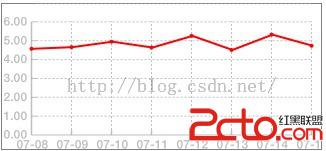
本文要示範的是完全手繪的座標系與折線圖,不依賴任何第三方圖表庫。核心都在 drawRect: 這個方法裡。
實作步驟
新建一個 UIView 子類,在裡面覆寫 drawRect:。整體分成幾個區塊:畫矩形邊框、算刻度間距、畫 X/Y 軸與刻度文字、畫虛線網格、最後把資料點連成折線並標上圓點。
#define PI 3.1415926

// Only override drawRect: if you perform custom drawing.
// An empty implementation adversely affects performance during animation.
- (void)drawRect:(CGRect)rect {
    // 取得當前繪圖環境
    CGContextRef context = UIGraphicsGetCurrentContext();
    // 保存目前狀態,方便後續還原
    CGContextSaveGState(context);

    // ---------- 1. 整理資料 ----------
    for (int i = 0; i < self.dataArray.count; i++) {
        [x_array    addObject:self.dataArray[i][@"xxx"]];
        [y_array    addObject:self.dataArray[i][@"yyyy"]];
        [rate_array addObject:self.dataArray[i][@"rrr"]];
    }

    // ---------- 2. 畫外框 ----------
    CGRect Rectangle = rect;
    UIBezierPath *path = [UIBezierPath bezierPathWithRect:Rectangle];
    [path stroke];

    // ---------- 3. 版面常數 ----------
    float fdistance_left_frame   = 30.0;  // 左側留給 Y 軸刻度文字的寬度
    float fdistance_bottom_frame = 15.0;  // 底部留白
    float fdistance_right_frame  = 10.0;  // 右側留白

    float fdraw_line_height = rect.size.height - fdistance_bottom_frame;
    float fdraw_line_width  = rect.size.width - fdistance_left_frame
                              - fdistance_right_frame;

    float f_x_axis_scale_number = 7.0;    // Y 軸(數值軸)大刻度數
    float f_y_axis_scale_number = 7.0;    // X 軸(日期軸)刻度數

    float x_unit_scale = 0.0;             // 單一刻度跨度
    float y_unit_scale = 0.0;

    // ---------- 4. 計算原點 ----------
    float left_bottom_x = rect.origin.x + fdistance_left_frame;
    float left_bottom_y = rect.origin.y + fdraw_line_height;
    CGPoint point_origin = CGPointMake(left_bottom_x, left_bottom_y);

    // ---------- 5. 畫數值軸與刻度文字 ----------
    UIBezierPath *x_startPath = [UIBezierPath bezierPath];
    [x_startPath setLineWidth:1.5];
    [x_startPath moveToPoint:point_origin];

    UIFont *font = [UIFont boldSystemFontOfSize:12.0];

    for (int x = 0; x < f_x_axis_scale_number; x++) {
        x_unit_scale = fdraw_line_height / f_x_axis_scale_number;
        float x_unit_distance_scale = x * x_unit_scale;

        // 左側刻度文字
        float text_centerY  = left_bottom_y - x_unit_distance_scale;
        CGRect x_axis_rect  = CGRectMake(2, text_centerY - 8,
                                        fdistance_left_frame, 16);
        CGContextSetLineWidth(context, 1.0);
        CGContextSetRGBFillColor(context, 0.5, 0.5, 0.5, 0.5);
        NSString *x_strtext = [NSString stringWithFormat:@"%zi.00", x];
        [x_strtext drawInRect:x_axis_rect withFont:font];

        if (0 == x) {
            // 原點處不再畫短刻度,直接畫一條橫貫的軸線
            CGContextSetRGBStrokeColor(context, 0.5, 0.5, 0.5, 0.5);
            CGContextMoveToPoint(context, left_bottom_x, text_centerY);
            CGContextAddLineToPoint(context, left_bottom_x + fdraw_line_width,
                                    text_centerY);
            CGContextStrokePath(context);

            // ---------- 6. 畫日期軸與刻度文字 ----------
            UIBezierPath *y_startPath = [UIBezierPath bezierPath];
            [y_startPath setLineWidth:1.5];
            [y_startPath moveToPoint:point_origin];

            for (int y = 0; y < f_y_axis_scale_number + 1; y++) {
                y_unit_scale = fdraw_line_width / f_y_axis_scale_number;
                float y_unit_distance_scale = y * y_unit_scale;

                [y_startPath addLineToPoint:
                    CGPointMake(left_bottom_x + y_unit_distance_scale,
                                left_bottom_y)];

                // 日期文字
                CGRect y_axis_rect = CGRectMake(
                    left_bottom_x + y_unit_distance_scale - 40,
                    left_bottom_y + 2, 80, 16);
                CGContextSetLineWidth(context, 1.5);
                CGContextSetRGBFillColor(context, 0.5, 0.5, 0.5, 0.5);

                // 日期資料是倒序排列的,這裡反向取值
                NSString *y_strtext = [y_array
                    objectAtIndex:f_y_axis_scale_number - y];
                [y_strtext drawInRect:y_axis_rect withFont:font];

                if (y != 0) {
                    // 短刻度線
                    float fscale_width = 5.0;
                    CGContextSetRGBStrokeColor(context, 0.5, 0.5, 0.5, 0.5);
                    CGContextMoveToPoint(context,
                        left_bottom_x + y_unit_distance_scale, left_bottom_y);
                    CGContextAddLineToPoint(context,
                        left_bottom_x + y_unit_distance_scale,
                        left_bottom_y - fscale_width);
                    CGContextStrokePath(context);
                }
            }
            [y_startPath stroke];
        } else {
            // 其餘數值刻度的小短線
            float fscale_width = 5.0;
            CGContextSetRGBStrokeColor(context, 0.5, 0.5, 0.5, 0.5);
            CGContextMoveToPoint(context, left_bottom_x, text_centerY);
            CGContextAddLineToPoint(context, left_bottom_x + fscale_width,
                                    text_centerY);
            CGContextStrokePath(context);
        }
    }
    [x_startPath stroke];

    // ---------- 7. 虛線網格 ----------
    CGFloat dashArray[] = {2.0, 2.0};
    CGContextSetLineDash(context, 0, dashArray, 2);
    CGContextSetRGBStrokeColor(context, 0.5, 0.5, 0.5, 0.5);

    for (int x = 1; x < f_x_axis_scale_number + 1; x++) {
        float offset = x * x_unit_scale;
        CGContextMoveToPoint(context, left_bottom_x + 5,
                             left_bottom_y - offset);
        CGContextAddLineToPoint(context, left_bottom_x + fdraw_line_width,
                                left_bottom_y - offset);
    }
    for (int y = 1; y < f_y_axis_scale_number + 1; y++) {
        float offset = y * y_unit_scale;
        CGContextMoveToPoint(context, point_origin.x + offset,
                             point_origin.y - 5);
        CGContextAddLineToPoint(context, point_origin.x + offset,
                                point_origin.y - fdraw_line_height
                                + fdistance_bottom_frame + 3);
    }
    CGContextStrokePath(context);

    // ---------- 8. 畫折線 ----------
    CGContextSetLineDash(context, 0.0, NULL, 0);   // 還原為實線
    CGContextSetLineWidth(context, 1.0);
    CGContextSetRGBStrokeColor(context, 1.0, 0, 0, 0.5);

    for (int a = 0; a < x_array.count; a++) {
        float fdata = [[x_array objectAtIndex:x_array.count - 1 - a] floatValue];
        CGPoint data_point = CGPointMake(point_origin.x + a * y_unit_scale,
                                        point_origin.y - fdata * x_unit_scale);
        if (0 == a) {
            CGContextMoveToPoint(context, data_point.x, data_point.y);
        } else {
            CGContextAddLineToPoint(context, data_point.x, data_point.y);
        }
    }
    CGContextStrokePath(context);

    // ---------- 9. 畫資料點圓標 ----------
    CGContextSetRGBStrokeColor(context, 1.0, 0.0, 0.0, 1.0);
    CGContextSetLineWidth(context, 2.0);
    // CGContextAddArc(context, x, y, radius, startAngle, endAngle, clockwise)
    // 1 弧度 = 180° / π ≈ 57.3°
    // clockwise:0 為順時針,1 為逆時針
    for (int a = 0; a < x_array.count; a++) {
        float fdata = [[x_array objectAtIndex:x_array.count - 1 - a] floatValue];
        CGPoint data_point = CGPointMake(point_origin.x + a * y_unit_scale,
                                        point_origin.y - fdata * x_unit_scale);
        CGContextAddArc(context, data_point.x, data_point.y, 2, 0, 2 * PI, 0);
    }
    CGContextDrawPath(context, kCGPathStroke);
}
幾個實作要點
- 刻度間距一定要在迴圈外算好。原範例把
x_unit_scale的計算放在迴圈內,每次都重算同一個值,雖不影響結果卻是無謂的開銷。 - 文字要留出固定高度。這裡用 16pt 的行高配合 12pt 字級,實務上可依設計稿調整。
- 資料是倒序的。Y 軸日期由下往上遞增,因此取資料時要用
count - 1 - a反向索引,這一步很容易出錯。 - 記得還原 LineDash。畫完虛線網格後必須用
CGContextSetLineDash(context, 0.0, NULL, 0)復位,否則折線也會變成虛線。
- 上一篇文章: iOS 設計模式筆記:橋接模式(Bridge)實作解析
- 下一篇文章: iOS 輸入框聚焦時隨鍵盤自動上移