
iOS Quartz2D 實作:手動裁剪圖片並存入相簿
編輯:iOS 開發綜合
要做出什麼
在畫面上拖曳滑鼠(手指)畫出一個矩形框,放開後跳出提示視窗詢問是否儲存,選擇「是」就把框內的區塊裁切出來存進系統相簿,再到相簿中確認結果。
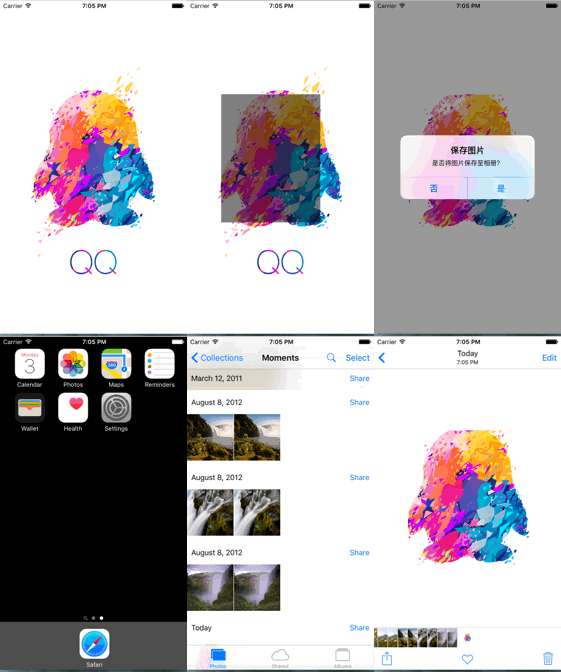
整體思路
- 在控制器的 view 上放一個 UIImageView 顯示原圖
- 掛上 pan 手勢,邊拖邊繪製代表裁切範圍的半透明矩形
- 手勢結束時,開啟一張與裁切框等大的位圖上下文
- 用 UIBezierPath 的 addClip 限制繪圖範圍,再把圖層渲染進去
- 從上下文中取出 UIImage,透過 alertView 詢問是否存入相簿
實作步驟
一、準備 imageView 與裁切框屬性
 @property (weak, nonatomic) IBOutlet UIImageView *imageView;
@property (nonatomic, weak) UIView *clipView;
二、懶加載建立裁切框
 - (UIView *)clipView {
    if (_clipView == nil) {
        UIView *view = [[UIView alloc] init];
        _clipView = view;
        view.backgroundColor = [UIColor blackColor];
        view.alpha = 0.5;                 // 半透明才能看到底下的圖
        [self.view addSubview:_clipView]; // 此時尚未設 frame,所以看不見
    }
    return _clipView;
}
三、用 pan 手勢追蹤矩形範圍
 UIPanGestureRecognizer *pan = [[UIPanGestureRecognizer alloc] initWithTarget:self action:@selector(pan:)];
[self.view addGestureRecognizer:pan];
 - (void)pan:(UIPanGestureRecognizer *)pan {
    CGPoint endPoint = CGPointZero;

    if (pan.state == UIGestureRecognizerStateBegan) {
        self.startPoint = [pan locationInView:self.view];   // 記住起點
    } else if (pan.state == UIGestureRecognizerStateChanged) {
        endPoint = [pan locationInView:self.view];          // 動態更新終點
        CGFloat w = endPoint.x - self.startPoint.x;
        CGFloat h = endPoint.y - self.startPoint.y;
        self.clipView.frame = CGRectMake(self.startPoint.x, self.startPoint.y, w, h);
    } else if (pan.state == UIGestureRecognizerStateEnded) {
        // 開啟與裁切框等大的位圖上下文
        UIGraphicsBeginImageContextWithOptions(self.imageView.bounds.size, NO, 0);

        // 建立封閉路徑並限制繪圖範圍
        UIBezierPath *path = [UIBezierPath bezierPathWithRect:self.clipView.frame];
        [path addClip];

        // 把圖層渲染進目前上下文
        CGContextRef context = UIGraphicsGetCurrentContext();
        [self.imageView.layer renderInContext:context];

        UIImage *image = UIGraphicsGetImageFromCurrentImageContext();
        UIGraphicsEndImageContext();

        [self.clipView removeFromSuperview];
        self.clipView = nil;
        self.imageView.image = image;

        UIAlertView *alertView = [[UIAlertView alloc] initWithTitle:@"保存圖片"
            message:@"是否將圖片保存至相冊?" delegate:self
            cancelButtonTitle:@"否" otherButtonTitles:@"是", nil];
        [alertView show];
    }
}
四、依使用者選擇決定是否寫入相簿
 - (void)alertView:(UIAlertView *)alertView clickedButtonAtIndex:(NSInteger)buttonIndex {
    if (buttonIndex == 1) {   // 點了「是」
        UIImageWriteToSavedPhotosAlbum(self.imageView.image, nil, nil, nil);
    }
}
若要更嚴謹,可以把第三個參數換成 callback 的 selector,在 image:didFinishSavingWithError:contextInfo: 中依 error 判斷是否真的存成功,再給使用者提示。
- 上一篇文章: iOS 手勢識別器全解:點擊、長按、旋轉、捏合、拖拽與掃動
- 下一篇文章: iOS 常用控件速覽:GIF 動畫、毛玻璃、音頻播放與滑桿控制