
UIImageView 幀動畫實作:讓圖片序列動起來
編輯:iOS 開發綜合
UIImageView 天生就支援幀動畫,只要餵它一個 UIImage 陣列、設定播放次數與每幀間隔,再 startAnimating 就完成了。這比自己在 timer 裡切圖簡單太多,是播放序列幀的首選方案。
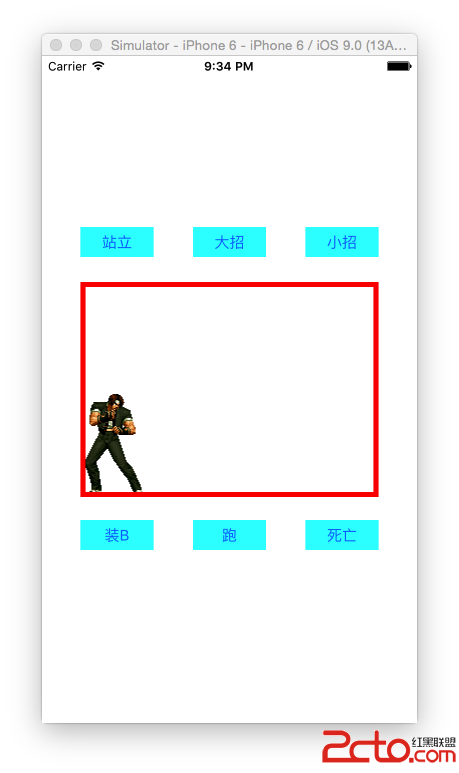


播放方法:一個函式搞定所有動畫
- (void)play:(NSString *)filenamePrefix count:(int)count {
    // 1. 載入所有的動畫圖片
    NSMutableArray *images = [NSMutableArray array];
    for (int i = 1; i <= count; i++) {
        NSString *filename = [NSString stringWithFormat:@"%@_%d", filenamePrefix, i];
        NSString *file = [[NSBundle mainBundle] pathForResource:filename ofType:@"png"];
        UIImage *image = [UIImage imageWithContentsOfFile:file];
        [images addObject:image];
    }

    // 2. 設定動畫圖片
    self.imageView.animationImages = images;

    // 3. 設定播放次數:站樁是無限次(0),其餘播一次
    self.imageView.animationRepeatCount =
        [filenamePrefix isEqualToString:@"stand"] ? 0 : 1;

    // 4. 設定靜態底圖(動畫未啟動時顯示的那一張)
    self.imageView.image = [UIImage imageNamed:@"stand_1"];

    // 5. 設定動畫總時長
    self.imageView.animationDuration = count * 0.04;

    // 6. 開始播放
    [self.imageView startAnimating];

    // 站樁是無限循環,不必安排後續
    if ([filenamePrefix isEqualToString:@"stand"]) return;

    // 7. 播完後回到站樁姿態
    [self performSelector:@selector(stand) withObject:nil afterDelay:self.imageView.animationDuration];
}
順帶播放音效
#import <AVFoundation/AVFoundation.h>

@property (strong, nonatomic) AVPlayer *player;

// 1. 取得音檔 URL(URL 就是檔案路徑物件)
NSURL *url = [[NSBundle mainBundle] URLForResource:@"dazhao" withExtension:@"mp3"];

// 2. 建立播放器
self.player = [AVPlayer playerWithURL:url];

// 3. 播放
[self.player play];
完整檢視器:以拳皇角色為例
#import "ViewController.h"
#import <AVFoundation/AVFoundation.h>

@interface ViewController ()
@property (weak, nonatomic) IBOutlet UIImageView *imageView;
@property (nonatomic, strong) AVPlayer *player;
@end

@implementation ViewController

- (void)viewDidLoad {
    [super viewDidLoad];

    // 加上紅色邊框
    CALayer *layer = [self.imageView layer];
    layer.borderColor = [UIColor redColor].CGColor;
    layer.borderWidth = 5.0f;

    [self stand];
}

#pragma mark - 各個動作
- (IBAction)stand { [self play:@"stand" count:10]; }
- (IBAction)dead { [self play:@"dead"  count:23]; }
- (IBAction)run  { [self play:@"run"   count:6];  }

// 小招:三段動畫串接,每段播完再播下一段
- (IBAction)xiaozhao {
    [self play:@"xiaozhao1" count:20];
    [self playMusic:@"xiaozhao1"];
    [self performSelector:@selector(xiaozhao2) withObject:nil afterDelay:20 * 0.06];
}

- (IBAction)dazhao {
    [self play:@"dazhao" count:87];
    [self playMusic:@"dazhao"];
}

- (IBAction)install_b { [self play:@"install_b" count:29]; }

#pragma mark - 續播
- (void)xiaozhao2 {
    [self play:@"xiaozhao2" count:35];
    [self playMusic:@"xiaozhao2"];
    [self performSelector:@selector(xiaozhao3) withObject:nil afterDelay:35 * 0.06];
}

- (void)xiaozhao3 {
    [self play:@"xiaozhao3" count:39];
    [self playMusic:@"xiaozhao3"];
}

#pragma mark - 音樂
- (void)playMusic:(NSString *)music {
    NSURL *url = [[NSBundle mainBundle] URLForResource:music withExtension:@"mp3"];
    self.player = [AVPlayer playerWithURL:url];
    [self.player play];
}

#pragma mark - 播放動畫
- (void)play:(NSString *)preFixName count:(int)count {
    NSMutableArray *images = [NSMutableArray array];
    for (int i = 1; i <= count; i++) {
        NSString *fileName = [NSString stringWithFormat:@"%@_%d", preFixName, i];
        NSString *name = [[NSBundle mainBundle] pathForResource:fileName ofType:@"png"];
        UIImage *image = [UIImage imageWithContentsOfFile:name];
        [images addObject:image];
    }

    self.imageView.animationImages = images;
    self.imageView.image = [UIImage imageNamed:@"stand_1"];
    self.imageView.animationRepeatCount =
        [preFixName isEqualToString:@"stand"] ? 0 : 1;
    self.imageView.animationDuration = count * 0.06;
    [self.imageView startAnimating];

    if ([preFixName isEqualToString:@"stand"]) return;
    [self performSelector:@selector(stand) withObject:nil afterDelay:count * 0.06];
}

@end
幾個實務上的建議
- 用 imageNamed 還是 imageWithContentsOfFile:前者會走系統的圖片快取,同一張圖重複載入較快;後者每次都從檔案系統讀,較適合大量一次性圖片。動畫幀通常重複播放,用
imageNamed:通常更好。 - 檔案命名假設太多:程式碼假設圖片一律是
前綴_1.png到前綴_count.png連續編號。若某張缺號,imageWithContentsOfFile:會得到 nil 而被加入陣列,播放時可能整段中斷。建議加入 nil 檢查。 - 延遲串接靠 performSelector:這種「播完再播下一段」的寫法很直觀,但若使用者在動畫途中又點了別的動作,多個 pending 的 performSelector 會互相干擾。實務上應在啟動新動畫前用
cancelPreviousPerformRequestsWithTarget:selector:object:清掉舊的排程。 - 記憶體:87 幀的 PNG 全部解成 UIImage 放在陣列裡,佔用量相當可觀。若幀數多,建議改用
SpriteKit的 texture atlas,或把序列圖打包成SpriteSheet/使用CAKeyframeAnimation搭配少量圖。 - 動畫時長寫法:
count * 0.04是「總時長」而不是每幀間隔——animationDuration代表整段動畫播放完所需的秒數,系統會用它除以幀數算出每幀時間。這點容易誤解。