
iOS 多執行緒(二):用 NSOperation 與 NSOperationQueue 組織任務
編輯:iOS 開發綜合
上一篇談的是 GCD,這篇換成 NSOperation。相較於 GCD 的函式導向,NSOperation 是物件導向的:每個任務都是一個物件,可以設定名稱、依賴關係、取消狀態,非常適合流程較複雜的場景。
NSInvocationOperation:把方法包成任務
// 建立佇列
NSOperationQueue *queue = [[NSOperationQueue alloc] init];

// 建立子任務,必須是 NSOperation 的子類
NSInvocationOperation *op = [[NSInvocationOperation alloc]
    initWithTarget:self
          selector:@selector(dosomething:)
            object:@"NSInvocationOperation"];

// 加入佇列後會自動開啟執行緒
[queue addOperation:op];
NSBlockOperation:把一段程式碼包成任務
NSOperationQueue *queue = [[NSOperationQueue alloc] init];

NSBlockOperation *operation = [NSBlockOperation blockOperationWithBlock:^{
    [self doSomething];
}];

[queue addOperation:operation];
NSBlockOperation 有個實用特性:可以用 addExecutionBlock: 掛多個 block,這些 block 會同時在多方執行緒執行,全部完成後才視為整個 operation 結束。
完整範例
下面用這兩種 operation 各做一件事:一個更新文字,一個下載圖片,最後都在主執行緒上更新 UI。
#import "ViewController.h"

@interface ViewController ()
@property (weak, nonatomic) IBOutlet UIImageView *iamgeView;
@property (weak, nonatomic) IBOutlet UILabel *lable;
@property (nonatomic, strong) NSOperationQueue *queue;
@end

@implementation ViewController

- (void)viewDidLoad {
    [super viewDidLoad];

    // 寫法一:NSInvocationOperation
    NSInvocationOperation *op = [[NSInvocationOperation alloc]
        initWithTarget:self
              selector:@selector(dosomething:)
                object:@"NSInvocationOperation"];
    op.name = @"xiaoming";

    NSOperationQueue *queue = [[NSOperationQueue alloc] init];
    [queue addOperation:op];
    NSLog(@"%@", queue.operations);
    _queue = queue;
}

- (void)dosomething:(NSString *)str {
    [NSThread sleepForTimeInterval:3];   // 模擬耗時操作

    // 更新 UI 一定要回主執行緒
    [self performSelectorOnMainThread:@selector(updateLable:)
                          withObject:str
                       waitUntilDone:YES];
}

- (void)updateLable:(NSString *)str {
    if ([[NSThread currentThread] isMainThread]) {
        NSLog(@"主線程>>>%s", __func__);
    }
    _lable.text = str;
}

- (IBAction)btnAction:(UIButton *)sender {
    NSBlockOperation *blockOp = [NSBlockOperation blockOperationWithBlock:^{
        [NSThread sleepForTimeInterval:3];

        NSString *urlStr = @"https://img.hb.aicdn.com/5a8f57157b47284724d09ffd2da28369731f8144ac9c-1XdZKJ_fw658";
        NSURL *url = [NSURL URLWithString:urlStr];
        NSData *data = [NSData dataWithContentsOfURL:url];
        UIImage *image = [UIImage imageWithData:data];

        [self performSelectorOnMainThread:@selector(updateImageView:)
                              withObject:image
                           waitUntilDone:YES];
    }];
    [_queue addOperation:blockOp];
}

- (void)updateImageView:(UIImage *)img {
    if ([[NSThread currentThread] isMainThread]) {
        NSLog(@"主線程>>>>>>%s", __func__);
    }
    _iamgeView.image = img;
}

@end
執行結果
2015-08-02 15:03:33.909 05-NSOperationDemo[3284:874300] (
    "{name = 'xiaoming'}"
)
2015-08-02 15:03:36.911 05-NSOperationDemo[3284:874300] 主線程>>>-[ViewController updateLable:]
2015-08-02 15:03:47.730 05-NSOperationDemo[3284:874300] 主線程>>>>>>-[ViewController updateImageView:]
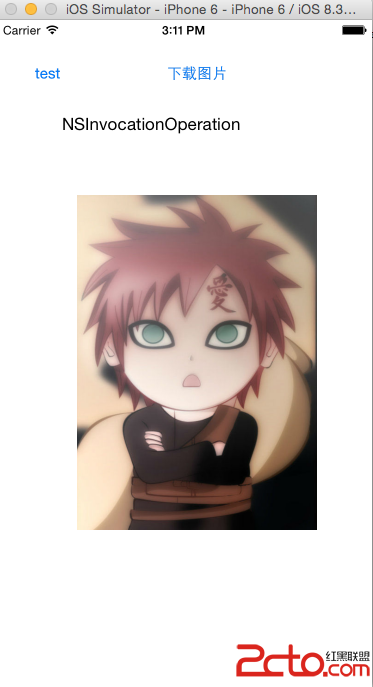
從時間戳可以清楚看到:耗時工作確實在背景跑(15:03:33 → 15:03:36 之間隔了三秒),而兩個 UI 更新方法都確實落在主執行緒上。
NSOperation 比 GCD 強在哪裡
- 可取消:
[op cancel]會設定取消旗標,配合isCancelled就能讓長任務中途停下。GCD 沒有對等的原生機制。 - 可設定依賴:
[opB addDependency:opA]讓 B 一定在 A 之後執行,複雜流程不必寫成一大坨巢狀 block。 - 可控制併發數:
queue.maxConcurrentOperationCount = 3一行就能限制同時執行的數量,避免一次打太多請求。 - 可暫停與恢復:
setSuspended:讓整個佇列暫停,適合「使用者離開頁面就停掉預下載」這類需求。 - 可 KVO 監看:operation 的
isFinished、isCancelled都支援 KVO,方便串接後續動作。
一句話選擇建議:任務彼此獨立、邏輯簡單,用 GCD 更輕量;任務之間有先後順序、需要取消或限流,用 NSOperation 更省心。
- 上一篇文章: C 語言速通:結構體與枚舉一次搞懂
- 下一篇文章: 動手做一個隨機點名/抽獎小程式