
iOS 自定義 cell 進階版:可展開的分組列表實作
編輯:iOS 開發綜合
本篇實作一個進階版的 iOS 自定義 cell 範例——一個可點擊展開、內含巢狀列表的分組表格,並示範資料請求、模型重構與自適應高度等技巧。
一、指定根視圖與請求資料
self.window.rootViewController = [[UINavigationController alloc]
    initWithRootViewController:[[RootTableViewController alloc] initWithStyle:UITableViewStylePlain]];
在 RootTableViewController 中,透過 NSURLConnection 異步請求資料,並用模型重構將 JSON 轉為 dictionary 結構:
- (void)loadDataAndShow {
    NSURL *url = [NSURL URLWithString:@"https://api.breadtrip.com/trips/2387133727/schedule/"];
    NSURLRequest *request = [NSURLRequest requestWithURL:url];
    [NSURLConnection sendAsynchronousRequest:request queue:[NSOperationQueue mainQueue]
        completionHandler:^(NSURLResponse *response, NSData *data, NSError *connectionError) {
            if (data != nil) {
                NSArray *array = [NSJSONSerialization JSONObjectWithData:data options:NSJSONReadingAllowFragments error:nil];
                for (NSDictionary *dict in array) {
                    NSString *key = dict[@"date"];
                    NSArray *placesArray = dict[@"places"];
                    NSMutableArray *mutableArray = [NSMutableArray array];
                    for (NSDictionary *placesDict in placesArray) {
                        WGModel *model = [[WGModel alloc] init];
                        [model setValuesForKeysWithDictionary:placesDict];
                        model.isShow = NO;
                        [mutableArray addObject:model];
                    }
                    [self.dataDict setObject:mutableArray forKey:key];
                }
                [self.tableView reloadData];
            }
        }];
}
二、資料源與自適應高度
依 dictionary 的鍵作為 section,值作為 row;點擊 cell 時切換展開狀態並刷新:
- (CGFloat)tableView:(UITableView *)tableView heightForRowAtIndexPath:(NSIndexPath *)indexPath {
    NSString *key = self.dataDict.allKeys[indexPath.section];
    NSMutableArray *mutableArray = self.dataDict[key];
    WGModel *model = mutableArray[indexPath.row];
    if (model.isShow) {
        return (model.pois.count + 1) * 44; // 展開時依子項數量動態增高
    } else {
        return 44;
    }
}

- (void)tableView:(UITableView *)tableView didSelectRowAtIndexPath:(NSIndexPath *)indexPath {
    NSString *key = self.dataDict.allKeys[indexPath.section];
    NSMutableArray *mutableArray = self.dataDict[key];
    WGModel *model = mutableArray[indexPath.row];
    model.isShow = !model.isShow;
    [self.tableView reloadRowsAtIndexPaths:@[indexPath] withRowAnimation:UITableViewRowAnimationAutomatic];
}
三、自定義 cell
自定義的 WGCell 內含一個標題 Label 與一個巢狀的 UITableView,透過 showTableView 與 hiddenTableView 控制巢狀列表的顯示:
- (void)configureCellWithModel:(WGModel *)model {
    [self.dataArray removeAllObjects];
    self.aLabel.text = model.place[@"name"];
    NSArray *array = model.pois;
    for (NSDictionary *dict in array) {
        [self.dataArray addObject:dict[@"name"]];
    }
    CGRect frame = self.tableView.frame;
    frame.size.height = 44 * array.count;
    self.tableView.frame = frame;
    [self.tableView reloadData];
}

- (void)showTableView {
    [self.contentView addSubview:self.tableView];
}
- (void)hiddenTableView {
    [self.tableView removeFromSuperview];
}
四、準備模型類
模型類 WGModel 透過重寫 setValue:forUndefinedKey: 空實作,來忽略 JSON 中未定義的欄位:
@implementation WGModel
- (void)setValue:(id)value forUndefinedKey:(NSString *)key {
    // 忽略未定義的鍵,避免拋出異常
}
@end
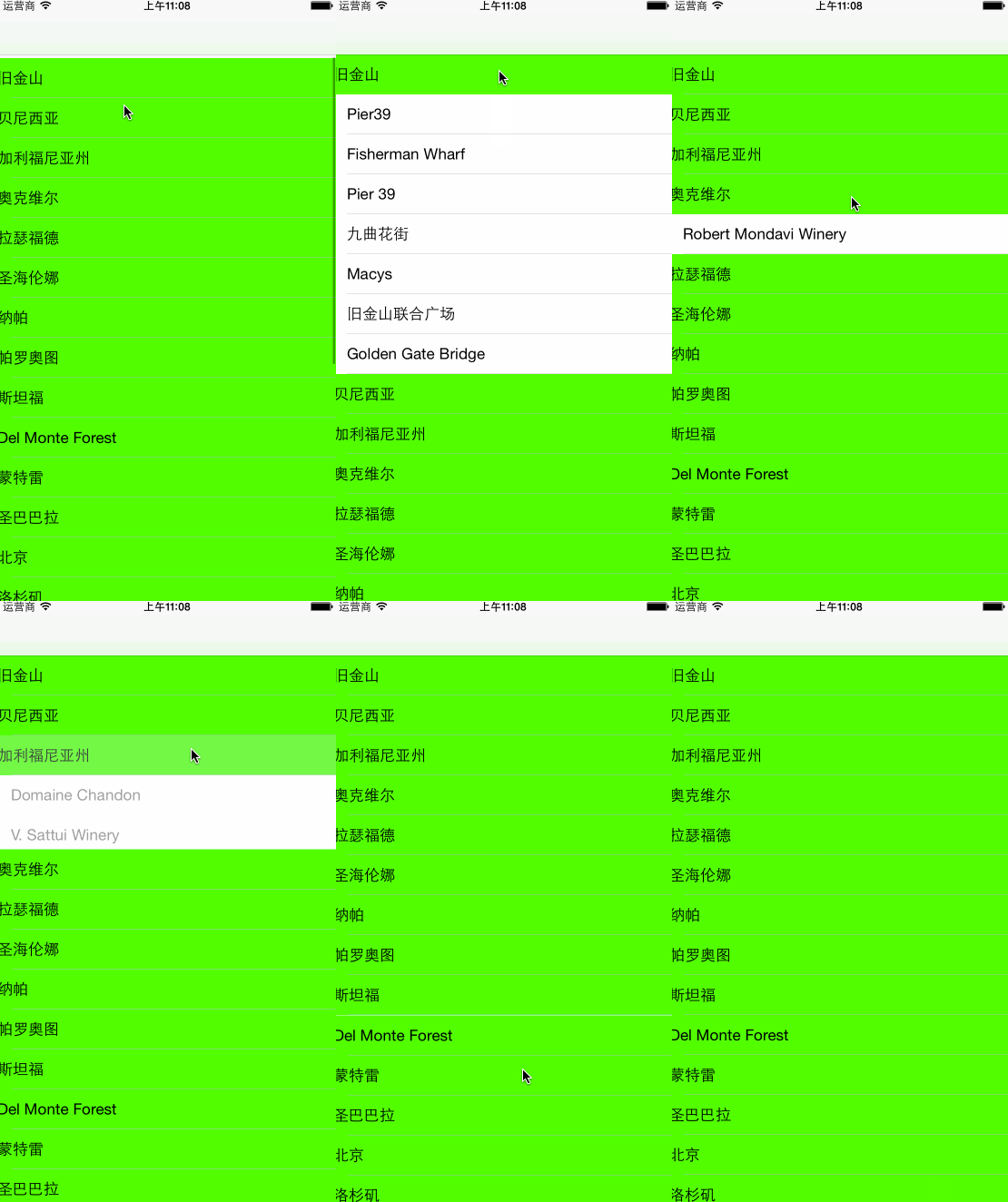
最終效果如下:
- 上一篇文章: iOS 地圖開發詳解:MapKit 定位、標注與地址搜尋
- 下一篇文章: iOS 遊戲開發:機器人投射遊戲成形記(十二)關卡與限制設定