
iOS 8 自適應高度 Cell:UITableViewAutomaticDimension 的三個必要條件
iOS 8 引入了 UITableViewAutomaticDimension,讓自適應高度的 cell 變得容易許多(在 iOS 7 時代得自己算字型高度、實作 heightForRowAtIndexPath,麻煩得多)。但實務上仍有幾個眉角沒處理好就會出問題。
條件一:模板 cell 的自動佈局必須能撐滿
cell 內的 subviews 之間必須有完整且連續的約束鏈,讓系統能從內容推算出 cell 的高度。以下面這個範例來看:
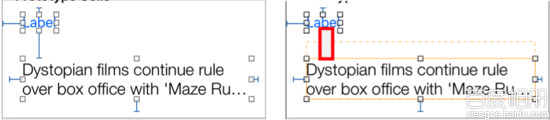
cell 裡有上下兩個 Label:上方 Label 只有一行(lines 為 1),高度固定;下方 Label 是多行(lines 為 0),高度會隨內容自動伸縮。
左圖的約束是正確的,執行時 cell 能自適應高度,因為系統可以依下列公式算出高度:
cell 高度 = 第一個 Label 的 top
          + 第一個 Label 高度
          + 第二個 Label 的 top
          + 第二個 Label 高度(依內容自動計算)
          + 第二個 Label 的 bottom
但若把第二個 Label 的 top 或 bottom 約束刪掉(如右圖紅框處),公式就少了一個變數,系統無從計算高度。執行結果是所有 cell 都退回固定高度、彼此重疊,主控台還會跳出警告:
Warning once only: Detected a case where constraints ambiguously suggest a
height of zero for a tableview cell's content view. We're considering the
collapse unintentional and using standard height instead.
條件二:在 viewDidLoad 中設定 tableView
tableView.rowHeight = UITableViewAutomaticDimension;
self.tableView.estimatedRowHeight = 100;
第一行開啟 iOS 8 的自動高度特性。第二行同樣重要:estimatedRowHeight 提供一個預估高度,數值基本上可以隨意給(只要不是 0)。若不設定、或設為 0,自動高度一樣不會生效。
條件三:兩個 delegate 方法可以放手不管
開啟自動高度後,heightForRowAtIndexPath 與 estimatedHeightForRowAtIndexPath 就不需要了,或者只回傳常數:
override func tableView(tableView: UITableView, heightForRowAtIndexPath indexPath: NSIndexPath) -> CGFloat {
    return UITableViewAutomaticDimension
}

override func tableView(tableView: UITableView, estimatedHeightForRowAtIndexPath indexPath: NSIndexPath) -> CGFloat {
    return UITableViewAutomaticDimension
}
當然,直接把這兩個方法整個刪掉也完全沒問題。
實作上的小提醒
如果 cell 內容在顯示後才變動(例如圖片下載完成),記得呼叫 reloadRowsAtIndexPaths: 或 beginUpdates/endUpdates 觸發重新計算,否則高度不會更新。另外,多行 Label 記得把 numberOfLines 設為 0,並確認沒有殘留固定的 height 約束,這是最常見的兩個陷阱。