
iOS 開發:ActionSheet 的使用與彈出選擇對話框
在 iOS 開發中,我們常會遇到這樣的介面需求:
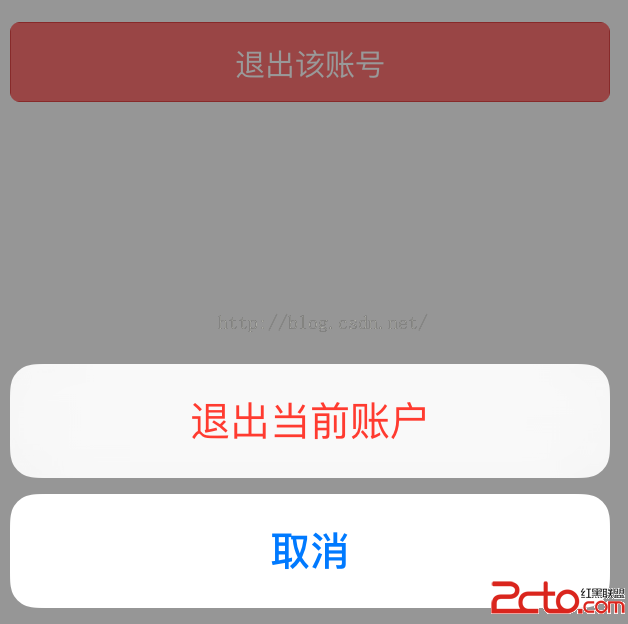
也就是點擊按鈕後,彈出一個選擇提示框。今天我們用兩種方式(ActionSheet 與 AlertController)來實作這個功能。示例程式碼已上傳至:https://github.com/chenyufeng1991/iOS-ActionSheet 。
【使用 ActionSheet 實作】
(1)實作程式碼如下:
#import "ViewController.h" @interface ViewController ()@end @implementation ViewController - (void)viewDidLoad { [super viewDidLoad]; } #pragma mark - 按鈕點擊事件 - (IBAction)actionSheetButtonPressed:(id)sender { /** UIActionSheet已經在8.3後被棄用了,如果想要去掉警告信息,可以把項目的Deployment Target設置為8.3以下,就可以去掉警告了。 */ /** Title:如果不想要title,可以設置為nil; 注意需要實現UIActionSheetDelegate; destructiveButtonTitle:設置的按鈕文字是紅色的; otherButtonTitles:按照按鈕順序; */ UIActionSheet *actionSheet = [[UIActionSheet alloc] initWithTitle:@"這是標題" delegate:self cancelButtonTitle:@"取消" destructiveButtonTitle:@"確定" otherButtonTitles:@"體育",@"娛樂", nil]; /** * UIActionSheetStyleAutomatic UIActionSheetStyleDefault UIActionSheetStyleBlackTranslucent UIActionSheetStyleBlackOpaque */ //這裡的actionSheetStyle也可以不設置; actionSheet.actionSheetStyle = UIActionSheetStyleAutomatic; [actionSheet showInView:self.view]; } /** * UIActionSheetDelegate中自動回調的方法; 響應事件在裡面處理; */ #pragma mark - UIActionSheetDelegate - (void)actionSheet:(UIActionSheet *)actionSheet clickedButtonAtIndex:(NSInteger)buttonIndex{ //按照按鈕的順序0-N; switch (buttonIndex) { case 0: NSLog(@"點擊了確定"); break; case 1: NSLog(@"點擊了體育"); break; case 2: NSLog(@"點擊了娛樂"); break; case 3: NSLog(@"點擊了取消"); break; default: break; } } @end
(2)由於我的專案部署在 iOS 9 上(Deployment Target 為 9.0),上述程式碼會跳出一個警告:

它表示 UIActionSheet 已在 iOS 8.3 之後被棄用,官方建議改用 UIAlertController 中的 UIAlertControllerStyleActionSheet 來替代。
不過,處理這類警告(*** is deprecated: first deprecated in iOS ...)有個投機取巧的方法:直接把專案的部署目標(Deployment Target)設為該元件被棄用的版本之前即可。例如某元件已在 9.0 被棄用,那麼把 Deployment Target 設為 8.x 就不會報警告,設為 9.x 才會報——只要低於開始棄用的版本即可。
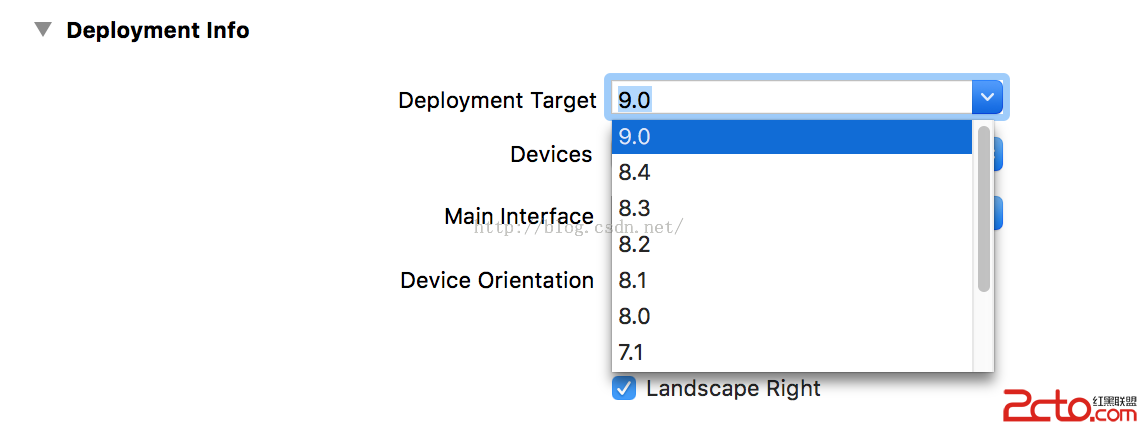
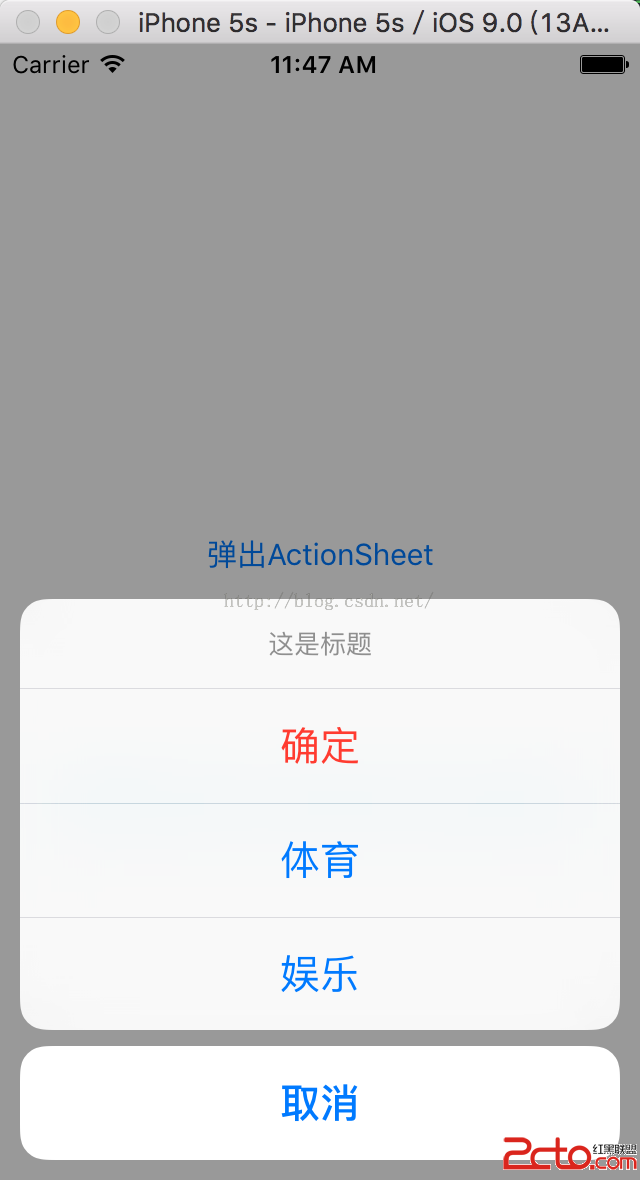
(3)執行程式,上述實作的效果如下:
【使用 AlertController 實作】
既然蘋果官方建議用 AlertController 來取代 ActionSheet,那我們同樣用 AlertController 來實作一遍:關於 AlertController 的其他用法,請參考《iOS 9 使用提示框的正確實作方式》。
(1)程式碼實作如下:
#import "SecondViewController.h" @interface SecondViewController () @end @implementation SecondViewController - (void)viewDidLoad { [super viewDidLoad]; } #pragma mark - 彈出選擇提示框 - (IBAction)buttonPressed:(id)sender { //初始化提示框; /** preferredStyle參數: UIAlertControllerStyleActionSheet, UIAlertControllerStyleAlert * 如果要實現ActionSheet的效果,這裡的preferredStyle應該設置為UIAlertControllerStyleActionSheet,而不是UIAlertControllerStyleAlert; */ UIAlertController *alert = [UIAlertController alertControllerWithTitle:@"提示" message:nil preferredStyle: UIAlertControllerStyleActionSheet]; /** * style參數: UIAlertActionStyleDefault, UIAlertActionStyleCancel, UIAlertActionStyleDestructive(默認按鈕文本是紅色的) * */ //分別按順序放入每個按鈕; [alert addAction:[UIAlertAction actionWithTitle:@"確定" style:UIAlertActionStyleDefault handler:^(UIAlertAction * _Nonnull action) { //點擊按鈕的響應事件; NSLog(@"點擊了確定"); }]]; [alert addAction:[UIAlertAction actionWithTitle:@"體育" style:UIAlertActionStyleDefault handler:^(UIAlertAction * _Nonnull action) { //點擊按鈕的響應事件; NSLog(@"點擊了體育"); }]]; [alert addAction:[UIAlertAction actionWithTitle:@"娛樂" style:UIAlertActionStyleDefault handler:^(UIAlertAction * _Nonnull action) { //點擊按鈕的響應事件; NSLog(@"點擊了娛樂"); }]]; [alert addAction:[UIAlertAction actionWithTitle:@"取消" style:UIAlertActionStyleDestructive handler:^(UIAlertAction * _Nonnull action) { //點擊按鈕的響應事件; NSLog(@"點擊了取消"); }]]; //彈出提示框; [self presentViewController:alert animated:true completion:nil]; } #pragma mark - 返回按鈕的點擊 - (IBAction)backPressed:(id)sender { [self dismissViewControllerAnimated:true completion:nil]; } @end
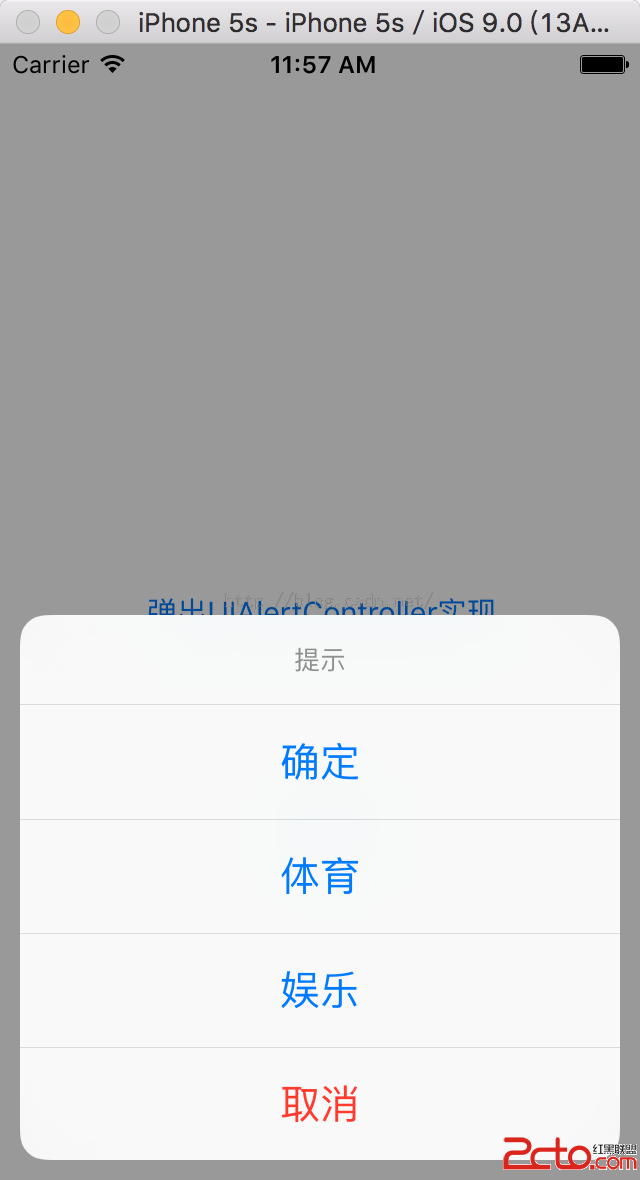
(2)執行效果如下:基本上同樣能實現與 ActionSheet 相同的效果。
【ActionSheet 與 AlertController 的比較】
比較這兩種實作方式,來看看它們有哪些不同:
(1)使用 ActionSheet 時,點擊提示框以外的區域,相當於點擊了「取消」按鈕,提示框會消失;而使用 AlertController 時,點擊提示框以外的空白區域,介面不會有任何反應。
(2)使用 ActionSheet 時,「取消」按鈕與其他按鈕之間有空白間隔;而使用 AlertController 時,所有按鈕都是連在一起的。
總結來說,大家可以依據自己的實際開發需求選擇不同的實作方式。當然,如果學有余力,也可以進行元件的自訂。